music in apple music on my imac doesn't show up on my ipad
music in apple music on my imac doesn't show up on my ipad. I have it turned on in my I loud to, so what am I missing
music in apple music on my imac doesn't show up on my ipad. I have it turned on in my I loud to, so what am I missing
Hi aug4k,
Start by making sure you're signed into both devices with the same Apple ID. Then, use these steps to turn on Sync Library if it isn't already turned on.
If you subscribe to Apple Music, you can access your music library, including your playlists, on any device that has the Apple Music app and signed in with the same Apple ID that you use with your Apple Music subscription.
How to turn on Sync Library on your Mac
1. Open the Apple Music app.
2. In the menu bar, choose Account and make sure that you're signed in with the same Apple ID that you use with your Apple Music subscription.
3. Choose File > Library > Organize Library. Then select Consolidate files.
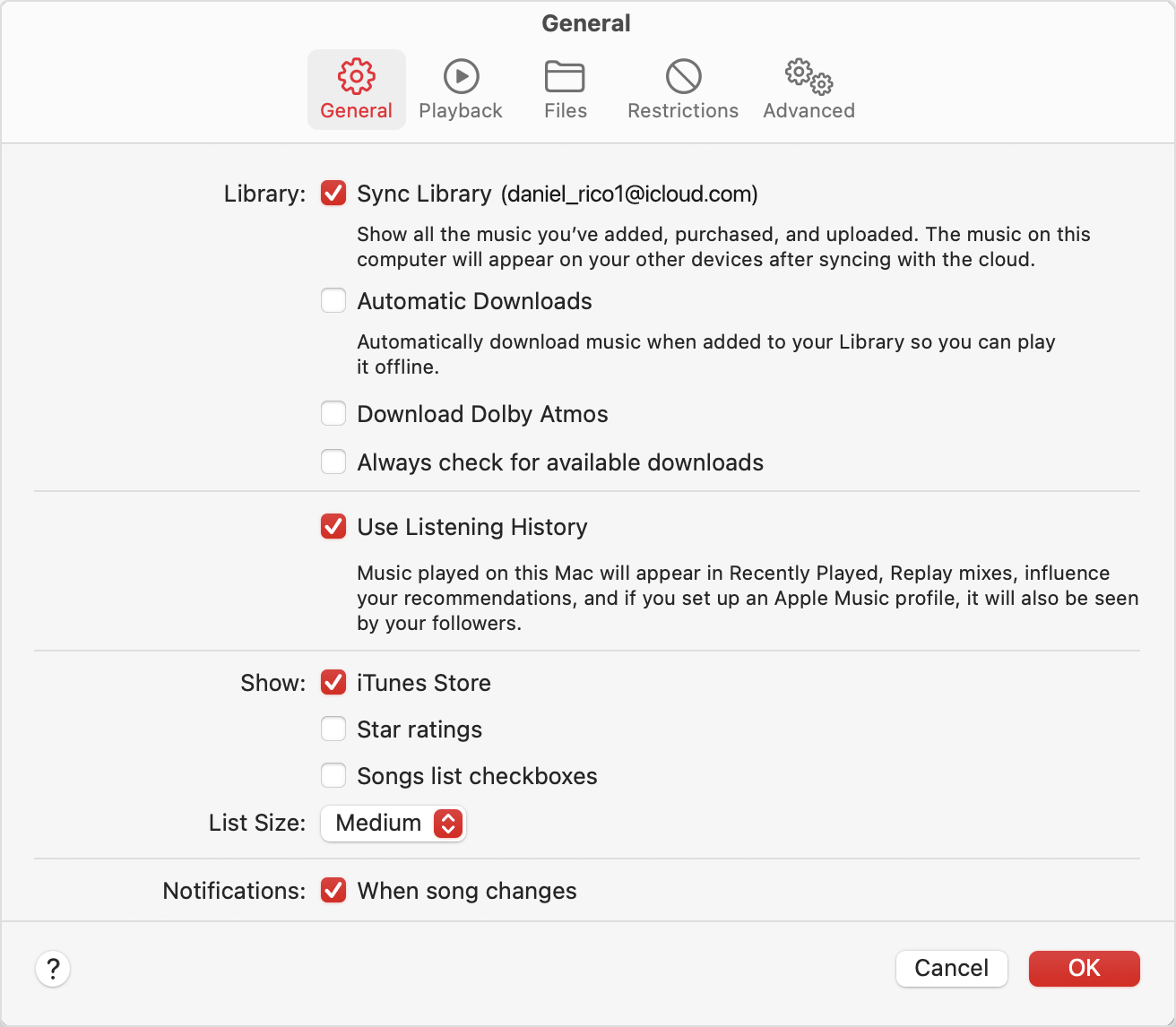
4. Choose Music > Settings or Music > Preferences.
5. Click the General tab.
6. Select Sync Library.
7. Click Ok.
8. Wait for your music library to sync. To check the status, go to the bottom of the sidebar and click Updating Cloud Library.
9. Turn on Sync Library on your other devices.
How to turn on Sync Library on your iPhone or iPad
1. Make sure that your iPhone or iPad is signed in with the same Apple ID that you use with your Apple Music subscription.
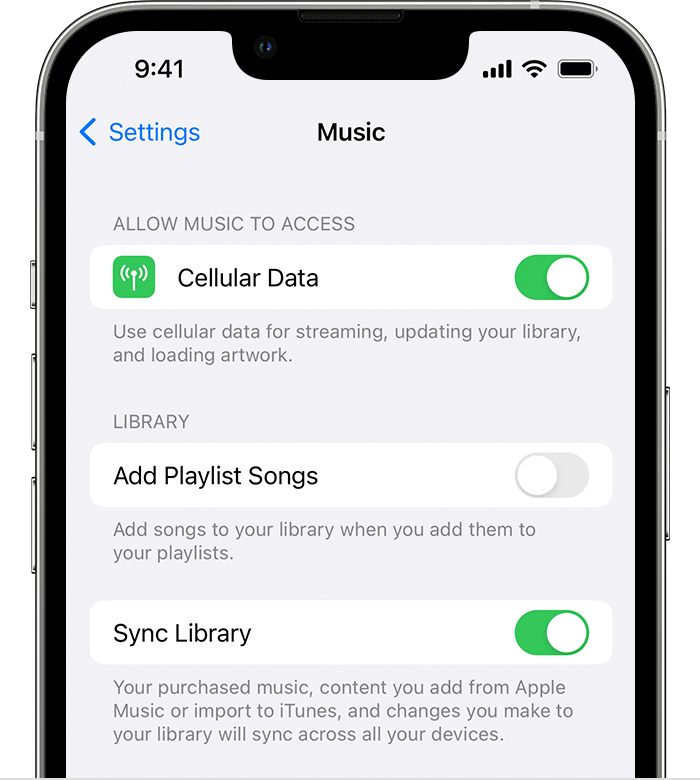
2. Go to Settings.
3. Tap Music.
4. Turn on Sync Library.
5. Turn on Sync Library on your other devices.
Regards.
Hi aug4k,
Start by making sure you're signed into both devices with the same Apple ID. Then, use these steps to turn on Sync Library if it isn't already turned on.
If you subscribe to Apple Music, you can access your music library, including your playlists, on any device that has the Apple Music app and signed in with the same Apple ID that you use with your Apple Music subscription.
How to turn on Sync Library on your Mac
1. Open the Apple Music app.
2. In the menu bar, choose Account and make sure that you're signed in with the same Apple ID that you use with your Apple Music subscription.
3. Choose File > Library > Organize Library. Then select Consolidate files.
4. Choose Music > Settings or Music > Preferences.
5. Click the General tab.
6. Select Sync Library.
7. Click Ok.
8. Wait for your music library to sync. To check the status, go to the bottom of the sidebar and click Updating Cloud Library.
9. Turn on Sync Library on your other devices.
How to turn on Sync Library on your iPhone or iPad
1. Make sure that your iPhone or iPad is signed in with the same Apple ID that you use with your Apple Music subscription.
2. Go to Settings.
3. Tap Music.
4. Turn on Sync Library.
5. Turn on Sync Library on your other devices.
Regards.
music in apple music on my imac doesn't show up on my ipad