Hello David Schwartzer,
Thanks for choosing the Apple Support Communities. We see you want to sync your photos on your iPhone and Mac. iCloud Photos is the best option to do this automatically. What you can do to save space, is set up iCloud Photos to optimize iPhone storage by storing the photos on iCloud and keeping a low-resolution copy on your iPhone. More about this can be found below.
Set up and use iCloud Photos - Apple Support
"Make sure that you have enough storage
The photos and videos that you keep in iCloud Photos use your iCloud storage and your device storage. And as long as you have enough space in iCloud and on your device, you can store as many photos and videos as you like. Learn more about iCloud storage and device storage
If you need more iCloud storage
When you sign up for iCloud, you automatically get 5GB of free storage. If you need more space, and access to premium features, you can upgrade to iCloud+.
Learn how to upgrade to iCloud+
If you need to save space on your device
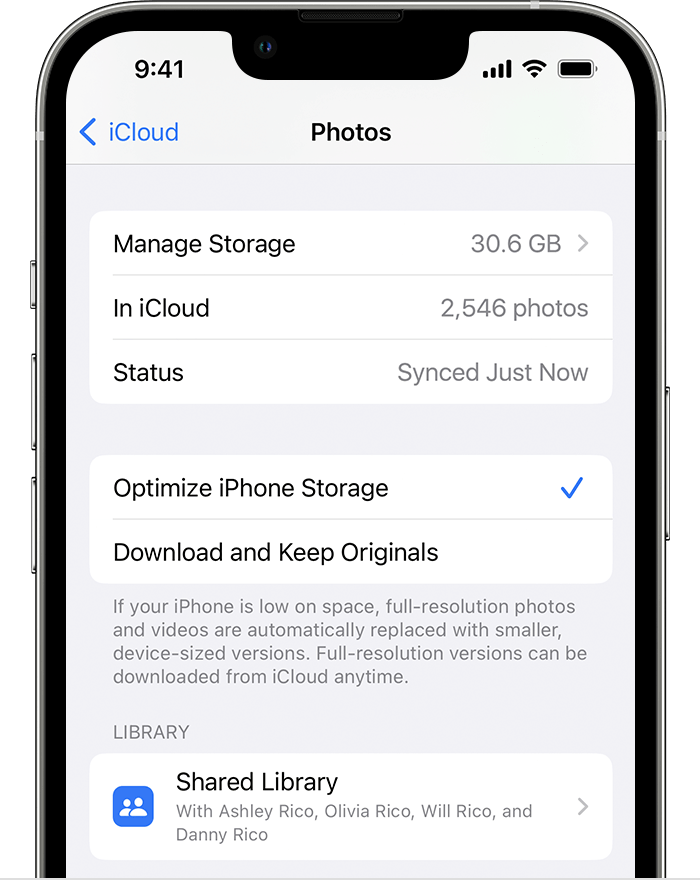
iCloud Photos keeps all your photos and videos in their original, high-resolution version. To save storage space on your device, you can turn on Optimize Storage.
If you turn on Optimize Storage, iCloud Photos automatically manages the size of your library on your device. Your original photos and videos are stored in iCloud and space-saving versions are kept on your device. Your library is optimized only when you need space, starting with the photos and videos you access least. You can download the original photos and videos over Wi-Fi or cellular when you need them.
If you turn on Download Originals, iCloud Photos keeps your original, full-resolution photos and videos in iCloud and on your device.
On your iPhone, iPad or iPod touch
- Go to Settings > [your name] > iCloud.
- Tap Photos.
- Choose Optimize [device] Storage.
On your Mac
- Open the Photos app and click Photos in the menu bar.
- Click Settings or click Preferences.
- Go to the iCloud tab and choose a storage setting."
We hope this helps.
Cheers!





