See -> How to redeem your Apple Gift Card or App Store & iTunes gift card
How to redeem your Apple Gift Card or App Store & iTunes gift card – Apple Support (UK)
When redeeming a gift card, (1) the amount will be credited to your Apple Account balance and (2) then you need to set your Apple Account balance as your default payment.
(1) See -> Check your Apple Account balance
Check your Apple Account balance – Apple Support (UK)
(2) See -> Add a payment method to your Apple ID
Add a payment method to your Apple ID – Apple Support (UK)
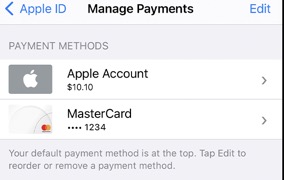
If you already use your Apple Account balance, the Apple Gift Card or App Store & iTunes gift card is automatically added to your Apple Account balance.
If you update your payment method or add funds to your Apple Account balance, It would take about 1 to 3 business days in order to process.
If you're still unable to update your payment method, Contact Apple Support.
See also -> What you can buy with your Apple Gift Card or Apple Account balance
What you can buy with your Apple Gift Card or Apple Account balance – Apple Support (UK)
- Some purchases might require you to have a credit card on file, even if you use your Apple Account balance to make the purchase.
If you have a valid payment method on file, instead of buying or order an App Store & iTunes gift card, you can Add money to your Apple Account balance anytime, no gift card needed, see
Apple Gift Card - Apple (UK)
If you still need help, get more help and assistant from Apple directly, see Contact Apple for support and service -> Contact Apple for support and service – Apple Support (UK)



