My screen freeze i can't power off either
My screen freeze i can't power off either
My screen freeze i can't power off either
Hello shar97,
Since your iPhone is no longer responding, you'll want to do a force restart using the applicable set of steps below:
Force restart an iPhone with Face ID
To force restart iPhone X, iPhone XS, iPhone XR, or any iPhone 11, iPhone 12, or iPhone 13 model, do the following:
Press and quickly release the volume up button, press and quickly release the volume down button, then press and hold the side button. When the Apple logo appears, release the button.
Force restart iPhone 8 or iPhone SE (2nd generation and later)
Press and quickly release the volume up button, press and quickly release the volume down button, then press and hold the side button. When the Apple logo appears, release the button.
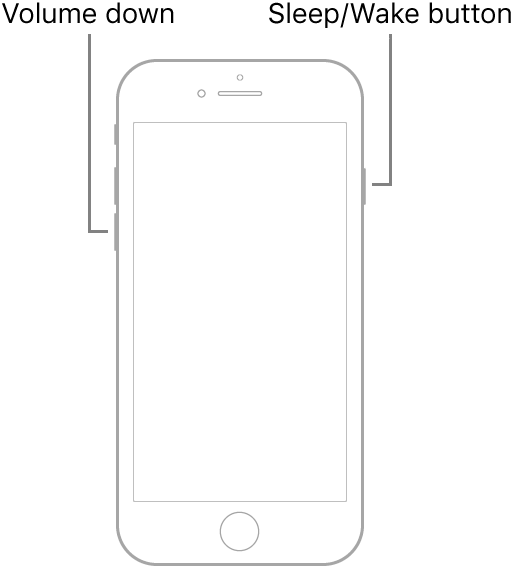
Force restart iPhone 7
Press and hold both the volume down button and the Sleep/Wake button at the same time. When the Apple logo appears, release both buttons.
Force restart iPhone 6s or iPhone SE (1st generation)
Press and hold both the Sleep/Wake button and the Home button at the same time. When the Apple logo appears, release both buttons.
You can also find those steps in this resource: Force restart iPhone - Apple Support
Should your iPhone still not respond after completing that process, you'll want to reach out to Apple Support: Get Support They'll be in the best position to look into your options further.
Take care.
Hello shar97,
Since your iPhone is no longer responding, you'll want to do a force restart using the applicable set of steps below:
Force restart an iPhone with Face ID
To force restart iPhone X, iPhone XS, iPhone XR, or any iPhone 11, iPhone 12, or iPhone 13 model, do the following:
Press and quickly release the volume up button, press and quickly release the volume down button, then press and hold the side button. When the Apple logo appears, release the button.
Force restart iPhone 8 or iPhone SE (2nd generation and later)
Press and quickly release the volume up button, press and quickly release the volume down button, then press and hold the side button. When the Apple logo appears, release the button.
Force restart iPhone 7
Press and hold both the volume down button and the Sleep/Wake button at the same time. When the Apple logo appears, release both buttons.
Force restart iPhone 6s or iPhone SE (1st generation)
Press and hold both the Sleep/Wake button and the Home button at the same time. When the Apple logo appears, release both buttons.
You can also find those steps in this resource: Force restart iPhone - Apple Support
Should your iPhone still not respond after completing that process, you'll want to reach out to Apple Support: Get Support They'll be in the best position to look into your options further.
Take care.
My screen freeze i can't power off either