How to change your Apple ID off your watch if you don’t know the Apple ID
How to change your Apple Watch id without knowing what your Apple ID was when you first signed in
How to change your Apple Watch id without knowing what your Apple ID was when you first signed in
Hi heaveneeparks23,
We'd love to help see if we can get the issue resolved for you. If your Apple Watch is currently paired with an iPhone, it would be signed into using the Apple ID that is associated with the paired device. Please follow the steps below to sign out, or remove Activation Lock from your Apple Watch.
Check if Activation Lock is on
Follow these steps on your paired iPhone to check if Activation Lock is turned on:
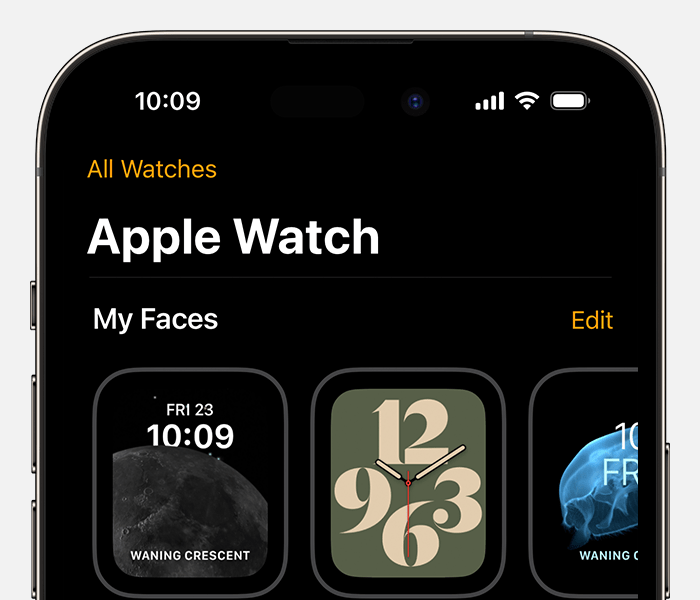
1. On your iPhone, open the Apple Watch app.
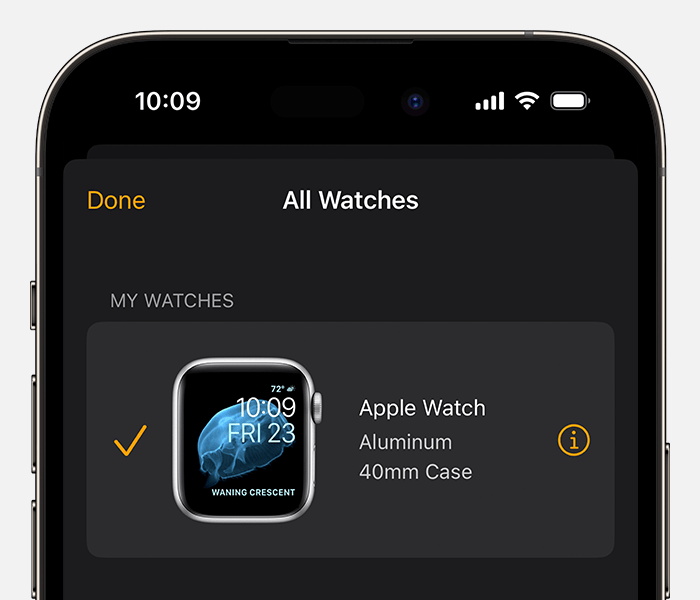
2. Tap the My Watch tab, then tap All Watches at the top of the screen.
3.
4. Tap the info buttonnext to your Apple Watch.
5.
If you see Find My Apple Watch, then Activation Lock is on.
If your Apple Watch goes missing
If your Apple Watch is lost or stolen, you can use Find My to help you locate it and protect your information. Just sign in to iCloud.com or the Find My app to locate your missing watch on a map, play a sound to help you find it, use Lost Mode to lock it, or remotely erase all of your personal information.
Turn off Activation Lock before you send your Apple Watch in for service, sell it, or give it away
Before you send your Apple Watch in for service, sell it, or give it away, you should turn off Activation Lock on your Apple Watch. Just unpair your Apple Watch from your iPhone:
1. Keep your Apple Watch and iPhone close together.
2. On your iPhone, open the Apple Watch app.
3. Tap the My Watch tab, then tap All Watches at the top of the screen.
4.
5. Tap the info button
6.
7. Tap Unpair Apple Watch.
8.For cellular models of Apple Watch, tap Remove [Carrier] Plan. If you aren't going to pair with a different Apple Watch or iPhone, you might need to contact your carrier to cancel your cellular subscription.*
9. Enter your Apple ID password. If you forgot your Apple ID password, you can reset it.
10. Tap again to confirm.
* Carrier fees may apply. Contact your carrier for details.
Turn off Activation Lock on the web
If you can't access your iPhone or Apple Watch, or if your Apple Watch isn't paired with your iPhone and you need to turn off Activation Lock:
1. Go to iCloud.com and sign in with your Apple ID.
2. From the Quick Access Menu in the top right, select Find My. You might be required to sign in.
3. Select All Devices, then click your Apple Watch.
4. Click Erase Apple Watch. Select Next until the device is erased.
5. Click the remove buttonnext to your Apple Watch.
Reference: About Activation Lock on your Apple Watch - Apple Support
Cheers!
Hi heaveneeparks23,
We'd love to help see if we can get the issue resolved for you. If your Apple Watch is currently paired with an iPhone, it would be signed into using the Apple ID that is associated with the paired device. Please follow the steps below to sign out, or remove Activation Lock from your Apple Watch.
Check if Activation Lock is on
Follow these steps on your paired iPhone to check if Activation Lock is turned on:
1. On your iPhone, open the Apple Watch app.
2. Tap the My Watch tab, then tap All Watches at the top of the screen.
3.
4. Tap the info button
5.
If you see Find My Apple Watch, then Activation Lock is on.
If your Apple Watch goes missing
If your Apple Watch is lost or stolen, you can use Find My to help you locate it and protect your information. Just sign in to iCloud.com or the Find My app to locate your missing watch on a map, play a sound to help you find it, use Lost Mode to lock it, or remotely erase all of your personal information.
Turn off Activation Lock before you send your Apple Watch in for service, sell it, or give it away
Before you send your Apple Watch in for service, sell it, or give it away, you should turn off Activation Lock on your Apple Watch. Just unpair your Apple Watch from your iPhone:
1. Keep your Apple Watch and iPhone close together.
2. On your iPhone, open the Apple Watch app.
3. Tap the My Watch tab, then tap All Watches at the top of the screen.
4.
5. Tap the info button
6.
7. Tap Unpair Apple Watch.
8.
9. Enter your Apple ID password. If you forgot your Apple ID password, you can reset it.
10. Tap again to confirm.
* Carrier fees may apply. Contact your carrier for details.
Turn off Activation Lock on the web
If you can't access your iPhone or Apple Watch, or if your Apple Watch isn't paired with your iPhone and you need to turn off Activation Lock:
1. Go to iCloud.com and sign in with your Apple ID.
2. From the Quick Access Menu in the top right, select Find My. You might be required to sign in.
3. Select All Devices, then click your Apple Watch.
4. Click Erase Apple Watch. Select Next until the device is erased.
5. Click the remove button
Reference: About Activation Lock on your Apple Watch - Apple Support
Cheers!
How to change your Apple ID off your watch if you don’t know the Apple ID