
Where is the rotation lock button
Where is the rotation lock button on the screen
Where is the rotation lock button on the screen
Just swipe straight down from the very top right corner, and it should work every time. There's around 3 fingers worth of area at the very top of the screen next to the corner where it works. It should not be difficult to find the spot at all.
It works for literally millions of people, as otherwise, there would be countless posts about it here no doubt, which there aren't.
Just swipe straight down from the very top right corner, and it should work every time. There's around 3 fingers worth of area at the very top of the screen next to the corner where it works. It should not be difficult to find the spot at all.
It works for literally millions of people, as otherwise, there would be countless posts about it here no doubt, which there aren't.
In control center as shown in the support document you posted from.
It's the one with a lock and an arrow around it, just below the Wi-Fi icon.
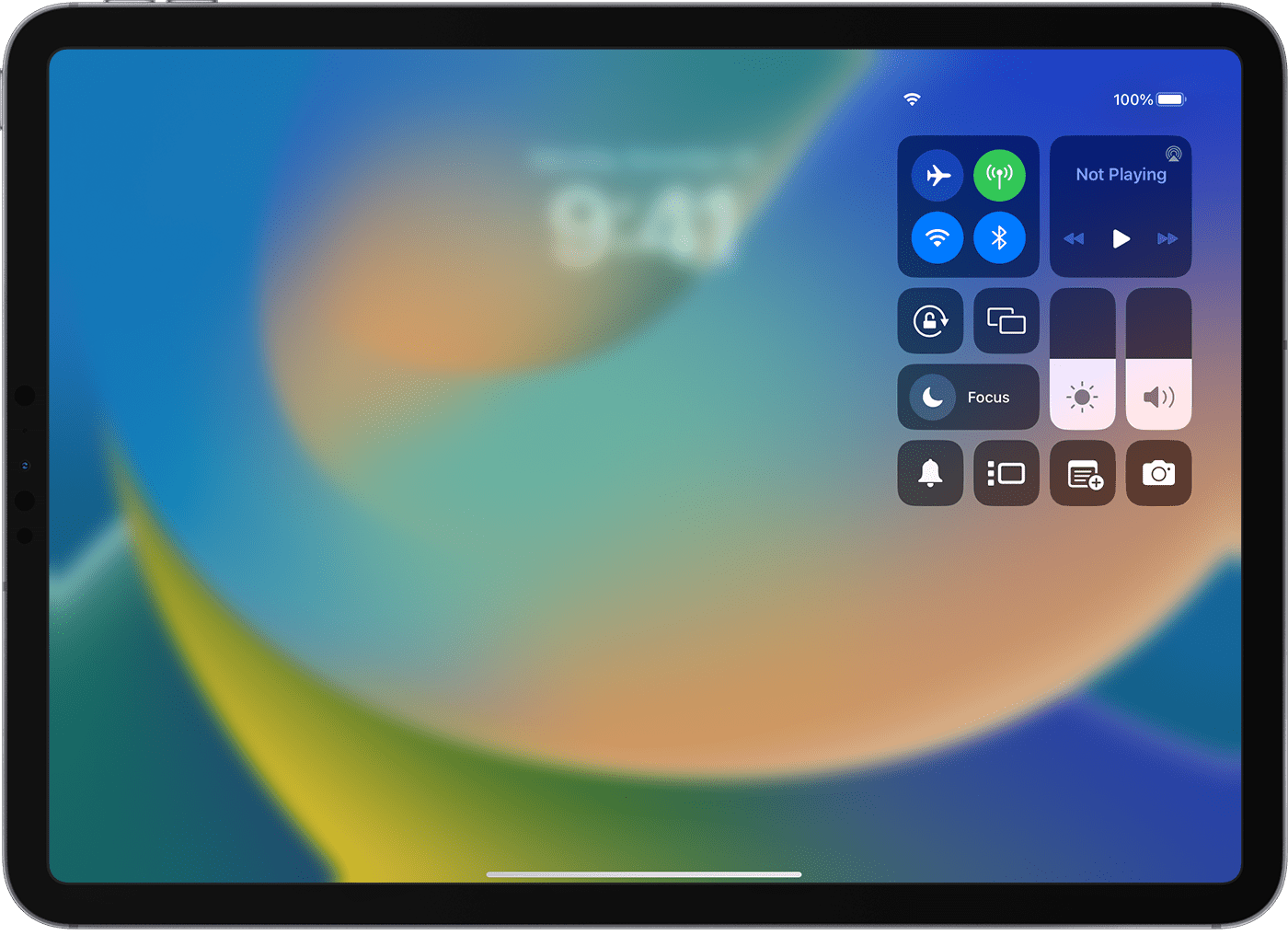
Thank you for the quick response to my question.
I am disappointed in the design of this function. In order to see this function along with others, I have to sweep down and across from the corner of a window. And I have to find the perfect spot in the upper right corner to sweep from. It took me several tries to find the exact spot!
i am surprised this made it through testing!
Where is the rotation lock button
