
I transferred my iTunes library to a new laptop.
Approx 100 songs will not play now, stating that it's not authorized on this device OR not available in my region. How do I correct this?
Thank you
Approx 100 songs will not play now, stating that it's not authorized on this device OR not available in my region. How do I correct this?
Thank you
Hi Sixwuz9,
It sounds like you're having an issue playing content from Apple Music and your iTunes Library on a new computer. If so, for help with checking your iTunes authorizations test the steps below found in the article here: Authorize or deauthorize your computer for iTunes Store purchases - Apple Support
"How to authorize or deauthorize your PC
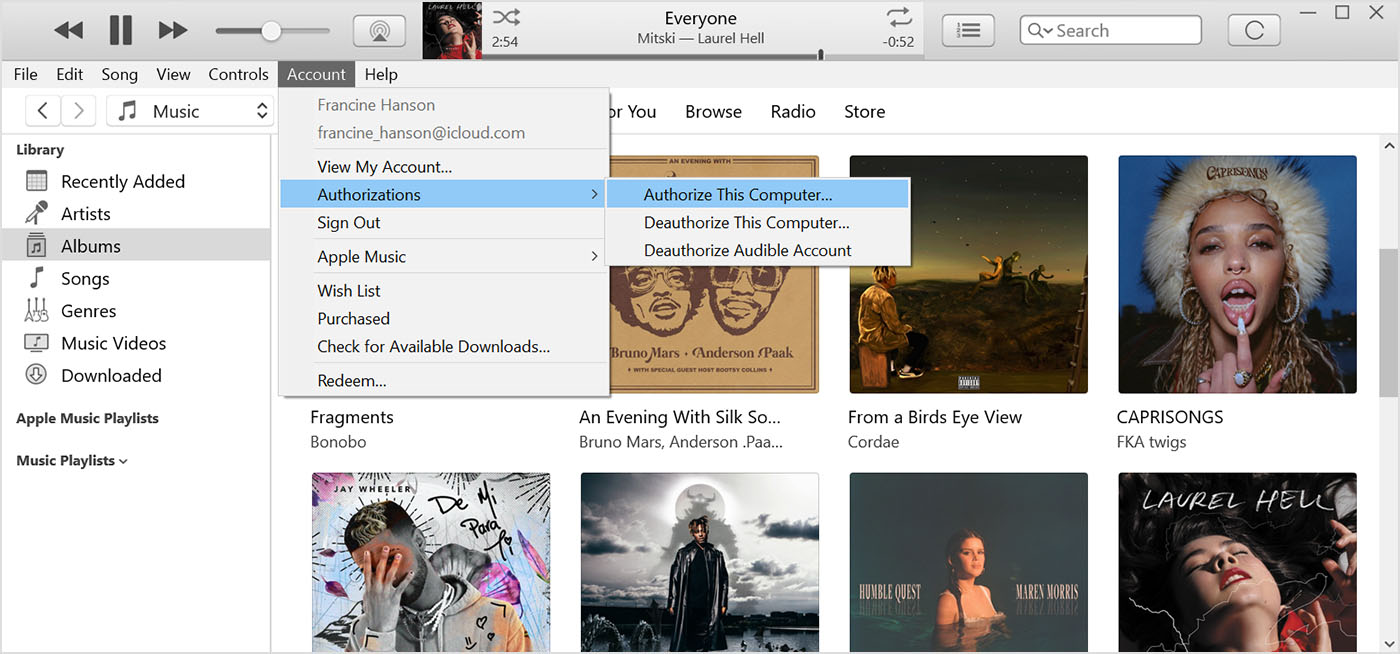 3. Sign in with your Apple ID and password. Forgot your Apple ID?
4. Click Authorize or Deauthorize."
If the issue remains the article here can also assist: If iTunes for Windows prompts you to authorize your computer when you try to play purchases
Regarding Apple Music as content can vary based on your country or region, check your Apple ID details for your region with the help of the steps here: Change your Apple ID country or region
Cheers.
Hi Sixwuz9,
It sounds like you're having an issue playing content from Apple Music and your iTunes Library on a new computer. If so, for help with checking your iTunes authorizations test the steps below found in the article here: Authorize or deauthorize your computer for iTunes Store purchases - Apple Support
"How to authorize or deauthorize your PC
3. Sign in with your Apple ID and password. Forgot your Apple ID?
4. Click Authorize or Deauthorize."
If the issue remains the article here can also assist: If iTunes for Windows prompts you to authorize your computer when you try to play purchases
Regarding Apple Music as content can vary based on your country or region, check your Apple ID details for your region with the help of the steps here: Change your Apple ID country or region
Cheers.
Hello Sixwuz9,
Since that still persists after authorizing your new computer, you'll want to reach out to Apple Support: Apple Support They'll be in the best position to look into this further.
Take care.
I appreciate your assistance. Unfortunately none this worked. Some songs I paid for some are my own off CDs. Now I’m seeing “Not available in your region or area.” What does that even mean!? They were before.
Thank for you time❤️
I transferred my iTunes library to a new laptop.
