The "\u200E" character you find at the beginning of each word in a file exported from Keynote is usually a control character called "Left-to-Right Mark". This character is used to indicate the direction of the text in the language, i.e. that the text should be read from left to right.
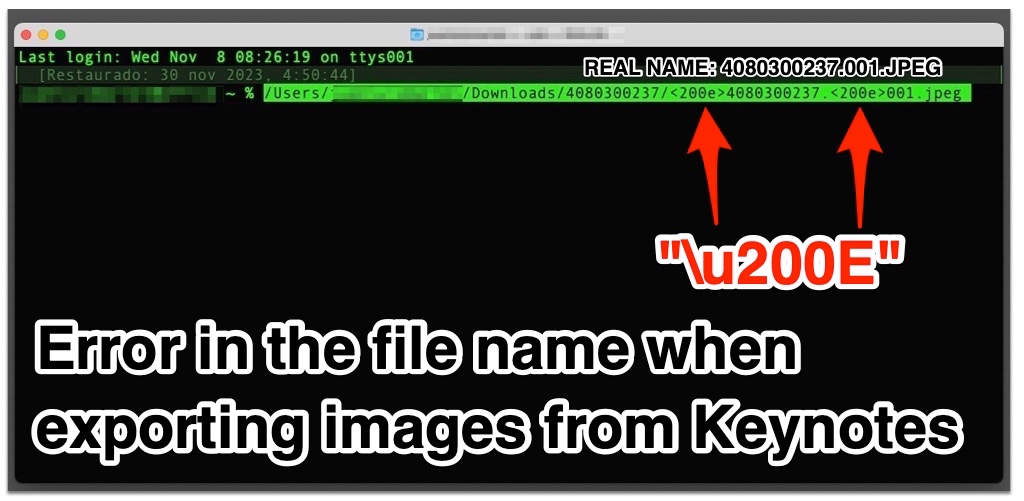 The problem with this character in the file name is that it is not visible, it is a hidden character.
When being hidden you can find in a windows environment two images with the same name but that are different.
Another problem is that this name with hidden character is also seen by databases like SQLSERVER, and here the problem is that when using this name by the programs or querys we have errors and crashes in the apps that are not prepared to detect these hidden characters.
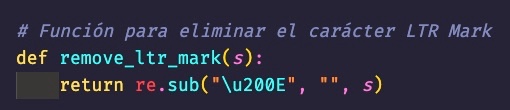
My solution has been to use ChatGPT to create a script to read the images that keynotes exports and clean them of hidden characters.
It's a simple problem for Apple to fix.
It's a problem that causes many bugs that sometimes remain hidden until you notice them.
A common bug is uploading photos to a WordPress with these hidden characters, you can go crazy to find the solution.
There are already many things that are better done from Windows than from Mac.
I hope I helped you, have a great day.
Atentamente JUAN LUIS MARTEL.


