I can’t send email on my iphone

I get an error message each time I try to send an email and message goes into the out box

iPhone 4s, iOS 9

Posted on Jul 21, 2023 11:06 AM

Reply
Question marked as Top-ranking reply

Posted on Jul 22, 2023 11:16 AM

Hello Strunza,


We'd like to provide you with a few steps that may be able to assist you with being able to send emails, on your iPhone:


"Before you begin

There are a few things to bear in mind and check:

  • When you make an iOS or iPadOS backup in iCloud or iTunes, it backs up your mail settings, but not your emails. If you delete or change your email account settings, previously downloaded emails might be removed from your device.
  • Make sure your device is connected to the internet.
  • Check with your email service provider to find out if there's a service outage.
  • Look for the Undo Send button in your Inbox or list of mailboxes. If Undo Send is available, the message has not been sent.
  • Find out what to do if you can’t access your iCloud Mail, or you can’t send and receive messages with your @icloud.com email address.

Check the Outbox for unsent email

If you get a message that says your email wasn’t sent, that email goes to your Outbox. Check your Outbox and try sending the email again by following these steps:
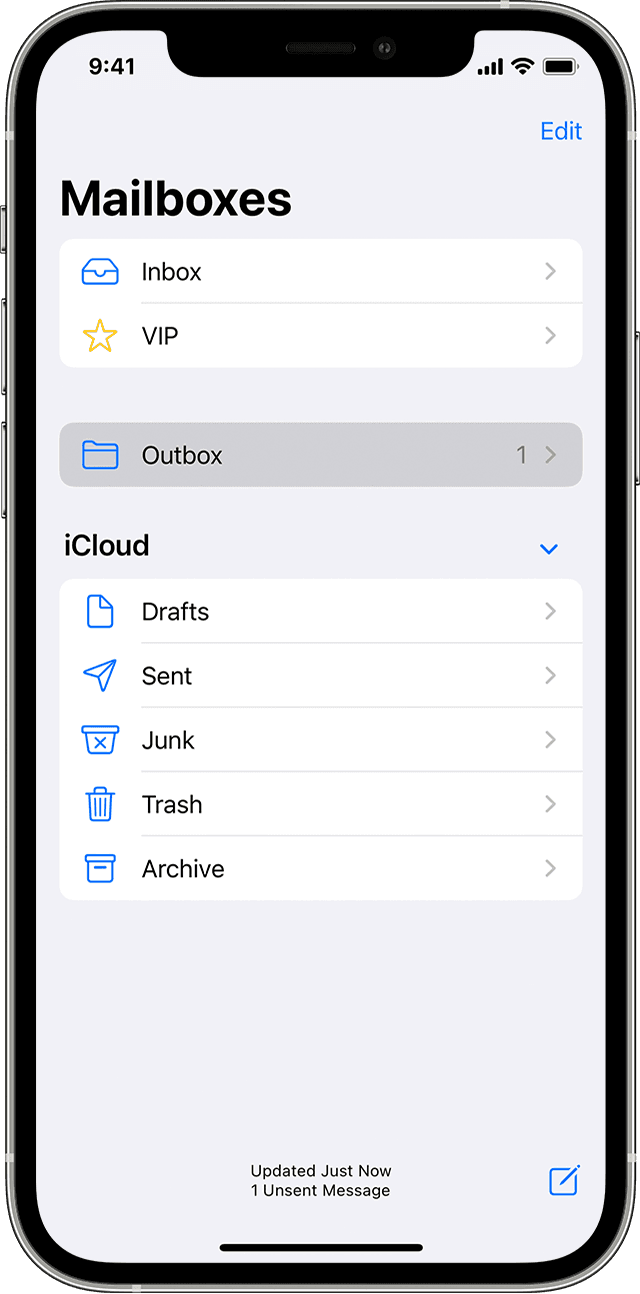
  1. In Mail, go to your list of mailboxes.
  2. Tap Outbox. If you can’t see an Outbox, your email was sent.

The Mailboxes page in iOS


3. Tap an email in the Outbox. Make sure the recipient’s email address is correct.

4. Tap Send.  

Check your email address and password

If Mail asks you to enter a password for your email account, make sure your password is correct. To check your email address and password, sign in to your email provider's website.

If you’re still receiving a username or password error, contact your email provider or system administrator.

Contact your email provider or system administrator

  1. Contact your email provider or check their status web page to see if there's a service outage. 
  2. Ask your email provider or system administrator if you have turned on any security features or restrictions, such as two-step verification, for your email account. You may need a special password or have to request authorisation from your email provider to send and receive emails on your device.
  3. Check your email account settings with your email provider or system administrator to make sure they're correct.

Remove your email account and set it up again

  1. On your computer, sign in to your email provider’s website. Make sure all of your emails are there or make sure your emails have been saved somewhere other than on your iOS or iPadOS device.
  2. On your device, go to Settings > Mail, then tap Accounts.
  3. Tap the email account you want to remove.
  4. Tap Delete Account.
  5. Add your account again."


More details here: If you can’t send emails on your iPhone or iPad


Thanks for connecting with Apple Support Communities.

Best wishes!


1 reply
Question marked as Top-ranking reply

Jul 22, 2023 11:16 AM in response to Strunza

Hello Strunza,


We'd like to provide you with a few steps that may be able to assist you with being able to send emails, on your iPhone:


"Before you begin

There are a few things to bear in mind and check:

  • When you make an iOS or iPadOS backup in iCloud or iTunes, it backs up your mail settings, but not your emails. If you delete or change your email account settings, previously downloaded emails might be removed from your device.
  • Make sure your device is connected to the internet.
  • Check with your email service provider to find out if there's a service outage.
  • Look for the Undo Send button in your Inbox or list of mailboxes. If Undo Send is available, the message has not been sent.
  • Find out what to do if you can’t access your iCloud Mail, or you can’t send and receive messages with your @icloud.com email address.

Check the Outbox for unsent email

If you get a message that says your email wasn’t sent, that email goes to your Outbox. Check your Outbox and try sending the email again by following these steps:

  1. In Mail, go to your list of mailboxes.
  2. Tap Outbox. If you can’t see an Outbox, your email was sent.

The Mailboxes page in iOS


3. Tap an email in the Outbox. Make sure the recipient’s email address is correct.

4. Tap Send.  

Check your email address and password

If Mail asks you to enter a password for your email account, make sure your password is correct. To check your email address and password, sign in to your email provider's website.

If you’re still receiving a username or password error, contact your email provider or system administrator.

Contact your email provider or system administrator

  1. Contact your email provider or check their status web page to see if there's a service outage. 
  2. Ask your email provider or system administrator if you have turned on any security features or restrictions, such as two-step verification, for your email account. You may need a special password or have to request authorisation from your email provider to send and receive emails on your device.
  3. Check your email account settings with your email provider or system administrator to make sure they're correct.

Remove your email account and set it up again

  1. On your computer, sign in to your email provider’s website. Make sure all of your emails are there or make sure your emails have been saved somewhere other than on your iOS or iPadOS device.
  2. On your device, go to Settings > Mail, then tap Accounts.
  3. Tap the email account you want to remove.
  4. Tap Delete Account.
  5. Add your account again."


More details here: If you can’t send emails on your iPhone or iPad


Thanks for connecting with Apple Support Communities.

Best wishes!


This thread has been closed by the system or the community team. You may vote for any posts you find helpful, or search the Community for additional answers.

I can’t send email on my iphone

Welcome to Apple Support Community
A forum where Apple customers help each other with their products. Get started with your Apple Account.