I am paying 2 x £6.99 monthly. one from my debit card and one from my credit card.
You can have a credit card / debit card on file and an Apple Account balance.
Your default payment method will be used first by Apple when you need to make a payment.
If you have set your Apple Account balance as your default payment method and you have a CC / debit card, you pay from your default payment method.
If you have 2 CC, and you have set one CC as your default payment method that will be charge by Apple.
1.
Both charged for your iCloud+ plan subscription?
Do you use multiple Apple ID?
If you have an iCloud+ plan subscription, you will receive a monthly bill from Apple, check your email box.
You pay monthly for iCloud storage.
Please check -> Go to -> Settings -> your name -> iCloud -> if you see 50 GB (or 200 GB or 2 TB) then you have an iCloud subscription.
With paying 2x, check the Apple ID on the invoice, the Order ID & the Document No.
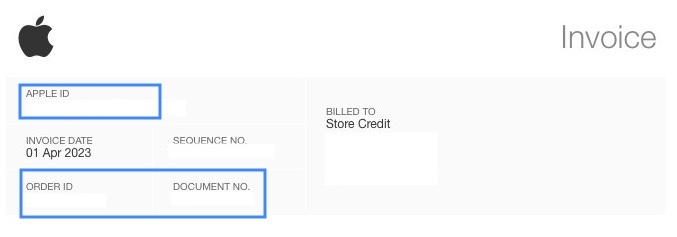
Then scroll down on the Apple invoice for your iCloud+ plan subscription:
👉 If you have any questions about your bill, contact support. This email confirms payment for the iCloud+ plan listed above. You will be billed each plan period until you cancel by downgrading to the free storage plan from your iOS device, Mac or PC.
2.
Check for sure the following Apple articles:
View your purchase history for the App Store, iTunes Store, and other Apple media services
View your purchase history for the App Store, iTunes Store, and other Apple media services - Apple Support
How apps, content, and subscriptions from Apple are billed
How apps, content, and subscriptions from Apple are billed - Apple Support
If you see "apple.com/bill" on your billing statement
If you see "apple.com/bill" on your billing statement – Apple Support (UK)
3.
If an app has a subscription associated with it, see -> Delete apps on your iPhone, iPad, and iPod touch -> Delete apps on your iPhone, iPad, and iPod touch - Apple Support
- If you delete an app, it doesn’t cancel in-app subscriptions that you might have. While deleting an app, you might see a Cancel Subscriptions option. Learn how to cancel your subscriptions.
If you don't want to continue a subscription you need always to cancel that subscription in time, see the following Apple articles:
If you want to cancel a subscription from Apple
If you want to cancel a subscription from Apple - Apple Support
If the subscription that you want to cancel is not listed
If the subscription that you want to cancel is not listed – Apple Support (UK)

