I purchased more iCloud space for $2.99 a month. I see that I was charged $2.99 on July 29 and on July 31. This is an overcharge and keeps happening. Please advise and refund one of those charges. Thank you. Paula Freeman

My Visa bill shows two $2.99 charges,,

iPad, iPadOS 16

Posted on Aug 2, 2023 3:41 PM

Reply
Question marked as Top-ranking reply

Posted on Aug 3, 2023 2:29 AM

Do you use multiple Apple ID?

If you have upgraded iCloud+ plan, once your request for iCloud+ plan has been activated, you should receive an invoice in your email box.

Please check -> Go to -> Settings -> your name -> iCloud -> if you see 50 GB (or 200 GB or 2 TB) then you have an iCloud subscription.

If you have an iCloud subscription, you will receive a monthly bill from Apple, check your email box.


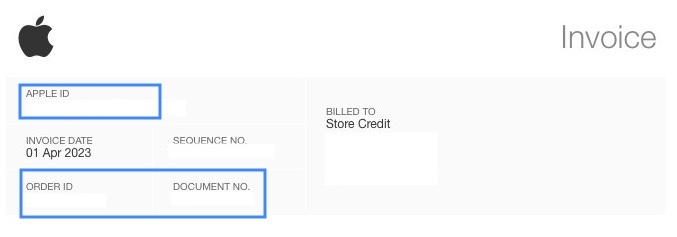
With that 2x invoice, check the Apple ID on the invoice, the Order ID & the Document No.

Then scroll down & see:

👉 If you have any questions about your bill, contact support. This email confirms payment for the iCloud+ plan listed above. You will be billed each plan period until you cancel by downgrading to the free storage plan from your iOS device, Mac or PC.


-----

My Visa bill shows two $2.99 charges,

If the invoice is not from Apple, was the money deducted by a stranger?

Contact your bank, they can find out who (name, address & account number) has collected the amount from your bank account, and when.

Depending on your bank, they can collect the amount back within 30 days.


See also ⤵️

Identify legitimate emails from the App Store or iTunes Store

Identify legitimate emails from the App Store or iTunes Store - Apple Support


Recognize and avoid phishing messages, phony support calls, and other scams

Recognize and avoid phishing messages, phony support calls, and other scams - Apple Support


2 replies
Question marked as Top-ranking reply

Aug 3, 2023 2:29 AM in response to Julystuff

Do you use multiple Apple ID?

If you have upgraded iCloud+ plan, once your request for iCloud+ plan has been activated, you should receive an invoice in your email box.

Please check -> Go to -> Settings -> your name -> iCloud -> if you see 50 GB (or 200 GB or 2 TB) then you have an iCloud subscription.

If you have an iCloud subscription, you will receive a monthly bill from Apple, check your email box.


With that 2x invoice, check the Apple ID on the invoice, the Order ID & the Document No.


Then scroll down & see:

👉 If you have any questions about your bill, contact support. This email confirms payment for the iCloud+ plan listed above. You will be billed each plan period until you cancel by downgrading to the free storage plan from your iOS device, Mac or PC.


-----

My Visa bill shows two $2.99 charges,

If the invoice is not from Apple, was the money deducted by a stranger?

Contact your bank, they can find out who (name, address & account number) has collected the amount from your bank account, and when.

Depending on your bank, they can collect the amount back within 30 days.


See also ⤵️

Identify legitimate emails from the App Store or iTunes Store

Identify legitimate emails from the App Store or iTunes Store - Apple Support


Recognize and avoid phishing messages, phony support calls, and other scams

Recognize and avoid phishing messages, phony support calls, and other scams - Apple Support



This thread has been closed by the system or the community team. You may vote for any posts you find helpful, or search the Community for additional answers.

I purchased more iCloud space for $2.99 a month. I see that I was charged $2.99 on July 29 and on July 31. This is an overcharge and keeps happening. Please advise and refund one of those charges. Thank you. Paula Freeman

Welcome to Apple Support Community
A forum where Apple customers help each other with their products. Get started with your Apple Account.