Unable to add funds to Apple ID.

I go through the steps to add funds but it doesn’t go through. It’s kinda a loop where it keeps asking for my password, accepts it, asks how much I want to add and nothing. Is this because I’m in a Shared Family and not the owner? Is there anyway around this?

iPhone 13 Pro, iOS 16

Posted on Aug 10, 2023 3:26 PM

Reply
Question marked as Top-ranking reply

Posted on Aug 10, 2023 3:36 PM

Is this because I’m in a Shared Family and not the owner?

1.

If you are a member of family sharing, the only payment method that can be on file is the organizer's card.

You can have your own payment method with your Apple Account balance.

See -> Make sure that each family member has a unique Apple ID

Make sure that each family member has a unique Apple ID - Apple Support


When you purchase something from the App Store or iTunes Store, the charges will be deducted from your Apple Account balance, before the organizer's credit card is charged.


See -> What you can buy with your Apple Gift Card or Apple Account balance

What you can buy with your Apple Gift Card or Apple Account balance – Apple Support (UK)
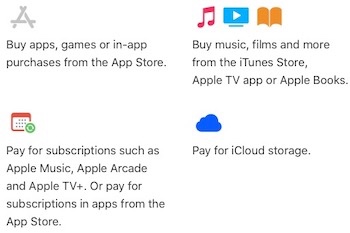


and ⤵️

  • You can't use your Apple Account balance to send gifts or gift cards.
  • If you use Family Sharing, your family members can't spend your Apple Account balance. Funds that you add to your Apple Account balance are only available to you. Find out more about how purchases are billed to your Apple Account balance.
  • Some purchases might require you to have a credit card on file, even if you use your Apple Account balance to make the purchase.


2.

You can also ask the family organizer to turn off purchase sharing, see -> How to share purchases with your family -> How to share purchases with your family - Apple Support

⤵️

Turn off purchase sharing and stop sharing a payment method

If you're the family organizer and you want family members to pay for purchases themselves, turn off purchase sharing: 

  1. Go to your Purchase Sharing settings in Settings on your iPhone or iPad or in System Settings on your Mac.
  2. Turn off purchase sharing:
    • On your iPhone or iPad, tap Stop Purchase Sharing.
    • On your Mac, click Turn Off, then click Stop Purchase Sharing.


When purchase sharing is turned off, you stop sharing your purchases and lose access to the purchases made by your other family members. However, you can continue to share subscriptions like Apple TV+ and Apple Arcade, but everyone must use their own payment method for purchases. 

If you still need help, get support from Apple directly -> Get Support or call Apple in your region see -> Contact Apple for support and service or check -> here for more support and assistance.


Similar questions

1 reply
Question marked as Top-ranking reply

Aug 10, 2023 3:36 PM in response to Straw-Bearie

Is this because I’m in a Shared Family and not the owner?

1.

If you are a member of family sharing, the only payment method that can be on file is the organizer's card.

You can have your own payment method with your Apple Account balance.

See -> Make sure that each family member has a unique Apple ID

Make sure that each family member has a unique Apple ID - Apple Support


When you purchase something from the App Store or iTunes Store, the charges will be deducted from your Apple Account balance, before the organizer's credit card is charged.


See -> What you can buy with your Apple Gift Card or Apple Account balance

What you can buy with your Apple Gift Card or Apple Account balance – Apple Support (UK)


and ⤵️

  • You can't use your Apple Account balance to send gifts or gift cards.
  • If you use Family Sharing, your family members can't spend your Apple Account balance. Funds that you add to your Apple Account balance are only available to you. Find out more about how purchases are billed to your Apple Account balance.
  • Some purchases might require you to have a credit card on file, even if you use your Apple Account balance to make the purchase.


2.

You can also ask the family organizer to turn off purchase sharing, see -> How to share purchases with your family -> How to share purchases with your family - Apple Support

⤵️

Turn off purchase sharing and stop sharing a payment method

If you're the family organizer and you want family members to pay for purchases themselves, turn off purchase sharing: 

  1. Go to your Purchase Sharing settings in Settings on your iPhone or iPad or in System Settings on your Mac.
  2. Turn off purchase sharing:
    • On your iPhone or iPad, tap Stop Purchase Sharing.
    • On your Mac, click Turn Off, then click Stop Purchase Sharing.


When purchase sharing is turned off, you stop sharing your purchases and lose access to the purchases made by your other family members. However, you can continue to share subscriptions like Apple TV+ and Apple Arcade, but everyone must use their own payment method for purchases. 

If you still need help, get support from Apple directly -> Get Support or call Apple in your region see -> Contact Apple for support and service or check -> here for more support and assistance.



This thread has been closed by the system or the community team. You may vote for any posts you find helpful, or search the Community for additional answers.

Unable to add funds to Apple ID.

Welcome to Apple Support Community
A forum where Apple customers help each other with their products. Get started with your Apple Account.