
I cannot find my email in iCloud. How can I access it?
My primary email on my iPad 16.6 is in iCloud but it is not accessible. How can I open it?
iPad Air, iPadOS 16
My primary email on my iPad 16.6 is in iCloud but it is not accessible. How can I open it?
iPad Air, iPadOS 16
Hi Augiee,
It sounds like you're attempting to check your iCloud email on your iPad. If so, first make sure iCloud mail is turned on using the steps below found in the article here: Set up iCloud Mail on all your devices
"Set up iCloud Mail on your iPhone, iPad, or iPod touch
2. If you want to send and receive iCloud Mail on your device, do one of the following:
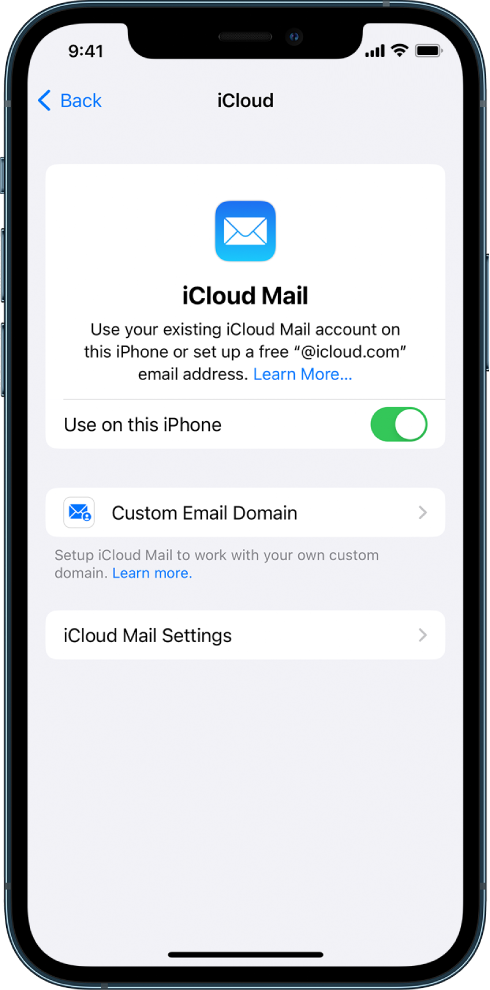
3. If you want to keep Mail settings up to date across your devices, turn on iCloud Drive. The following settings stay up to date:
4. To view your iCloud Mail, open the Mail app. Tap a mailbox or folder in the iCloud section."
The article here also has steps to help you view and check your iCloud settings on your iPad: Use iCloud on iPad
If there's a different question you have, provide more detail about what it is you're looking to accomplish and we'll continue to assist.
Cheers.
Hi Augiee,
It sounds like you're attempting to check your iCloud email on your iPad. If so, first make sure iCloud mail is turned on using the steps below found in the article here: Set up iCloud Mail on all your devices
"Set up iCloud Mail on your iPhone, iPad, or iPod touch
2. If you want to send and receive iCloud Mail on your device, do one of the following:
3. If you want to keep Mail settings up to date across your devices, turn on iCloud Drive. The following settings stay up to date:
4. To view your iCloud Mail, open the Mail app. Tap a mailbox or folder in the iCloud section."
The article here also has steps to help you view and check your iCloud settings on your iPad: Use iCloud on iPad
If there's a different question you have, provide more detail about what it is you're looking to accomplish and we'll continue to assist.
Cheers.
I cannot find my email in iCloud. How can I access it?

