How do I recover a deleted note

I can’t find a deleted note

Posted on Aug 15, 2023 11:47 PM

Reply
Question marked as Top-ranking reply

Posted on Aug 15, 2023 11:52 PM

Hi PapaSparkles, if you're missing notes, you can check your Recently Deleted folder.


Check your Recently Deleted folder

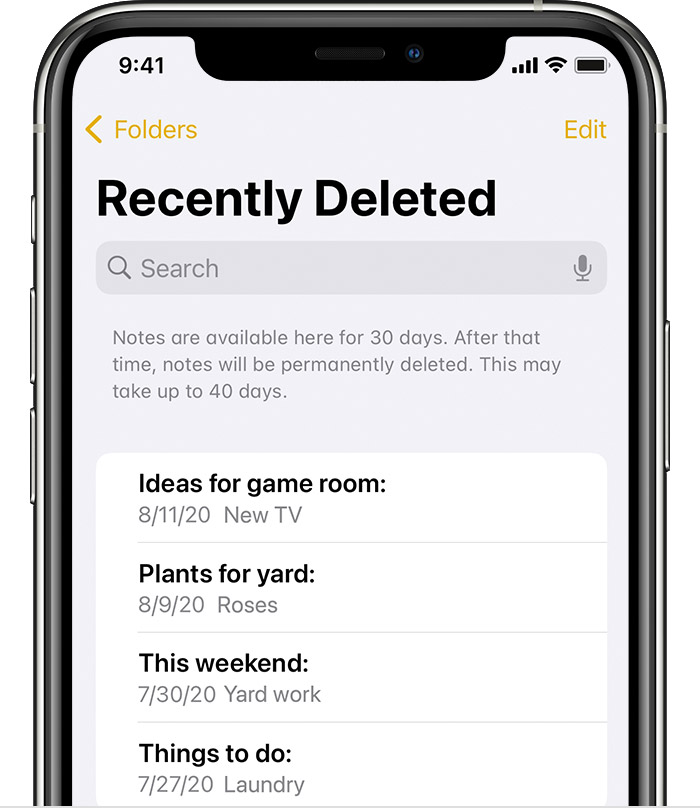
If you store your notes on iCloud, check your Recently Deleted folder:

  1. Open Notes, then tap the back icon ( < ) until you see your Folders list.
  2. Tap Recently Deleted and search for your note.


If you find your note in Recently Deleted or in another folder, you can move it:
  1. In the Notes list, tap Edit.
  2. Select the note that you want to move.
  3. Tap Move, then select the folder you want to move it to.


Read more at If you're missing notes on your iPhone, iPad, or iPod touch - Apple Support


Hope this helps! Let us know if you're still facing issues.


1 reply
Question marked as Top-ranking reply

Aug 15, 2023 11:52 PM in response to PapaSparkles

Hi PapaSparkles, if you're missing notes, you can check your Recently Deleted folder.


Check your Recently Deleted folder

If you store your notes on iCloud, check your Recently Deleted folder:

  1. Open Notes, then tap the back icon ( < ) until you see your Folders list.
  2. Tap Recently Deleted and search for your note.


If you find your note in Recently Deleted or in another folder, you can move it:

  1. In the Notes list, tap Edit.
  2. Select the note that you want to move.
  3. Tap Move, then select the folder you want to move it to.


Read more at If you're missing notes on your iPhone, iPad, or iPod touch - Apple Support


Hope this helps! Let us know if you're still facing issues.


This thread has been closed by the system or the community team. You may vote for any posts you find helpful, or search the Community for additional answers.

How do I recover a deleted note

Welcome to Apple Support Community
A forum where Apple customers help each other with their products. Get started with your Apple Account.
