How to choose how to open my links

So whenever you open a link from somewhere there will be a pop up of you choosing chrome safari, in browser, etc but I accidentally disabled it and now whenever I open a link it takes me to my browser immediately and I don’t want that so please help me to get it back!!

iPhone 12

Posted on Aug 16, 2023 12:10 PM

Reply
3 replies

Aug 17, 2023 10:44 AM in response to cherrykook

Hi cherrykook,


Thanks for contacting Apple Support Communities!


We understand that you'd like to choose which browser to open links in when you tap a link.


You can choose a default browser which would open that particular browser each time you tap a link as outlined here: Change the default web browser or email app on your iPhone, iPad or iPod touch – Apple Support

"How to change your default web browser or email app 

  1. Go to Settings and scroll down until you find the browser app or email app.
  2. Tap the app, then tap Default Browser App or Default Mail App.
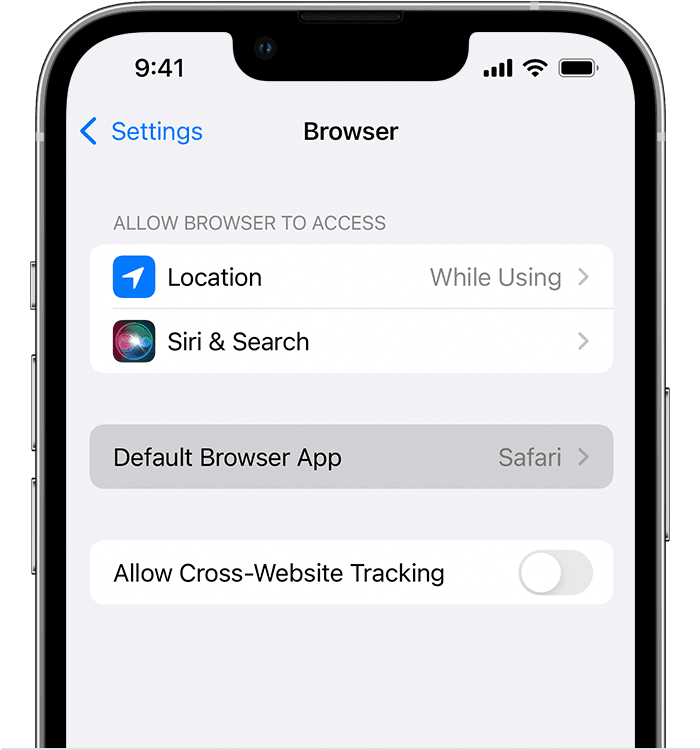
iPhone showing Default Browser App


3. Select a web browser or email app to set it as the default. A tick will appear to confirm it's the default."


We hope this helps you.


Cheers!


This thread has been closed by the system or the community team. You may vote for any posts you find helpful, or search the Community for additional answers.

How to choose how to open my links

Welcome to Apple Support Community
A forum where Apple customers help each other with their products. Get started with your Apple Account.