How to undo “forget this device”

Both our iPod Max’s were listening to same video. Both devices on same iCloud account. But wanted to each watch out separate videos on each device. Thought “forget this device” would work. But now can’t connect to either iPod Max. How do I undo “forget this device”?

iPhone 6, iOS 12

Posted on Aug 18, 2023 1:37 PM

Reply
Question marked as Top-ranking reply

Posted on Aug 19, 2023 12:00 PM

Hello JohnnyAlexB,


We understand that you're unable to connect your AirPods Max as expected, after having them connected. The following steps can help to resolve this issue:


"How to reset your AirPods Max

Learn how to restart your AirPods Max if you're experiencing issues, or reset them to factory settings.
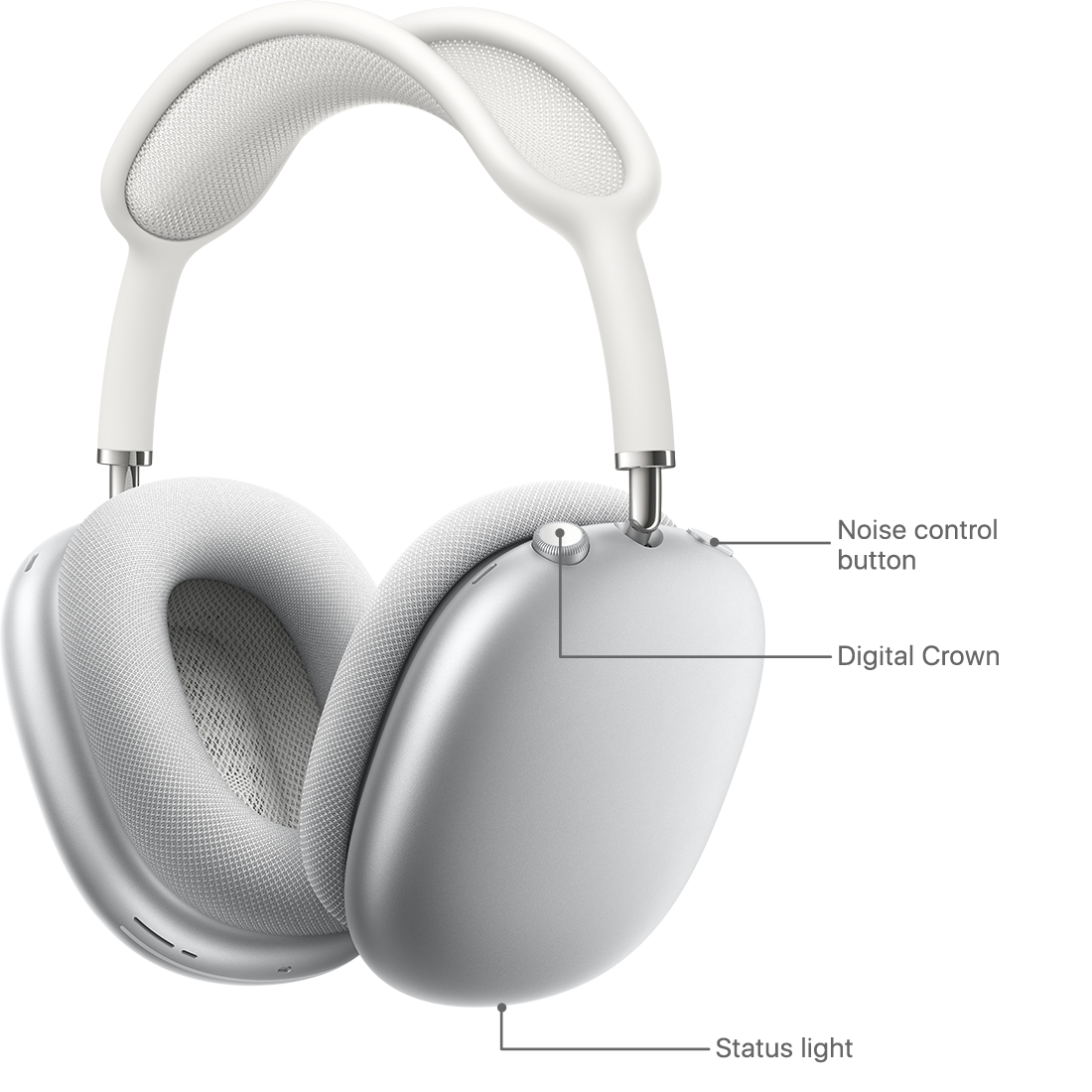

Noise control button, Digital Crown, and status light


To restart or reset your AirPods Max:

  • First, charge them for a few minutes.
  • If you're experiencing issues with your AirPods Max, you can restart them. Press and hold the noise control button and the Digital Crown until the LED flashes amber.
  • You can also reset AirPods Max to factory settings. Press and hold the noise control button and the Digital Crown for 15 seconds, until the LED flashes amber, then white.
  • After you reset your AirPods Max, you can connect them to your iOS or iPadOS device, or connect them to your Mac or other device.

AirPods Max can be associated with one Apple ID. If you want to use AirPods Max that someone else has used, they need to first remove them from their Apple ID."


We hope this helps.

Take care!

1 reply
Question marked as Top-ranking reply

Aug 19, 2023 12:00 PM in response to JohnnyAlexB

Hello JohnnyAlexB,


We understand that you're unable to connect your AirPods Max as expected, after having them connected. The following steps can help to resolve this issue:


"How to reset your AirPods Max

Learn how to restart your AirPods Max if you're experiencing issues, or reset them to factory settings.


Noise control button, Digital Crown, and status light


To restart or reset your AirPods Max:

  • First, charge them for a few minutes.
  • If you're experiencing issues with your AirPods Max, you can restart them. Press and hold the noise control button and the Digital Crown until the LED flashes amber.
  • You can also reset AirPods Max to factory settings. Press and hold the noise control button and the Digital Crown for 15 seconds, until the LED flashes amber, then white.
  • After you reset your AirPods Max, you can connect them to your iOS or iPadOS device, or connect them to your Mac or other device.

AirPods Max can be associated with one Apple ID. If you want to use AirPods Max that someone else has used, they need to first remove them from their Apple ID."


We hope this helps.

Take care!

This thread has been closed by the system or the community team. You may vote for any posts you find helpful, or search the Community for additional answers.

How to undo “forget this device”

Welcome to Apple Support Community
A forum where Apple customers help each other with their products. Get started with your Apple Account.