Beats Flex Earphones
My Beats Flex earphones are not charging
Beats
My Beats Flex earphones are not charging
Beats
Hi there Donmac1956,
If your Beats Flex earphones aren't charging as expected, try resetting them with the steps below to see if that resolves the issue for you:
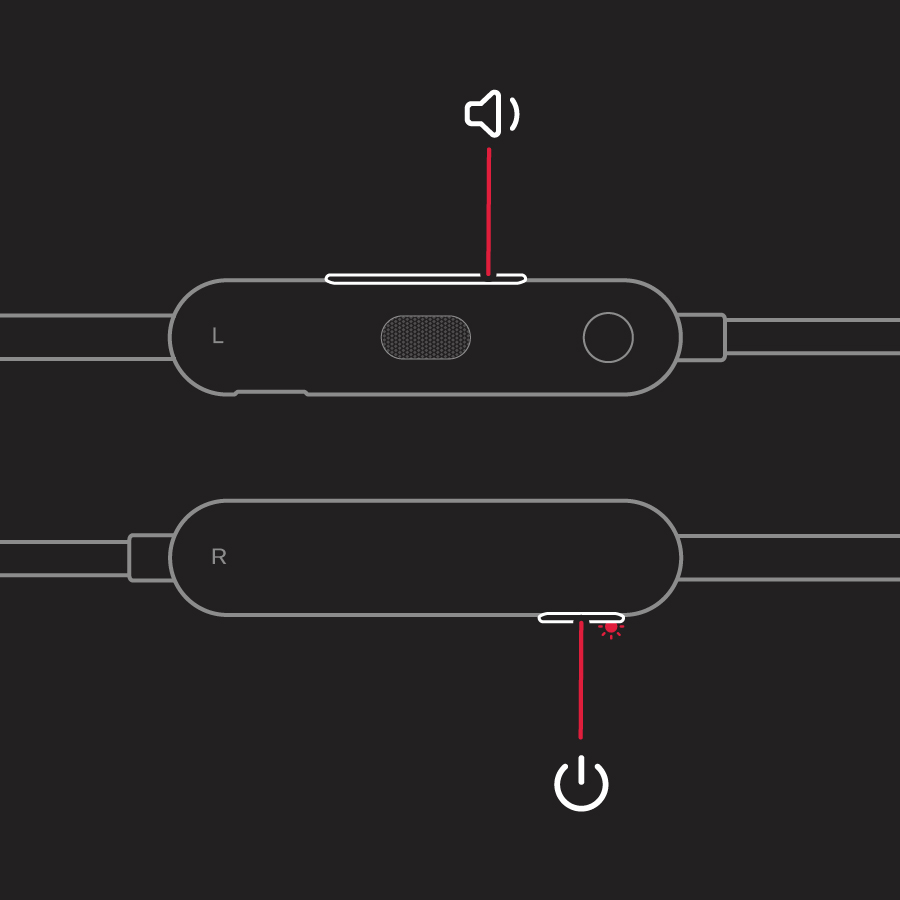
Reset Beats Flex
1. Hold down both the power button and the volume down button for 15 seconds.
2. When the LED indicator light flashes, release the buttons. Your earphones are now reset and ready to be set up with your devices again.
If the issue persists after resetting, try the additional steps below to see if they help:
Still having issues with your earphones? Try these things next:
* If your earphones won't charge, use another power source or a different cable.
* If you're having issues with sound, learn about sound troubleshooting for earphones.
* If your earphones disconnect from your device, get help with your Bluetooth connection.
* Use these steps to check for firmware updates.
You'll find all the steps above in this support article: Reset your Beats earphones - Apple Support
If your Beats still aren't charging after trying all the steps we suggested from the link above, you'll want to have them serviced. This link will help you get started: Beats Repair & Service - Apple Support
Take care.
Hi there Donmac1956,
If your Beats Flex earphones aren't charging as expected, try resetting them with the steps below to see if that resolves the issue for you:
Reset Beats Flex
1. Hold down both the power button and the volume down button for 15 seconds.
2. When the LED indicator light flashes, release the buttons. Your earphones are now reset and ready to be set up with your devices again.
If the issue persists after resetting, try the additional steps below to see if they help:
Still having issues with your earphones? Try these things next:
* If your earphones won't charge, use another power source or a different cable.
* If you're having issues with sound, learn about sound troubleshooting for earphones.
* If your earphones disconnect from your device, get help with your Bluetooth connection.
* Use these steps to check for firmware updates.
You'll find all the steps above in this support article: Reset your Beats earphones - Apple Support
If your Beats still aren't charging after trying all the steps we suggested from the link above, you'll want to have them serviced. This link will help you get started: Beats Repair & Service - Apple Support
Take care.
Beats Flex Earphones