voice memos on my watch won't sync
When I make recordings on my apple watch, it wont show up or sync with my iphone.
Apple Watch SE, watchOS 9
When I make recordings on my apple watch, it wont show up or sync with my iphone.
Apple Watch SE, watchOS 9
Hi there igalvez,
To confirm, is Voice Memos enabled in Settings > tap your name near the top > iCloud > Show All? If not, please enable that and then your Voice Memos should start appearing on your iPhone as well.
Another step you can take if that is already enabled is to restart both your iPhone and Apple Watch. Restarting can refresh software and may help push the syncing process. If needed, the steps below show how to do that:
Here is how to restart your Apple Watch:
How to restart your Apple Watch if you have watchOS 9
1. If your Apple Watch is charging, take it off the charger.
2. Press and hold the side button until you see the power buttonin the upper-right corner of the display.
3. Tap the power button.
4. Drag the Power Off slider.
5. After your watch turns off, press and hold the side button again until you see the Apple logo.
Those steps are from this article: Restart your Apple Watch - Apple Support If your Apple Watch is running an earlier watchOS, then the article would have steps for that watchOS version too.
Here is how to restart an iPhone:
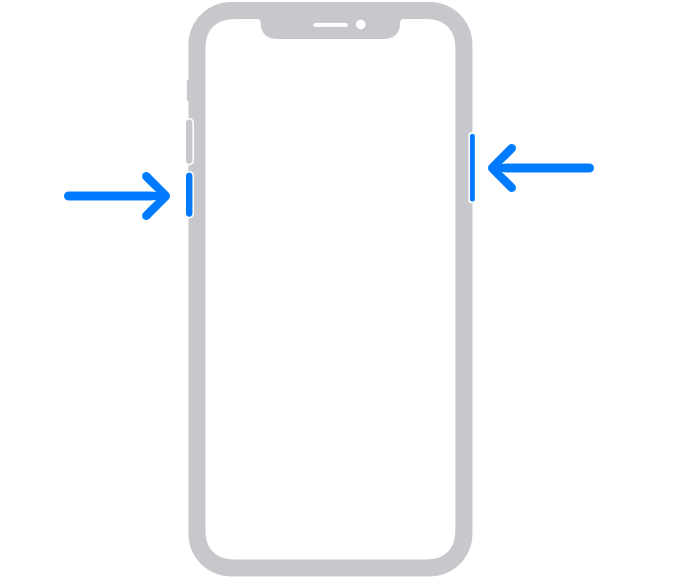
How to restart your iPhone X, 11, 12, 13, or later
1. Press and hold either volume button and the side button until the power-off slider appears.
2. Drag the slider, then wait 30 seconds for your device to turn off. If your device is frozen or unresponsive, force restart your device.
3. To turn your device back on, press and hold the side button (on the right side of your iPhone) until you see the Apple logo.
Those steps, and steps for other iPhone models, are from this article: Restart your iPhone - Apple Support
Please let us know if those steps help or if you've already tried those steps.
Take care.
Hi there igalvez,
To confirm, is Voice Memos enabled in Settings > tap your name near the top > iCloud > Show All? If not, please enable that and then your Voice Memos should start appearing on your iPhone as well.
Another step you can take if that is already enabled is to restart both your iPhone and Apple Watch. Restarting can refresh software and may help push the syncing process. If needed, the steps below show how to do that:
Here is how to restart your Apple Watch:
How to restart your Apple Watch if you have watchOS 9
1. If your Apple Watch is charging, take it off the charger.
2. Press and hold the side button until you see the power button
3. Tap the power button.
4. Drag the Power Off slider.
5. After your watch turns off, press and hold the side button again until you see the Apple logo.
Those steps are from this article: Restart your Apple Watch - Apple Support If your Apple Watch is running an earlier watchOS, then the article would have steps for that watchOS version too.
Here is how to restart an iPhone:
How to restart your iPhone X, 11, 12, 13, or later
1. Press and hold either volume button and the side button until the power-off slider appears.
2. Drag the slider, then wait 30 seconds for your device to turn off. If your device is frozen or unresponsive, force restart your device.
3. To turn your device back on, press and hold the side button (on the right side of your iPhone) until you see the Apple logo.
Those steps, and steps for other iPhone models, are from this article: Restart your iPhone - Apple Support
Please let us know if those steps help or if you've already tried those steps.
Take care.
I’ve done every single thing to try and get it to work. I even called Apple support and they offered the same suggestions and it’s still not working
voice memos on my watch won't sync