
my airpods right side not charging and left side 4,5 seconds after deconnect
plz my airpods not working
plz my airpods not working
Hi sanju94,
Thanks for posting in Apple Support Communities! Since you're having a few different issues with your AirPods, try resetting them. A reset can fix many issues. Here's how to reset them:
 next to your AirPods, tap Forget This Device, then tap again to confirm.
5. Put your AirPods in their charging case, and keep the lid open.
6. Press and hold the setup button on the back of the case for about 15 seconds, until the status light on the front of the case flashes amber, then white.*
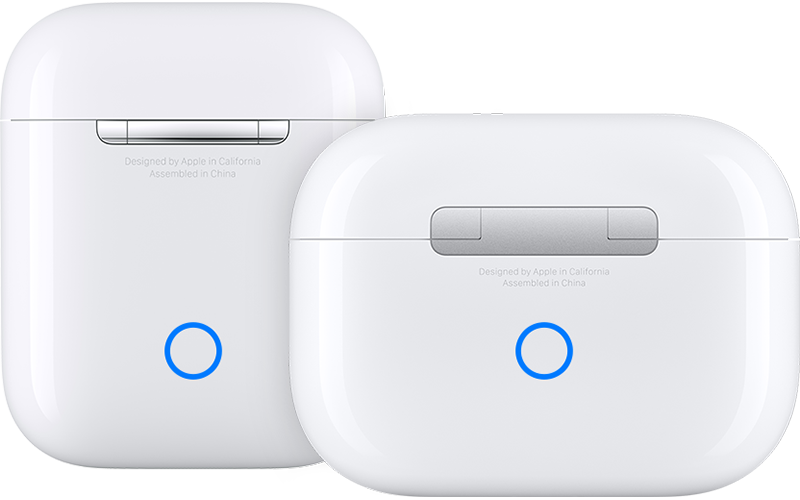
7. Reconnect your AirPods: With your AirPods in their charging case and the lid open, place your AirPods close to your iPhone or iPad. Follow the steps on your device's screen."
Find these steps in the article How to reset your AirPods and AirPods Pro.
To correct issues with charging, follow the guidance in this article: If your AirPods won’t charge.
Hope that helps!
Hi sanju94,
Thanks for posting in Apple Support Communities! Since you're having a few different issues with your AirPods, try resetting them. A reset can fix many issues. Here's how to reset them:
next to your AirPods, tap Forget This Device, then tap again to confirm.5. Put your AirPods in their charging case, and keep the lid open.
6. Press and hold the setup button on the back of the case for about 15 seconds, until the status light on the front of the case flashes amber, then white.*
7. Reconnect your AirPods: With your AirPods in their charging case and the lid open, place your AirPods close to your iPhone or iPad. Follow the steps on your device's screen."
Find these steps in the article How to reset your AirPods and AirPods Pro.
To correct issues with charging, follow the guidance in this article: If your AirPods won’t charge.
Hope that helps!
my airpods right side not charging and left side 4,5 seconds after deconnect

