Notifying Family Via Satellite?
can you send a short text to family via satellite to notify them if you are ok if they are listed in emergency contacts or is it strictly emergency services?
can you send a short text to family via satellite to notify them if you are ok if they are listed in emergency contacts or is it strictly emergency services?
Hi there Xoxodani2,
The only way to share information with your emergency contacts using Emergency SOS via satellite is by following the steps from this section of Use Emergency SOS via satellite on your iPhone 14 (that you've already looked over):
Share information with your emergency contacts
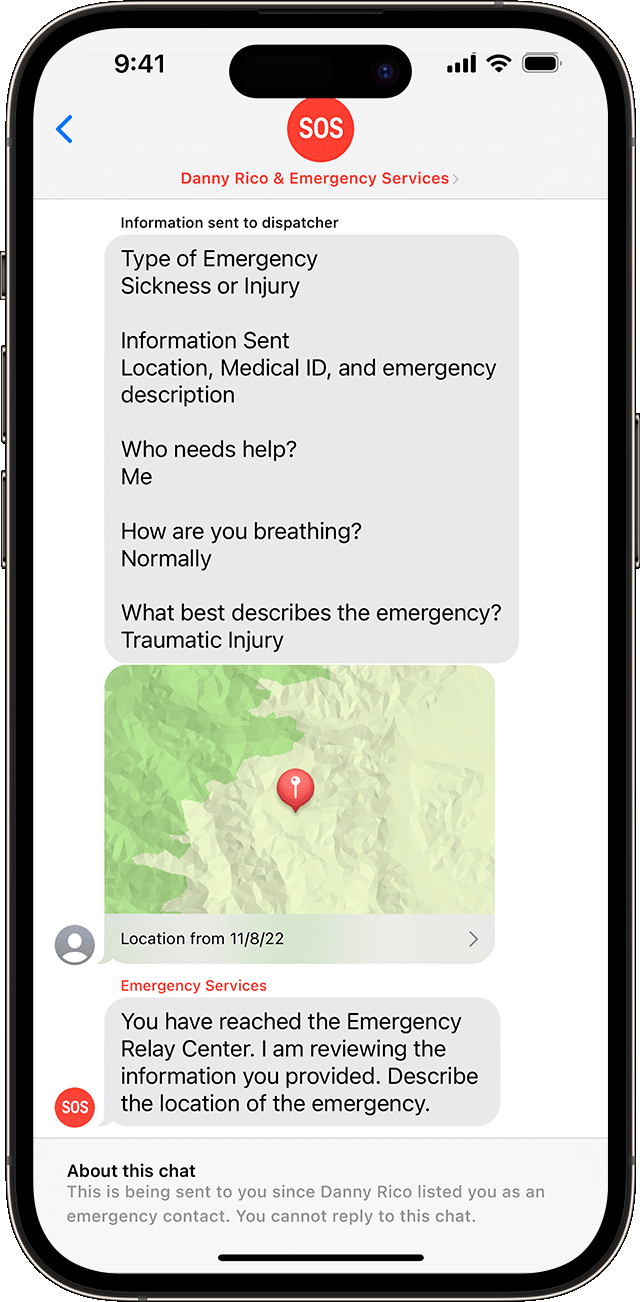
If you set up emergency contacts in the Health app, you can choose to notify and share information with them when you text emergency services with Emergency SOS via satellite. When you choose to share this information, your emergency contacts get these messages automatically.
If your emergency contacts use iMessage on iOS 16.1 or later, you can share a live transcript of your conversation with emergency services. This transcript includes:
* Your answers to the emergency questionnaire.
* A map with your location.
* The messages that you exchange with emergency services.
If your emergency contacts have a non-Apple device or don't have iOS 16.1 or later, they receive a text message that alerts them about your emergency. In the U.S. and Canada, this message comes from the number 767911. In Europe, this message comes from 767112.
* The message says, "You're receiving this message because someone you know chose you as an emergency contact and used Emergency SOS via satellite."
* To receive additional text messages, your emergency contacts need to respond "YES" to the first message within 48 hours. If they respond "NO" or "STOP," they won't receive any more messages about Emergency SOS via satellite notifications (either for the current emergency or future emergencies).
* If your emergency contact responded "NO" or "STOP," they can receive future messages about Emergency SOS via satellite notifications again by texting "RESTART" to the same number.
* The additional messages include your name, the time that you contacted emergency services, your location, and the information that you provided about your emergency.
Your emergency contacts can't respond to the messages, other than replying "YES" or "NO" when necessary. They do not need to contact emergency services, because emergency services has already been contacted for the emergency.
Take care!
Hi there Xoxodani2,
The only way to share information with your emergency contacts using Emergency SOS via satellite is by following the steps from this section of Use Emergency SOS via satellite on your iPhone 14 (that you've already looked over):
Share information with your emergency contacts
If you set up emergency contacts in the Health app, you can choose to notify and share information with them when you text emergency services with Emergency SOS via satellite. When you choose to share this information, your emergency contacts get these messages automatically.
If your emergency contacts use iMessage on iOS 16.1 or later, you can share a live transcript of your conversation with emergency services. This transcript includes:
* Your answers to the emergency questionnaire.
* A map with your location.
* The messages that you exchange with emergency services.
If your emergency contacts have a non-Apple device or don't have iOS 16.1 or later, they receive a text message that alerts them about your emergency. In the U.S. and Canada, this message comes from the number 767911. In Europe, this message comes from 767112.
* The message says, "You're receiving this message because someone you know chose you as an emergency contact and used Emergency SOS via satellite."
* To receive additional text messages, your emergency contacts need to respond "YES" to the first message within 48 hours. If they respond "NO" or "STOP," they won't receive any more messages about Emergency SOS via satellite notifications (either for the current emergency or future emergencies).
* If your emergency contact responded "NO" or "STOP," they can receive future messages about Emergency SOS via satellite notifications again by texting "RESTART" to the same number.
* The additional messages include your name, the time that you contacted emergency services, your location, and the information that you provided about your emergency.
Your emergency contacts can't respond to the messages, other than replying "YES" or "NO" when necessary. They do not need to contact emergency services, because emergency services has already been contacted for the emergency.
Take care!
Notifying Family Via Satellite?