I'm not sure if my MacBook has been hacked

I have a 2017 i7 macbook pro running on ventura 13.5.1. I started using it again for school recently and have been noticing some slight bugs with pop ups appearing out of the blue and then disappearing quickly. I have also noticed that when I'm in chrome in full screen, sometimes the window will randomly push from the right to the left similar to the animation when you switch between full screen apps but it stopps about 1/4 of the way and then snaps back to full screen. I have noticed this happen multiple times without me touching the mouse or the keyboard at all.

I havent been able to identify any unusal activity on activity monitor so im not super concerned but I dont want to ignore all of the strange pop ups ive been getting.


[Re-titled by Moderator]

MacBook Pro (2017 – 2020)

Posted on Sep 1, 2023 1:29 PM

Reply
1 reply

Sep 2, 2023 11:29 AM in response to lnadolny

Hi lnadolny,


Thanks for posting in Apple Support Communities.


We understand your Mac is demonstrating odd behavior such as windows moving on their own and moving back in place. If you have already updated to the latest available version for your Mac and restarted, run a health check to see whether there are any disk errors found. If there are, it will try to repair itself.


Open Disk Utility
In general, you can just open Disk Utility from the Utilities folder of your Applications folder. However, if your Mac doesn't start up all the way, or you want to repair the disk your Mac starts up from, open Disk Utility from macOS Recovery:
1. Determine whether you're using a Mac with Apple silicon, then follow the appropriate steps:
* Apple silicon: Turn on your Mac and continue to press and hold the power button until you see the startup options window. Click the gear icon labeled Options, then click Continue.
* Intel processor: Turn on your Mac, then immediately press and hold these two keys until you see an Apple logo or other image: Command (⌘) and R.
4. You may be asked to select a user you know the password for. Select the user, then click Next and enter their administrator password.
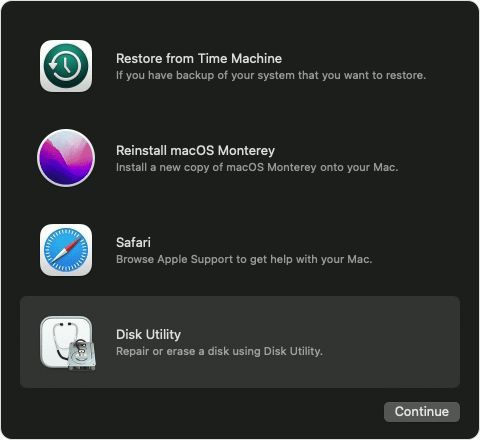
5. From the utilities window in macOS Recovery, select Disk Utility and click Continue.
6. macOS Recovery options with Disk Utility selected

Continue with the steps in How to repair a Mac disk with Disk Utility - Apple Support.


Regards.


This thread has been closed by the system or the community team. You may vote for any posts you find helpful, or search the Community for additional answers.

I'm not sure if my MacBook has been hacked

Welcome to Apple Support Community
A forum where Apple customers help each other with their products. Get started with your Apple Account.