Lost phone need to fully erase

I’ve lost/miss placed my iPhone and need to fully erase it. I cannot seem to do this as it keeps asking for the Authentication code but that’s sending to the phone I don’t have so I can’t log in to delete the phone. Please help

iPhone 11

Posted on Sep 2, 2023 12:49 AM

Reply
Question marked as Top-ranking reply

Posted on Sep 2, 2023 1:59 AM

If you can't unlock your Apple ID

If you use security questions with your Apple ID, or if you don't have access to a trusted device or phone number, go to iforgot.apple.com. Then you can unlock your account with your existing password or reset your password.


Watch this GIF
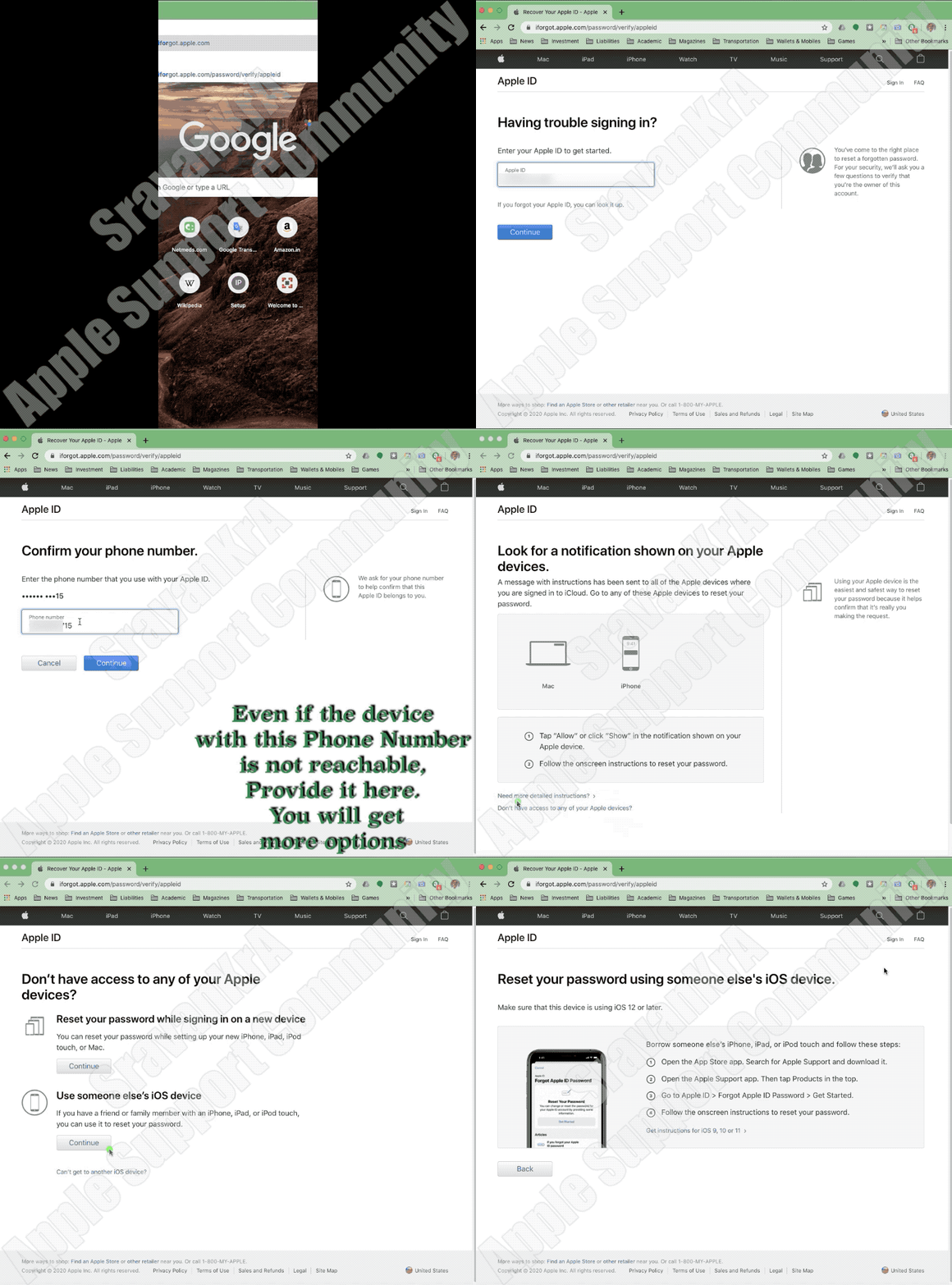


What if I can't access a trusted device or didn't receive a verification code?

If you're signing in and don’t have a trusted device handy that can display verification codes, you can have a code sent to your trusted phone number via text message or an automated phone call instead. Click Didn't Get a Code on the sign in screen and choose to send a code to your trusted phone number. You can also get a code directly from Settings on a trusted device. Learn how to get a verification code.

If you use iOS 11.3 or later on your iPhone, you might not need to enter a verification code. In some cases, your trusted phone number can be automatically verified in the background on your iPhone. It’s one less thing to do, and your account is still protected with two-factor authentication.


If I can't sign in, how do I regain access to my account?

If you can’t sign in, access a trusted device, reset your password, or receive verification codes, you can request account recovery to regain access to your account. Account recovery is an automatic process designed to get you back in to your account as quickly as possible while denying access to anyone who might be pretending to be you. It might take a few days—or longer—depending on what specific account information you can provide to verify your identity.


Do I still need to remember any security questions?

No. With two-factor authentication, you don't need to remember any security questions. We verify your identity exclusively using your password and verification codes sent to your trusted devices and phone numbers. When you enroll in two-factor authentication, we keep your old security questions on file for two weeks in case you need to return your account to its previous security settings. After that, they're deleted.


Can Apple Support help me regain access to my account?

Apple Support can answer your questions about the account recovery process, but can't verify your identity or expedite the process in any way.



If you lost / can't reach the trusted device or phone number associated with your Apple ID

As long as you still have your Recovery Key and remember your Apple ID password, you can sign in and add a new trusted device or phone number to your account. You can also remove any devices you may have lost, sold, or given away.

  1. Go to your Apple ID account page and enter your Apple ID and password.
  2. On the Verify Your Identity screen, select "Can’t access your trusted devices?"
  3. In the pop-up window, enter your Recovery Key.
  4. Go to the Security section and click Edit.

Remove the device you no longer wish to use to verify your identity. If you have additional devices with Find My iPhone enabled, you can verify them as trusted devices. You can also add additional trusted phone numbers.


If you lost your Recovery Key

As long as you remember your Apple ID password and still have access to one of your trusted devices, you can sign in and create a new Recovery Key.

  1. Go to your Apple ID account page.
  2. Sign in with your password and trusted device.
  3. In the Security section, click Edit > Replace Lost Key.

Keep your new Recovery Key in a safe place. Your old Recovery Key won't work anymore and you can't use it to reset your password or access your account.


If you can't sign in with two-step verification using your Apple ID ...


3 replies
Question marked as Top-ranking reply

Sep 2, 2023 1:59 AM in response to ejelb

If you can't unlock your Apple ID

If you use security questions with your Apple ID, or if you don't have access to a trusted device or phone number, go to iforgot.apple.com. Then you can unlock your account with your existing password or reset your password.


Watch this GIF


What if I can't access a trusted device or didn't receive a verification code?

If you're signing in and don’t have a trusted device handy that can display verification codes, you can have a code sent to your trusted phone number via text message or an automated phone call instead. Click Didn't Get a Code on the sign in screen and choose to send a code to your trusted phone number. You can also get a code directly from Settings on a trusted device. Learn how to get a verification code.

If you use iOS 11.3 or later on your iPhone, you might not need to enter a verification code. In some cases, your trusted phone number can be automatically verified in the background on your iPhone. It’s one less thing to do, and your account is still protected with two-factor authentication.


If I can't sign in, how do I regain access to my account?

If you can’t sign in, access a trusted device, reset your password, or receive verification codes, you can request account recovery to regain access to your account. Account recovery is an automatic process designed to get you back in to your account as quickly as possible while denying access to anyone who might be pretending to be you. It might take a few days—or longer—depending on what specific account information you can provide to verify your identity.


Do I still need to remember any security questions?

No. With two-factor authentication, you don't need to remember any security questions. We verify your identity exclusively using your password and verification codes sent to your trusted devices and phone numbers. When you enroll in two-factor authentication, we keep your old security questions on file for two weeks in case you need to return your account to its previous security settings. After that, they're deleted.


Can Apple Support help me regain access to my account?

Apple Support can answer your questions about the account recovery process, but can't verify your identity or expedite the process in any way.


If you lost / can't reach the trusted device or phone number associated with your Apple ID

As long as you still have your Recovery Key and remember your Apple ID password, you can sign in and add a new trusted device or phone number to your account. You can also remove any devices you may have lost, sold, or given away.

  1. Go to your Apple ID account page and enter your Apple ID and password.
  2. On the Verify Your Identity screen, select "Can’t access your trusted devices?"
  3. In the pop-up window, enter your Recovery Key.
  4. Go to the Security section and click Edit.

Remove the device you no longer wish to use to verify your identity. If you have additional devices with Find My iPhone enabled, you can verify them as trusted devices. You can also add additional trusted phone numbers.


If you lost your Recovery Key

As long as you remember your Apple ID password and still have access to one of your trusted devices, you can sign in and create a new Recovery Key.

  1. Go to your Apple ID account page.
  2. Sign in with your password and trusted device.
  3. In the Security section, click Edit > Replace Lost Key.

Keep your new Recovery Key in a safe place. Your old Recovery Key won't work anymore and you can't use it to reset your password or access your account.


If you can't sign in with two-step verification using your Apple ID ...


Sep 2, 2023 1:56 AM in response to ejelb

Don'ts

If the device is removed from an account after it is erased, Activation Lock will be turned off. This allows another person to turn on and use the device.


An example of my iPhone 5 is given in the GIF below. There is no "Undo" after you remove it from your account.


iPhones are designed with strong security measures to protect the privacy and data of their owners. One of the key features that ensure this is the requirement of an Apple ID and password or a passcode to access the device's contents. This means that without the owner's authorization, it is nearly impossible for anyone else to open an iPhone and gain access to its data.


  • The Apple ID and password serve as a unique identifier for each user and are used to link the device to the owner's iCloud account.
  • In the event that the owner has chosen to set up a passcode, an additional layer of protection is added.
  • Additionally, enabling two-factor authentication for the Apple ID further enhances the security of the device by requiring a secondary verification step, typically through a trusted device or phone number, to access the account.


With these security measures in place, iPhones offer a high level of protection against unauthorized access. Even if someone physically possesses the device, they will find it extremely challenging to access its contents without the owner's Apple ID and password or the passcode. This helps safeguard sensitive information, personal data, and ensures the privacy of the iPhone's owner.


It is worth noting that while these security measures provide strong protection against unauthorized access, it is essential for iPhone owners to choose strong and unique passcodes or passwords. This minimizes the risk of brute-force attacks or password-guessing attempts.


This thread has been closed by the system or the community team. You may vote for any posts you find helpful, or search the Community for additional answers.

Lost phone need to fully erase

Welcome to Apple Support Community
A forum where Apple customers help each other with their products. Get started with your Apple Account.