How do I pay for iCloud and hotpot storage
My payment was not taken probably because there was no money available over 65 days.
iPhone 7 Plus, iOS 15
My payment was not taken probably because there was no money available over 65 days.
iPhone 7 Plus, iOS 15
Hi Snickpeanutbutter.
Thanks for using Apple Support Communities. If you have an outstanding payment, make sure your billing information is updated using the steps here:
1. Open the Settings app.
2. Tap your name.
3. Tap Media & Purchases, then tap View Account. You might be asked to sign in with your Apple ID.
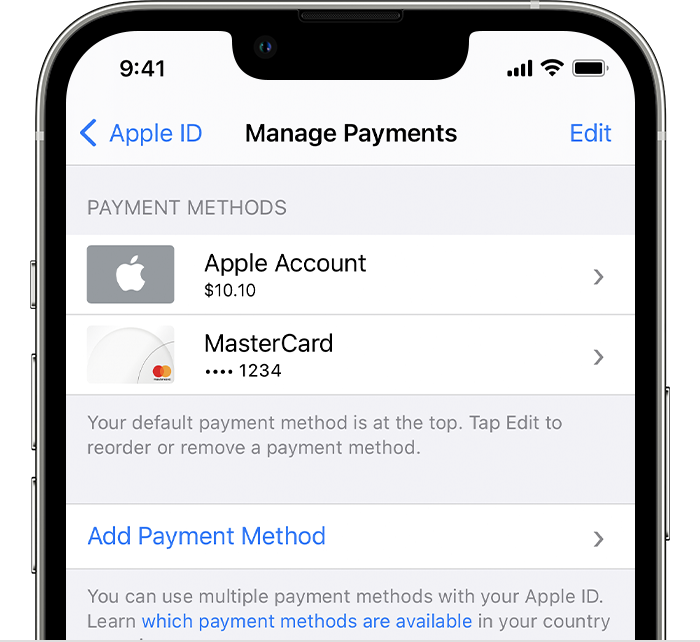
4. Tap Manage Payments.
5. Tap Add Payment Method.
6. Enter the payment method details, then tap Done.
See more about those steps here: Add a payment method to your Apple ID - Apple Support
Thanks.
Hi Snickpeanutbutter.
Thanks for using Apple Support Communities. If you have an outstanding payment, make sure your billing information is updated using the steps here:
1. Open the Settings app.
2. Tap your name.
3. Tap Media & Purchases, then tap View Account. You might be asked to sign in with your Apple ID.
4. Tap Manage Payments.
5. Tap Add Payment Method.
6. Enter the payment method details, then tap Done.
See more about those steps here: Add a payment method to your Apple ID - Apple Support
Thanks.
How do I pay for iCloud and hotpot storage