Transfer my photos from my iCloud account into a separate (non-apple) photo app?

iCloud photo storage was presented to me as just that…a STORAGE where all my photos could be safely kept. The fact that I can’t delete photos from my iPhone without them also being deleted from the Cloud Storage is just stupid. What’s the point of paying iCloud+ with 2TB of storage to “safely store” my items if I can’t even remove them from my iPhone?

Am I missing something here? Can someone explain this to me? Is there a way to delete photos from my iPhone without them being deleted from iCloud? If this isn’t possible, how do I transfer my photos from iCloud to another photo storage app or account?

Thank you for any help.

Posted on Sep 2, 2023 2:46 PM

Reply
Question marked as Top-ranking reply

Posted on Sep 3, 2023 11:24 AM

Hello YarnJunkie,


iCloud is fully explained here: What is iCloud? - Apple Support. It is intended to copy the content on your devices to be accessible on the others, not as a stand-alone storage space. As you correctly indicated in your posting, deleting from a device will also remove the content from iCloud.


If you wish to download all of your iCloud media for storage on a computer, external hard drive or other source, this article explains how: Download iCloud photos and videos - Apple Support.


We hope this helps. Let us know if we can assist with anything else at all. Take care.


3 replies
Question marked as Top-ranking reply

Sep 3, 2023 11:24 AM in response to YarnJunkie

Hello YarnJunkie,


iCloud is fully explained here: What is iCloud? - Apple Support. It is intended to copy the content on your devices to be accessible on the others, not as a stand-alone storage space. As you correctly indicated in your posting, deleting from a device will also remove the content from iCloud.


If you wish to download all of your iCloud media for storage on a computer, external hard drive or other source, this article explains how: Download iCloud photos and videos - Apple Support.


We hope this helps. Let us know if we can assist with anything else at all. Take care.


Sep 4, 2023 7:22 AM in response to YarnJunkie

Hi YarnJunkie,


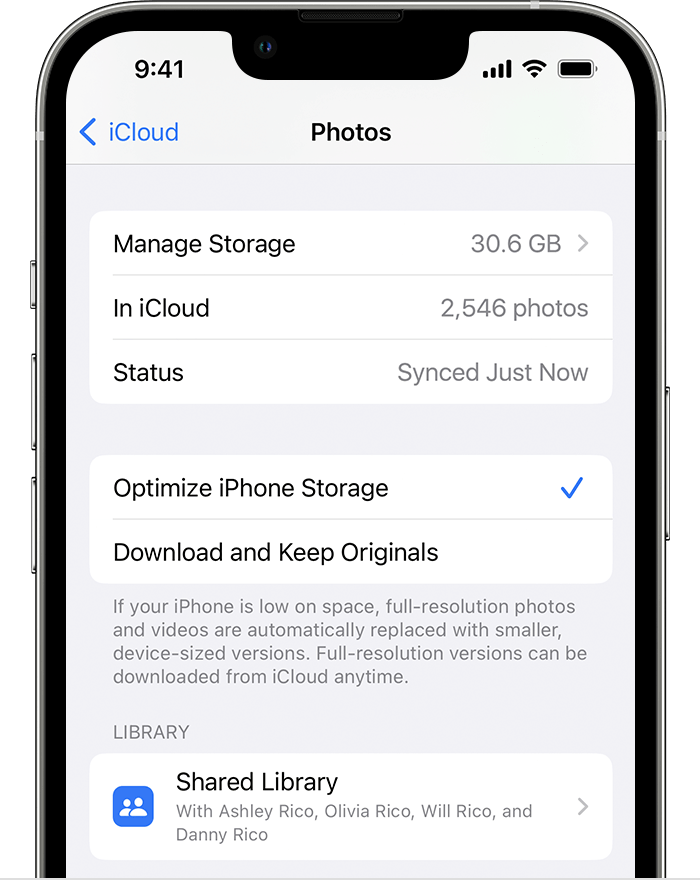
Now that you have a good idea of how iCloud works for syncing, you can enable features to automatically save space instead.


You wouldn't manually delete your photos to save the space, instead the your iPhone can automatically manage the library when you need space on your iPhone:

Store your photos and videos in iCloud

By default, your photos and videos are stored on your device in their original, high-resolution version. This means that they use a lot of space on your iPhone, iPad, and iPod touch. With iCloud Photos, you can make more space available on your device and still have access to your entire full-resolution collection wherever you go.

Get started with iCloud Photos:

1. Tap Settings > [your name] > iCloud > Photos.
2. Tap Sync this iPhone. In iOS 15 or earlier, tap to turn on iCloud Photos.
3. Select Optimize iPhone Storage to save space on your device.
4.

When Optimize Storage is turned on, full-resolution photos and videos are stored in iCloud, and, when needed, space-saving copies are stored on your device. And as long as you have enough space in iCloud, you can store as many photos and videos as you want.


Manage your photo and video storage


There is no risk of losing them in this configuration.


Thanks for using the Apple Support Communities.

Sep 3, 2023 8:51 PM in response to Gena_D

Thank you Gena_D. Your reply is greatly appreciated.


Unfortunately, there are no other devices. I don’t have a computer, external hard drive or other source. There is no one else with whom my content is shared.


Is there no other way to move my photos from iCloud into some type of storage like *Shutterfly, *Snapfish, etc? (*mentioned for example only). If there is an app or option for storing my photos, without risk of losing them, please let me know.


Thank you.

This thread has been closed by the system or the community team. You may vote for any posts you find helpful, or search the Community for additional answers.

Transfer my photos from my iCloud account into a separate (non-apple) photo app?

Welcome to Apple Support Community
A forum where Apple customers help each other with their products. Get started with your Apple Account.