I have a new iPad mini 6 and can’t download any apps. Looked at all settings and there doesn’t seem to be a problem, however when I press the download nothin happens
Fresh out of the box set up from my iphone
Fresh out of the box set up from my iphone
Hello jo_in_asia,
Thanks for reaching out to Apple Support Communities. We see you have some questions about your iPad not downloading apps, and we'd like to help. The following link may be able to assist, as it walks through what to do if you have issues with the App Store: If you can’t download or update apps on your iPhone or iPad - Apple Support
If you can’t download or update apps on your iPhone or iPad
Try this if you have an issue when you update or download apps from the App Store on your iPhone or iPad.
1) Manually update the app
Learn how to manually update an app
2) Add a payment method
You might need to have a valid payment method on file, even if the app that you want to download is free.
Add a payment method
3) Resolve a problem with your payment method
If your payment method is expired, declined, or failed, or a message says 'billing problem with previous purchase'
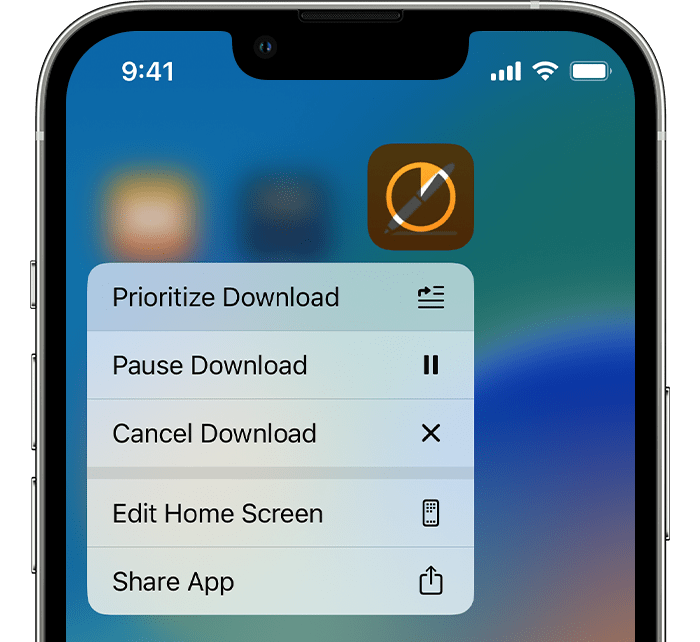
4) Prioritize the download
From the Home Screen, touch and hold the app. From the menu that appears, choose Prioritize Download.
5) Restart your device
Restart your iPhone or iPad, then check to see if you can download or update apps.
Restart your iPhone
Restart your iPad
If you still can't download or update apps
Contact Apple Support
Regards.
I have a new iPad mini 6 and can’t download any apps. Looked at all settings and there doesn’t seem to be a problem, however when I press the download nothin happens