Iphone 12 Pro Max overheating + losing service

Hi,

I recently noticed that my iPhone 12 Pro Max is overheating whenever connected to the charger and by just smelling (a little period of time) the sun ,

But this is not the true problem

the main problem is that when the phone just connected to the charger instantly loses service

and i get a triangle next to the battery percentage with no service’s bars and the same problem occurs when overheated by the sun …..

any suggestions knowing that i’m using the original Apple charger

Posted on Sep 11, 2023 6:23 PM

Reply
2 replies

Sep 11, 2023 6:30 PM in response to Ezzaddin_Gan

Ezzaddin_Gan Said:

"Iphone 12 Pro Max overheating + losing service: [...]any suggestions knowing that i’m using the original Apple charger"

-------


Get your iPhone Serviced:

If you are having both of these issues, then get this iPhone serviced.


A. Take to an Appel store:

You'd setup a Genius Bar Appointment at your local Apple Store, taking it in for service. There, it will be diagnosed, and you'll be provided with your options.


Or...


B. Take this to an AASP:

See an AASP (Apple Authorized Service Provider) in your local area...

Contacting an AASP: 

  1. Go Here: Find Locations - Apple Authorized Reseller
  2. Click: Service & Support
  3. Enter: your location information
  4. See: if there is an AASP nearby
  5. Contact: an AASP that shows up, and find out more about the services that they offer to fix the battery

Sep 11, 2023 6:26 PM in response to Ezzaddin_Gan

When I had a somwhat similar issue this is What I did...


  1. Took a backup on iCloud (Which I do regularly)
  2. Logged out of the Apple ID
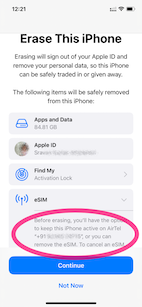
  3. Erase --> Erase iPhone - Apple Support (IN)
    1. Keep eSIM Data was the option I chose (See the pic)
    2. .
  4. Set up my iPhone and restored it from iCloud Backup
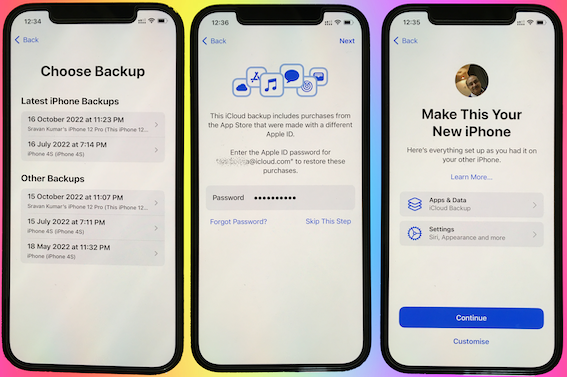

I continued to have the same issue with the heating.


I repeated the above steps but this time I did not restore from the iCloud Backup. I set it up as a new iPhone.


Waited for 3 days. There is no heating issue, now.


Conclusion.:

  • There is no hardware issue!
  • This is not an iOS 16.0.3 issue
  • Some Apps or iPhone storage and some settings may be heating up the device.


Action Plan:

  • I will now slowly get my all data back one by one.
  • Using the elimination process I will try to find out which app or settings were causing this...


Now the heating issue isn't there anymore. I am adding apps one by one and keeping tab on the heating issue.



My experience says this is purely caused by some third-party app that you may have installed.


I am not aware of the ambient temperature in which you are using the iPhone. However --> Keeping iPhone, iPad, and iPod touch within acceptable ...


Store the device where the temperature is between -20º and 45º C (-4º to 113º F). Don’t leave the device in your car, because temperatures in parked cars can exceed this range.


Use iOS devices where the ambient temperature is between 0º and 35º C (32º to 95º F). Low- or high-temperature conditions might cause the device to change its behavior to regulate its temperature. Using an iOS device in very cold conditions outside of its operating range might temporarily shorten battery life and could cause the device to turn off. Battery life will return to normal when you bring the device back to higher ambient temperatures. Using an iOS device in very hot conditions can permanently shorten battery life.


This thread has been closed by the system or the community team. You may vote for any posts you find helpful, or search the Community for additional answers.

Iphone 12 Pro Max overheating + losing service

Welcome to Apple Support Community
A forum where Apple customers help each other with their products. Get started with your Apple Account.