AirPod Pro 2 Microphone Echo on NC

I just got a new pair of AirPod pro’s, 2nd gen. There’s an echo whenever I’m on calls using NC. If I switch over to transparency mode the echo goes away, and it only appears when the AirPod microphone is activated. Please help.

Posted on Sep 14, 2023 2:21 PM

Reply
1 reply

Sep 16, 2023 7:30 AM in response to macgman123

Hello macgman123,


We would like to see how we can help you with your AirPod Pro's. Follow the steps in this link and get back to us with your results: If Active Noise Cancellation isn't working as expected on your AirPods Pro - Apple Support


  1. "Make sure you have the latest software on your connected iPhone, iPad, iPod touch or Mac.
  2. Put both AirPods Pro in your ears and check that Active Noise Cancellation (ANC) is turned on.
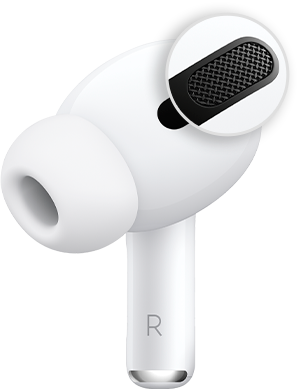
  3. Clean the mesh located on the top of your AirPods Pro. Sometimes, Active Noise Cancellation can be affected if debris or earwax builds up in the area shown below.

If this happens, you may experience: 

    • A loss of bass sound
    • An increase in background sound, such as street or aeroplane noise

4.If Active Noise Cancellation still isn't working as expected on your AirPods Pro (1st generation), refer to AirPods Pro Service Programme for Sound Issues."


Cheers!


This thread has been closed by the system or the community team. You may vote for any posts you find helpful, or search the Community for additional answers.

AirPod Pro 2 Microphone Echo on NC

Welcome to Apple Support Community
A forum where Apple customers help each other with their products. Get started with your Apple Account.