Photo did not pop up in the hidden folder
I tried hiding some photos and videos and once i go over to the hidden folder the photos i just sent are not in there.
iPhone 14 Pro Max, iOS 17
I tried hiding some photos and videos and once i go over to the hidden folder the photos i just sent are not in there.
iPhone 14 Pro Max, iOS 17
Hi there Arrowquoia1,
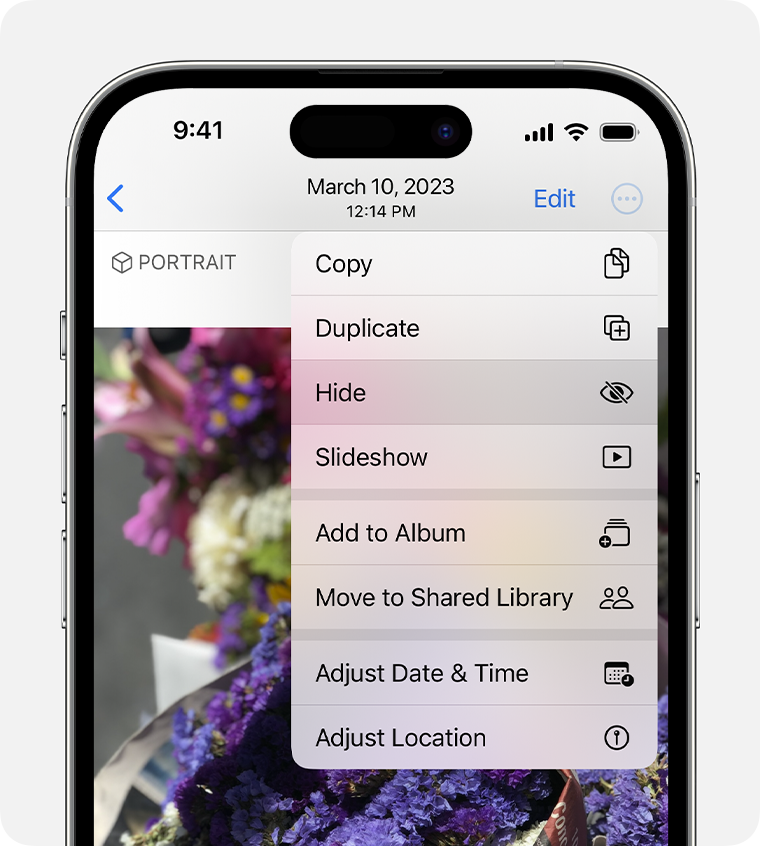
If you are having issues hiding certain photos on your iPhone, first ensure you are following these steps from Hide photos on your iPhone, iPad, or Mac with the Hidden album to do this:
How to hide photos on iPhone or iPad
1. Open Photos.
2. Select the photo or video that you want to hide.
3. Tap the More button, then tap Hide.
4. Confirm that you want to hide the photo or video.
If you are following those steps and this continues, ensure your iPhone is fully updated next. This installs feature improvements and fixes that can resolve unexpected behavior like this. This article walks you through how to back up and update: Update your iPhone or iPad
Cheers!
Hi there Arrowquoia1,
If you are having issues hiding certain photos on your iPhone, first ensure you are following these steps from Hide photos on your iPhone, iPad, or Mac with the Hidden album to do this:
How to hide photos on iPhone or iPad
1. Open Photos.
2. Select the photo or video that you want to hide.
3. Tap the More button
4. Confirm that you want to hide the photo or video.
If you are following those steps and this continues, ensure your iPhone is fully updated next. This installs feature improvements and fixes that can resolve unexpected behavior like this. This article walks you through how to back up and update: Update your iPhone or iPad
Cheers!
Photo did not pop up in the hidden folder