My notes has been disappeared

I opened the Notes application and all the notes disappeared, knowing that two days ago they were there , I also opened on icloud and made sure that the Notes button is active and already it is active and now I erased the application and re-downloaded it and nothing appeared ،

What is the reason

iPhone 14 Pro Max, iOS 16

Posted on Sep 25, 2023 7:44 AM

Reply
Question marked as Top-ranking reply

Posted on Sep 28, 2023 6:21 PM

Hi rima252,


Thanks for posting in Apple Support Communities.


With your notes missing, check that you have the correct accounts enabled since you have the option to store notes with third-party accounts. You'll also want to check your Recently Deleted folder.


If you're missing notes on your iPhone, iPad, or iPod touch

If you're missing notes, they might have been accidentally deleted, or you might need to change your settings.

First, update all of your devices to the latest version of iOS, iPadOS, or macOS to make sure that the issue isn't related to previous software. Then try the following steps.
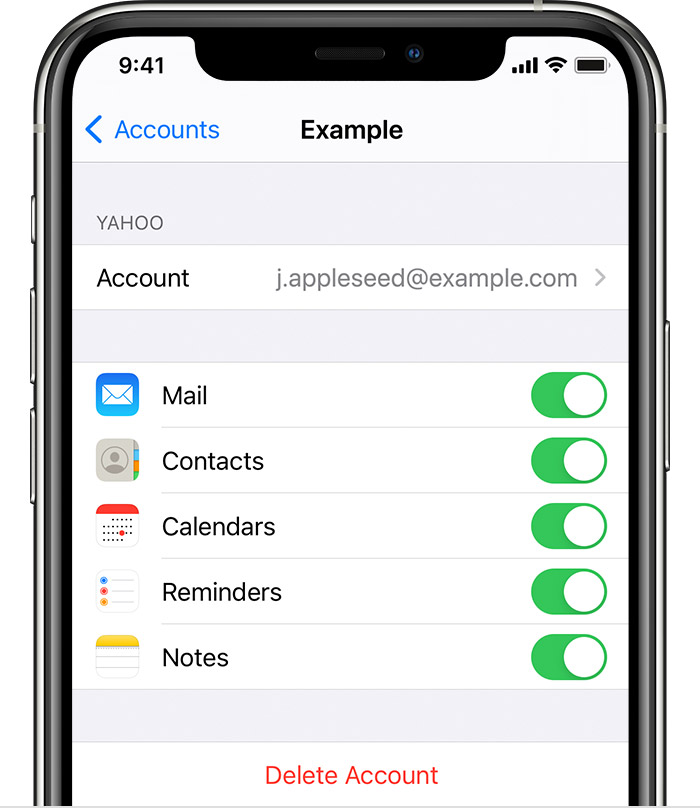
To make sure your Notes work is associated with an email account, find the email settings screen located at Settings > Mail > Accounts.


Check your account settings

If you store your notes with a third-party account or email service, like Gmail or Yahoo, check your settings:
1. In the Settings app, tap Mail.
2. Tap Accounts, then tap the email account that you want to check.
3. Make sure that Notes is on.
If you use Notes with more than one email account, just repeat the steps for each account. If your account is missing, learn how to add an email account to your device.


The recently deleted folder in Mail holds recently deleted notes for 30 days.


Check your Recently Deleted folder

If you store your notes on iCloud, check your Recently Deleted folder:
1. Open Notes, then tap the back icon Tap the arrow icon until you see your Folders list.
2. Tap Recently Deleted and search for your note.
If you find your note in Recently Deleted or in another folder, you can move it:
1. In the Notes list, tap Edit.
2. Select the note that you want to move.
3. Tap Move, then select the folder you want to move it to.
If you use notes with another service, like Gmail or Yahoo, check the Trash folder of that account in the Mail app. If you delete a note from the Notes app, your third-party account will usually keep it in the Trash folder. To recover a note from the Trash folder, you need to copy and paste the note to a new note in the Notes app.

You can find these and more details in If you're missing notes on your iPhone, iPad, or iPod touch - Apple Support.


Contact Apple Support if you're still unable to locate your notes.


Get Support


Regards.


1 reply
Question marked as Top-ranking reply

Sep 28, 2023 6:21 PM in response to rima252

Hi rima252,


Thanks for posting in Apple Support Communities.


With your notes missing, check that you have the correct accounts enabled since you have the option to store notes with third-party accounts. You'll also want to check your Recently Deleted folder.


If you're missing notes on your iPhone, iPad, or iPod touch

If you're missing notes, they might have been accidentally deleted, or you might need to change your settings.

First, update all of your devices to the latest version of iOS, iPadOS, or macOS to make sure that the issue isn't related to previous software. Then try the following steps.
To make sure your Notes work is associated with an email account, find the email settings screen located at Settings > Mail > Accounts.


Check your account settings

If you store your notes with a third-party account or email service, like Gmail or Yahoo, check your settings:
1. In the Settings app, tap Mail.
2. Tap Accounts, then tap the email account that you want to check.
3. Make sure that Notes is on.
If you use Notes with more than one email account, just repeat the steps for each account. If your account is missing, learn how to add an email account to your device.
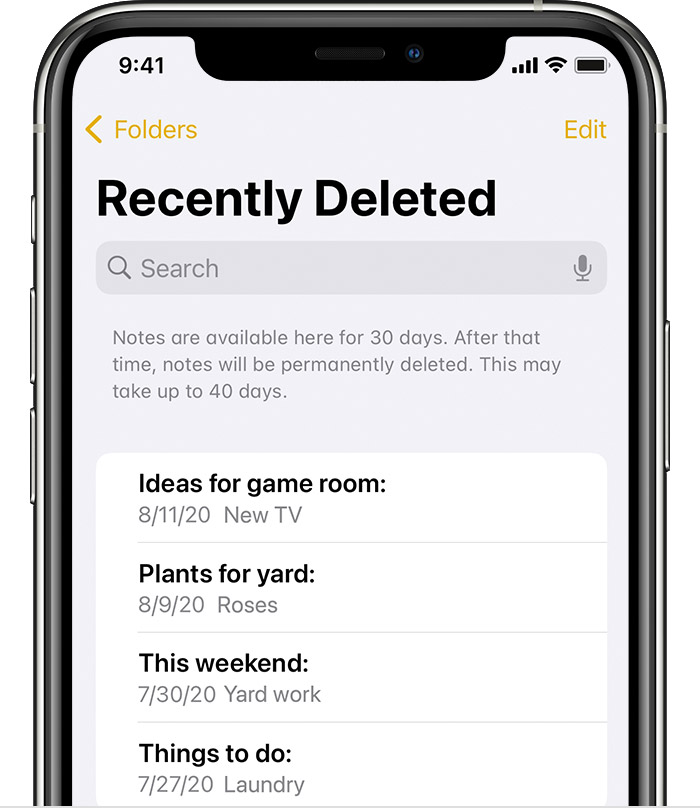

The recently deleted folder in Mail holds recently deleted notes for 30 days.


Check your Recently Deleted folder

If you store your notes on iCloud, check your Recently Deleted folder:
1. Open Notes, then tap the back icon Tap the arrow icon until you see your Folders list.
2. Tap Recently Deleted and search for your note.
If you find your note in Recently Deleted or in another folder, you can move it:
1. In the Notes list, tap Edit.
2. Select the note that you want to move.
3. Tap Move, then select the folder you want to move it to.
If you use notes with another service, like Gmail or Yahoo, check the Trash folder of that account in the Mail app. If you delete a note from the Notes app, your third-party account will usually keep it in the Trash folder. To recover a note from the Trash folder, you need to copy and paste the note to a new note in the Notes app.

You can find these and more details in If you're missing notes on your iPhone, iPad, or iPod touch - Apple Support.


Contact Apple Support if you're still unable to locate your notes.


Get Support


Regards.


This thread has been closed by the system or the community team. You may vote for any posts you find helpful, or search the Community for additional answers.

My notes has been disappeared

Welcome to Apple Support Community
A forum where Apple customers help each other with their products. Get started with your Apple Account.