Multiple printers, different paper sizes, Ventura.

I have an canon A4 inkjet printer and a Zebra thermal label printer which carries 6x4 labels on a roll.


They are both permanently attached to my iMac running Ventura 13.5.2.


Can a default paper size be assigned to each printer?


Each time I select print output via the label printer I need to either select a preset (the only preset I've created, but I can't seem to make the software select it by default) or change the paper size from A4 to 4x6.


Drives me insane. It cannot be that difficult to do can it?


Am I missing something very obvious?

iMac (2017 – 2020)

Posted on Sep 27, 2023 7:19 AM

Reply

Similar questions

5 replies

Sep 30, 2023 11:43 AM in response to RickSean

Hi RickSean,


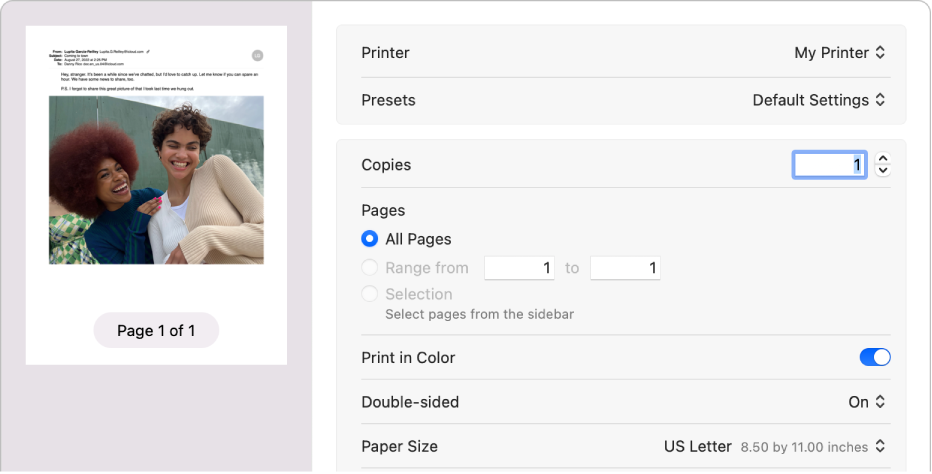
Welcome to Apple Support Communities. Just to be sure, are you seeing the available options to adjust the print options from the Print dialog that appears? Just to be sure, here the guidelines on how to modify the paper size in macOS Ventura: Choose a paper size for your printed document on Mac - Apple Support


Choose a paper size for your printed document on Mac
You can choose a paper size to match the sheet size in your printer and set a default paper size for routine printing.
The Print dialog showing the Paper Size pop-up menu.

Change paper size for printing
You can specify the paper size that you use in your printer.
1. With a document open on your Mac, choose File > Print.
2. Choose a paper size from the Paper Size pop-up menu.

In apps such as Pages or Microsoft Word, you can also specify a page size for a document as you’re working on it. When you print, the document is already formatted to fit the paper size you selected. However, you can choose to scale the document to fit your printer’s paper. See Reduce or enlarge pages and images to fit on a page.

In most apps, the Paper Size menu has a Manage Custom Sizes option. If you choose this option, see Print on unusual sized paper by creating a custom paper size.

Change the default paper size you routinely use for printing
If you usually print on a particular size of paper, you can set it as the default paper size, so it’s used whenever you print. (You can still change the paper size in the Print dialog if you need to.)

The default size is also used as the page size whenever you create a new document in an app, such as Pages. Changing the default size affects only new documents; it doesn’t change previously created documents.
1. On your Mac, choose Apple menu  > System Settings, then click Printers & Scanners  in the sidebar. (You may need to scroll down.)
2. Choose a paper size from the “Default paper size” pop-up menu on the right.
The Printers and Scanners settings showing the Default printer and Default paper size pop-up menus.

Following these steps may help.


Kind regards.

Apr 11, 2024 10:10 AM in response to KMB_12

@RickSean did you ever end up filing anything with Apple Support? I would like to upvote anything I can about this issue cause it's been annoying me too on Ventura 13.4.1


I have a letter-size printer and a 4x6 label printer, and I frequently use them both. But the macos print dialogue seems to be capable of remembering the "last used" settings only for whichever one is set as the default printer. So whenever I select the non-default printer I need to re-select the correct dimensions. Not the biggest hardship ever but it definitely interrupts my workflow to have to keep checking it (and occasionally missing it and wasting a piece of paper)


Using a preset makes it slightly easier than scrolling through the giant list of dimensions, but it's still another thing to check and select every time. You'd think a computer with 32GB of memory should be able to remember the settings for at least two printers...

Sep 30, 2023 1:01 PM in response to bryanr14

Thank you for your reply.


I have a default paper size of A4 set. My Canon printer takes A4 paper. So if I leave everything alone, I have the correct paper size as soon as I send the job to that printer.


I can go further and use a preset to print say, in black and white on A4 paper, which the computer will remember as long as I don't close the application such as 'preview'. On closing and reopening, up comes default settings with A4 paper.


However, when I switch output destination to my Zebra 6x4 printer, that takes 6 x 4 labels on a roll. The default paper is still A4 - presumably because that's a global setting. I have to select a preset or change from A4 to 4x6 label every single time I switch printers.


I need to assign a default paper size for each available printer without having to change printer settings manually.


This thread has been closed by the system or the community team. You may vote for any posts you find helpful, or search the Community for additional answers.

Multiple printers, different paper sizes, Ventura.

Welcome to Apple Support Community
A forum where Apple customers help each other with their products. Get started with your Apple Account.