Missing Animoji record button

I updated my iPhone 13 Pro Max to IOS 17 and I was able to find the Animojis but there is not a record button, I only see the motion. Searching for a fix only brings up the steps to make an Animoji which does not help. I need the record button back. Please help.

iPhone 13 Pro Max, iOS 17

Posted on Sep 27, 2023 8:28 AM

Reply
Question marked as Top-ranking reply

Posted on Sep 30, 2023 12:02 PM

Hello 5ayem,


Thank you for reaching out in Apple Support Communities. Are you referring to the inability of recording an animated Memoji when using the Messages app? If so, let's ensure that your iPhone 13 Pro Max is updated to the latest version of iOS 17.0.2. This latest update provides software improvements that may help. Here's how:


Update your iPhone or iPad wirelessly
1. Back up your device using iCloud or your computer.
2. Plug your device into power and connect to the internet with Wi-Fi.
3. Go to Settings > General, then tap Software Update.
4. If you see more than one software update option available, choose the one that you want to install.
5. Tap Install Now. If you see Download and Install instead, tap it to download the update, enter your passcode, then tap Install Now. If you don't know your passcode, learn what to do.
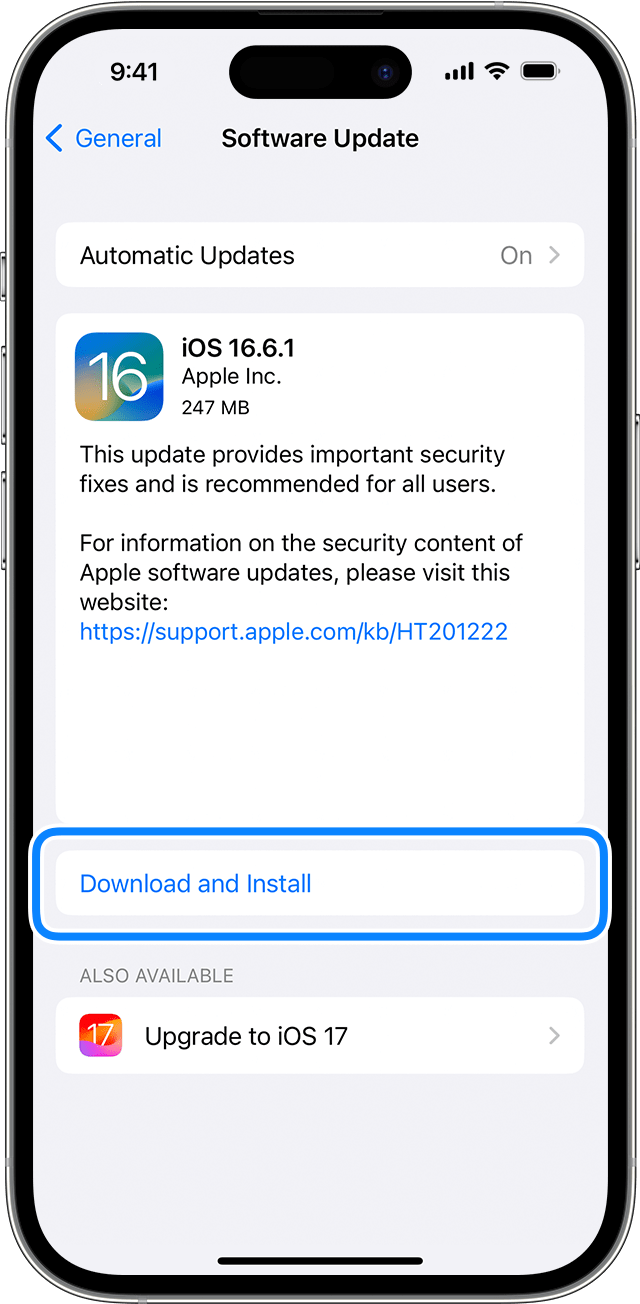
An iPhone showing the option to download and install the update

This information is outlined in this helpful article: Update your iPhone or iPad - Apple Support


In addition, you'll want to verify that you do not have content and privacy restrictions turned on for parental control. Here's more information: Use parental controls on your child's iPhone, iPad, and iPod touch - Apple Support


Kind regards.


1 reply
Question marked as Top-ranking reply

Sep 30, 2023 12:02 PM in response to 5ayem

Hello 5ayem,


Thank you for reaching out in Apple Support Communities. Are you referring to the inability of recording an animated Memoji when using the Messages app? If so, let's ensure that your iPhone 13 Pro Max is updated to the latest version of iOS 17.0.2. This latest update provides software improvements that may help. Here's how:


Update your iPhone or iPad wirelessly
1. Back up your device using iCloud or your computer.
2. Plug your device into power and connect to the internet with Wi-Fi.
3. Go to Settings > General, then tap Software Update.
4. If you see more than one software update option available, choose the one that you want to install.
5. Tap Install Now. If you see Download and Install instead, tap it to download the update, enter your passcode, then tap Install Now. If you don't know your passcode, learn what to do.
An iPhone showing the option to download and install the update

This information is outlined in this helpful article: Update your iPhone or iPad - Apple Support


In addition, you'll want to verify that you do not have content and privacy restrictions turned on for parental control. Here's more information: Use parental controls on your child's iPhone, iPad, and iPod touch - Apple Support


Kind regards.


This thread has been closed by the system or the community team. You may vote for any posts you find helpful, or search the Community for additional answers.

Missing Animoji record button

Welcome to Apple Support Community
A forum where Apple customers help each other with their products. Get started with your Apple Account.