iPhone Safari Search Bar Not Functioning

Upgraded from iPhone 12 to 15 Pro and having the exact same issue with safari on both. I type something into the search bar and press go and the keyboard just minimizes and it doesn't search anything, screen just stays blank. I can't click on my favorites either, I have to hold them down and then click the small window. How do I fix this? I have had this issue on my 12 for about a year and now it has carried over to my 15 which I did a full transfer over to.

iPhone 15 Pro

Posted on Sep 27, 2023 12:06 PM

Reply
Question marked as Top-ranking reply

Posted on Sep 30, 2023 2:17 PM

Hi Safari_Search_Issue,


The following steps may help if there is a corrupt file in your Safari history or data:

"Delete history, cache, and cookies

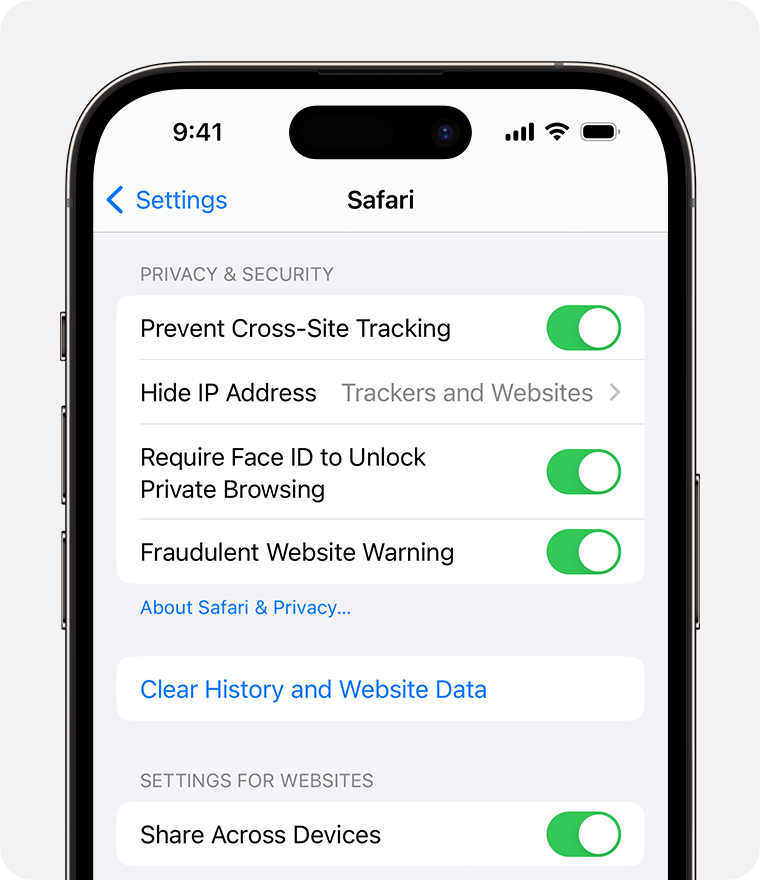
  1. Go to Settings > Safari.
  2. Tap Clear History and Website Data.

An iPhone on the Safari Settings screen. The Clear History and Website Data button is underneath the Fraudulent Website Warning toggle.

Clearing your history, cookies, and browsing data from Safari won't change your AutoFill information.

When there's no history or website data to clear, the button to clear it turns gray. The button might also be gray if you have web content restrictions set up under Content & Privacy Restrictions in Screen Time.

To visit sites without leaving a history, turn Private Browsing on."


You can find these steps along with other information that may be helpful, here: Clear the history, cache, and cookies from Safari on your iPhone, iPad, or iPod touch - Apple Support

If you have followed the steps correctly and you still have the issue, let us know if you get any specific alerts or error messages when trying, as those may help us determine what might be causing the issue.


We also recommend checking to see if somehow Screen Time is enabled for Safari and blocking the search function. Use Screen Time on your iPhone, iPad, or iPod touch - Apple Support


If you still have questions, reach out to Apple Support directly, as this may require closer guidance: Get Support


Cheers!


Similar questions

1 reply
Question marked as Top-ranking reply

Sep 30, 2023 2:17 PM in response to Safari_Search_Issue

Hi Safari_Search_Issue,


The following steps may help if there is a corrupt file in your Safari history or data:

"Delete history, cache, and cookies

  1. Go to Settings > Safari.
  2. Tap Clear History and Website Data.

An iPhone on the Safari Settings screen. The Clear History and Website Data button is underneath the Fraudulent Website Warning toggle.

Clearing your history, cookies, and browsing data from Safari won't change your AutoFill information.

When there's no history or website data to clear, the button to clear it turns gray. The button might also be gray if you have web content restrictions set up under Content & Privacy Restrictions in Screen Time.

To visit sites without leaving a history, turn Private Browsing on."


You can find these steps along with other information that may be helpful, here: Clear the history, cache, and cookies from Safari on your iPhone, iPad, or iPod touch - Apple Support

If you have followed the steps correctly and you still have the issue, let us know if you get any specific alerts or error messages when trying, as those may help us determine what might be causing the issue.


We also recommend checking to see if somehow Screen Time is enabled for Safari and blocking the search function. Use Screen Time on your iPhone, iPad, or iPod touch - Apple Support


If you still have questions, reach out to Apple Support directly, as this may require closer guidance: Get Support


Cheers!



This thread has been closed by the system or the community team. You may vote for any posts you find helpful, or search the Community for additional answers.

iPhone Safari Search Bar Not Functioning

Welcome to Apple Support Community
A forum where Apple customers help each other with their products. Get started with your Apple Account.