
New Mailbox
I created a new mailbox but I can’t find it.
I created a new mailbox but I can’t find it.
Hello WS321,
Thank you for reaching out to Apple Support Communities.
These steps can help you locate and manage your Mailboxes:
"Organize your mail with mailboxes
You can choose which mailboxes to view, reorder your mailboxes, create new ones, or rename or delete mailboxes. (Some mailboxes can’t be changed.)
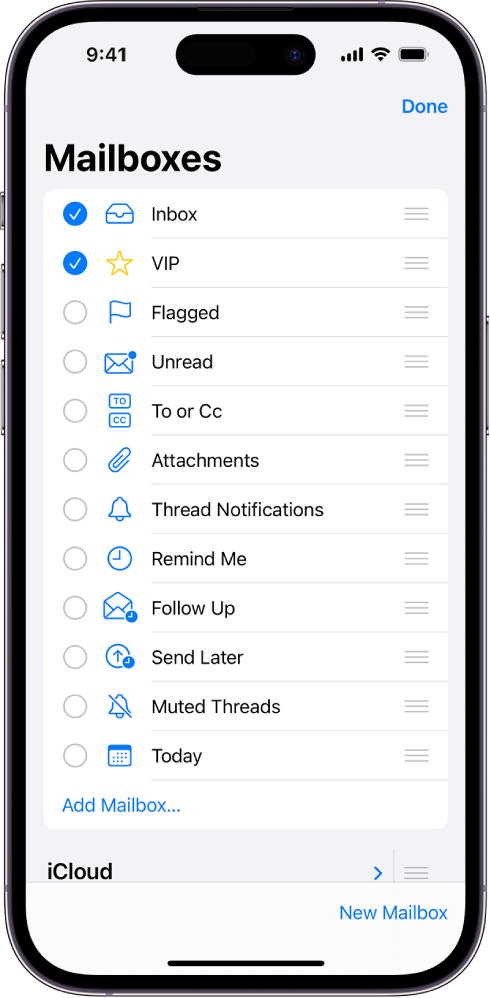
To organize your mailboxes, tap  in the upper-left corner until you see Mailboxes. Tap Edit, then do any of the following:
 next to a mailbox until it lifts up, then drag it to the new position.
Additional details can be found here: Organize email in mailboxes on iPhone
If the issue persists, can you provide a few more details? When did you last see the mailbox? Also, which device and iOS version are you currently using?
Cheers!
Hello WS321,
Thank you for reaching out to Apple Support Communities.
These steps can help you locate and manage your Mailboxes:
"Organize your mail with mailboxes
You can choose which mailboxes to view, reorder your mailboxes, create new ones, or rename or delete mailboxes. (Some mailboxes can’t be changed.)
To organize your mailboxes, tap in the upper-left corner until you see Mailboxes. Tap Edit, then do any of the following:
next to a mailbox until it lifts up, then drag it to the new position.Additional details can be found here: Organize email in mailboxes on iPhone
If the issue persists, can you provide a few more details? When did you last see the mailbox? Also, which device and iOS version are you currently using?
Cheers!
It finally showed up , not where I was trying to locate it but usable.
New Mailbox

