
How do i access the emoji keyboard from my Magic Keyboard? The globe no longer works
How do i access the emoji keyboard from my Magic Keyboard? The globe no longer works
iPad 2, iOS 9
How do i access the emoji keyboard from my Magic Keyboard? The globe no longer works
iPad 2, iOS 9
Hi fjl1989,
For help with accessing the emoji keyboard, test using the emoji button. The steps below found in the article here can help: Have fun with emoji - Apple Support
"Add an emoji
Find the emoji keyboard in any app that uses the standard keyboard, like Mail or Messages. To add an emoji:
 or the globe
 .
.  to see emoji that you've recently used. You can also search for the emoji you want to add in the "Search Emoji" field.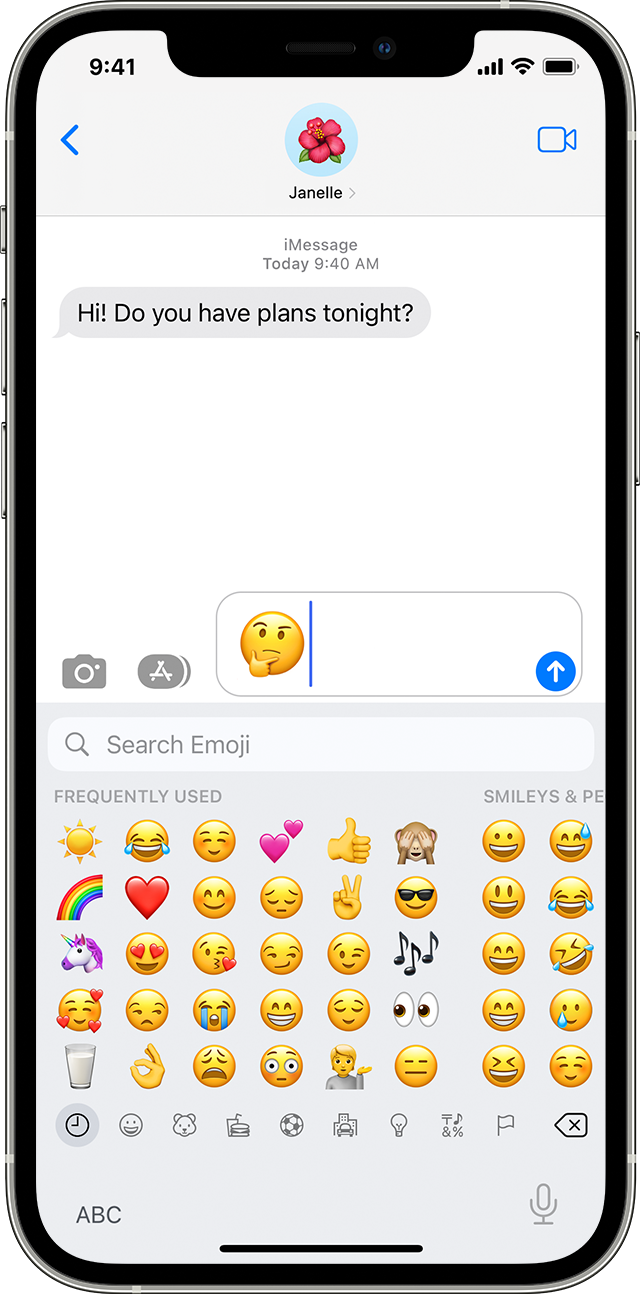
"
As mentioned in the article be sure the settings are correct. You can even toggle off then back on to test. If needed find those steps in the same article and information below.
"Don't see the emoji keyboard?
If you don't see the emoji keyboard, make sure that it's added.
If you continue to have an issue restart your iPad and test. Reach out to Apple if the issue persists. Get Support
Best.
Hi fjl1989,
For help with accessing the emoji keyboard, test using the emoji button. The steps below found in the article here can help: Have fun with emoji - Apple Support
"Add an emoji
Find the emoji keyboard in any app that uses the standard keyboard, like Mail or Messages. To add an emoji:
or the globe. to see emoji that you've recently used. You can also search for the emoji you want to add in the "Search Emoji" field.
"
As mentioned in the article be sure the settings are correct. You can even toggle off then back on to test. If needed find those steps in the same article and information below.
"Don't see the emoji keyboard?
If you don't see the emoji keyboard, make sure that it's added.
If you continue to have an issue restart your iPad and test. Reach out to Apple if the issue persists. Get Support
Best.
How do i access the emoji keyboard from my Magic Keyboard? The globe no longer works
