My Apple Watch can go several hours without a measurement while I am sleeping. That’s when I want measurements!

I want to see blood oxygen levels throughout the night to have a sense of sleep apnea occurrences, but sometimes it will go six or seven hours without a measurement while sleeping.

Apple Watch Series 6, watchOS 10

Posted on Oct 3, 2023 7:16 AM

Reply
Question marked as Top-ranking reply

Posted on Oct 5, 2023 7:35 AM

Hello Jim Hazelwood,


We understand that you'd like to receive Blood Oxygen measurements while sleeping. The following details may be able to assist you:


"How to get the best results
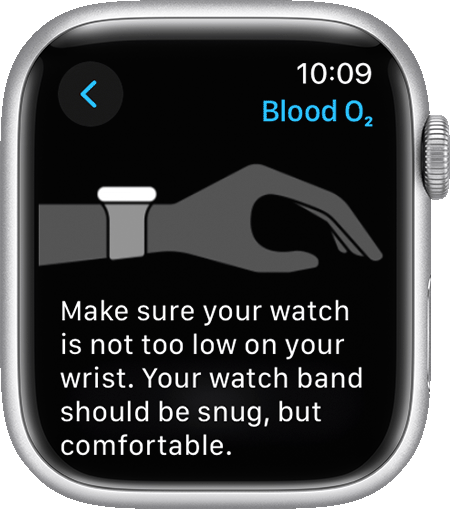

A screenshot of the Apple Watch Series 7 showing how to wear your watch to get the best results.


  1. Rest your arms on a table or in your lap while you take a measurement. Keep your wrist and palm down and flat, and hold as still as you can.
  2. Make sure that your Apple Watch isn’t loose on your wrist. The band should be snug but comfortable, and the back of your Apple Watch needs to be touching your wrist.
  3. Make sure that the back of your Apple Watch is flush with the top of your wrist. If your wrist bones interfere with this, move your watch 1 to 2 inches up your arm away from your wrist bone.


Additional factors

Even under ideal conditions, your Apple Watch may not be able to get a reliable blood oxygen measurement every time. For a small percentage of users, various factors may make it impossible to get any blood oxygen measurement.

  • Skin perfusion (or how much blood flows through your skin) can impact measurements. Skin perfusion varies significantly from person to person and can also be impacted by the environment. If you are out in the cold, for example, the skin perfusion in your wrist might be too low for the sensor to work with the Blood Oxygen app to get a measurement. 
  • Permanent or temporary changes to your skin, such as some tattoos, can also impact performance. The ink, pattern, and saturation of some tattoos can block light from the sensor, making it difficult for the Blood Oxygen app to get a measurement.
  • Motion is another factor that can affect your ability to get successful background or on-demand measurements. Certain postures, such as arms hanging by your side or fingers in a fist position will also result in unsuccessful measurements.
  • If your heart rate is too high (above 150 bpm) while at rest, you won't be able to get a successful blood oxygen measurement. 


About background measurements

The Blood Oxygen app on your Apple Watch will occasionally measure your blood oxygen levels if background measurements are on. This will usually happen when you are not moving. Depending on how active you are, the number of readings collected each day and the time between these readings will vary. Blood oxygen measurements use a bright red light that shines against your wrist, so it may be more visible in dark environments. If you find the light distracting, you can turn off background measurements.

  1. Open the Settings app on your Apple Watch.
  2. Tap Blood Oxygen, then turn off In Sleep Focus and In Theater Mode.
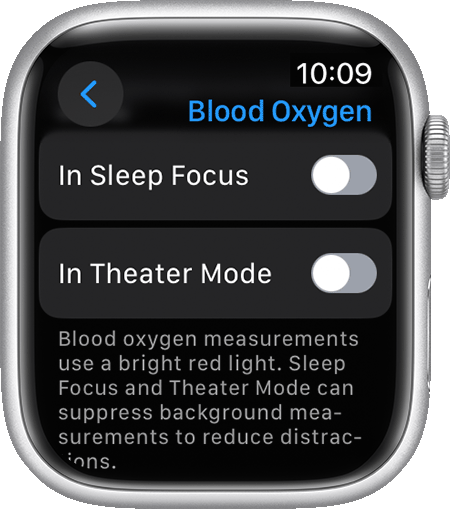
A screenshot of the Blood Oxygen settings on an Apple Watch Series 7.


Blood oxygen measurements only occur during sleep if the Track Sleep with Apple Watch setting is turned on."


You can find more details here: How to use the Blood Oxygen app on Apple Watch


If you need further assistance, we suggest that you reach out to Apple directly. You can connect with them here: Get Support


Best wishes!

Similar questions

1 reply
Question marked as Top-ranking reply

Oct 5, 2023 7:35 AM in response to Jim Hazelwood

Hello Jim Hazelwood,


We understand that you'd like to receive Blood Oxygen measurements while sleeping. The following details may be able to assist you:


"How to get the best results


A screenshot of the Apple Watch Series 7 showing how to wear your watch to get the best results.


  1. Rest your arms on a table or in your lap while you take a measurement. Keep your wrist and palm down and flat, and hold as still as you can.
  2. Make sure that your Apple Watch isn’t loose on your wrist. The band should be snug but comfortable, and the back of your Apple Watch needs to be touching your wrist.
  3. Make sure that the back of your Apple Watch is flush with the top of your wrist. If your wrist bones interfere with this, move your watch 1 to 2 inches up your arm away from your wrist bone.


Additional factors

Even under ideal conditions, your Apple Watch may not be able to get a reliable blood oxygen measurement every time. For a small percentage of users, various factors may make it impossible to get any blood oxygen measurement.

  • Skin perfusion (or how much blood flows through your skin) can impact measurements. Skin perfusion varies significantly from person to person and can also be impacted by the environment. If you are out in the cold, for example, the skin perfusion in your wrist might be too low for the sensor to work with the Blood Oxygen app to get a measurement. 
  • Permanent or temporary changes to your skin, such as some tattoos, can also impact performance. The ink, pattern, and saturation of some tattoos can block light from the sensor, making it difficult for the Blood Oxygen app to get a measurement.
  • Motion is another factor that can affect your ability to get successful background or on-demand measurements. Certain postures, such as arms hanging by your side or fingers in a fist position will also result in unsuccessful measurements.
  • If your heart rate is too high (above 150 bpm) while at rest, you won't be able to get a successful blood oxygen measurement. 


About background measurements

The Blood Oxygen app on your Apple Watch will occasionally measure your blood oxygen levels if background measurements are on. This will usually happen when you are not moving. Depending on how active you are, the number of readings collected each day and the time between these readings will vary. Blood oxygen measurements use a bright red light that shines against your wrist, so it may be more visible in dark environments. If you find the light distracting, you can turn off background measurements.

  1. Open the Settings app on your Apple Watch.
  2. Tap Blood Oxygen, then turn off In Sleep Focus and In Theater Mode.

A screenshot of the Blood Oxygen settings on an Apple Watch Series 7.


Blood oxygen measurements only occur during sleep if the Track Sleep with Apple Watch setting is turned on."


You can find more details here: How to use the Blood Oxygen app on Apple Watch


If you need further assistance, we suggest that you reach out to Apple directly. You can connect with them here: Get Support


Best wishes!

This thread has been closed by the system or the community team. You may vote for any posts you find helpful, or search the Community for additional answers.

My Apple Watch can go several hours without a measurement while I am sleeping. That’s when I want measurements!

Welcome to Apple Support Community
A forum where Apple customers help each other with their products. Get started with your Apple Account.