
Translate app stuck on "Download Offline Languages"

Translate app stuck on "Download Offline Languages" for iPhone 14 pro max, after the latest update of iOS 17.0.1

iPhone 4s, iOS 9

Posted on Oct 4, 2023 12:04 AM

Reply
Question marked as Top-ranking reply

Posted on Oct 5, 2023 4:32 PM

Hello abdullatiffromabudhabi,


If your iPhone has any VPNs, security software or profiles you'll want to try removing these fully to help rule out interference from them, as these may affect some functionality in some instances. They can generally be found in Settings > General > VPN & Device Management. With regards to profiles, if there are any installed you may wish to check with the issuer of it to see if it's best to proceed with removal.


Also check and ensure the date, time, and time zone are set accurately at Settings > General > Date & Time.


Cheers.

3 replies
Question marked as Top-ranking reply

Oct 5, 2023 4:32 PM in response to abdullatiffromabudhabi

Hello abdullatiffromabudhabi,


If your iPhone has any VPNs, security software or profiles you'll want to try removing these fully to help rule out interference from them, as these may affect some functionality in some instances. They can generally be found in Settings > General > VPN & Device Management. With regards to profiles, if there are any installed you may wish to check with the issuer of it to see if it's best to proceed with removal.


Also check and ensure the date, time, and time zone are set accurately at Settings > General > Date & Time.


Cheers.

Oct 6, 2023 6:49 AM in response to abdullatiffromabudhabi

Abdullatiffromabudhabi,


To clarify, are you able to download other apps or do you experience the same behavior with them as well? Also, let's force restart your iPhone 14 Pro Max to see if that helps:
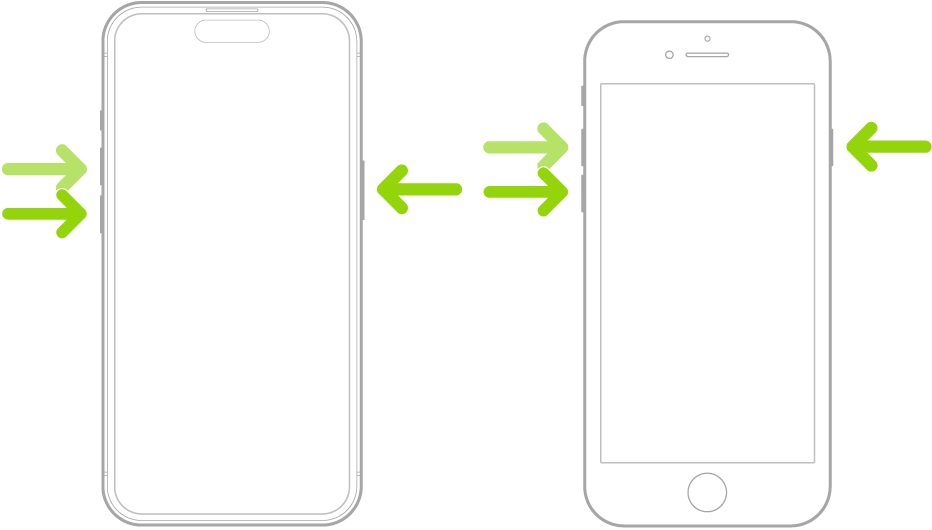

  1. "Press and quickly release the volume up button.
  2. Press and quickly release the volume down button.
  3. Press and hold the side button.
  4. When the Apple logo appears, release the side button."

An illustration of two iPhone models, one with a Home button and one without, with the screens facing up. The volume buttons for each model are on the left side of iPhone, and the side button is on the right.


More details here: Force restart iPhone


We hope this help.

Take care.

This thread has been closed by the system or the community team. You may vote for any posts you find helpful, or search the Community for additional answers.

Translate app stuck on "Download Offline Languages"

Welcome to Apple Support Community
A forum where Apple customers help each other with their products. Get started with your Apple Account.