Iphone not pairing with other devices
Iphone 15 will not pair with any other devices my old iphone did, i have deleted the old one.
when searching for on my bluetooth accessories my phone is not being found in the search
iPhone 15, iOS 17
Iphone 15 will not pair with any other devices my old iphone did, i have deleted the old one.
when searching for on my bluetooth accessories my phone is not being found in the search
iPhone 15, iOS 17
Hi AndiF506,
Thanks for posting in Apple Support Communities.
To pair your iPhone with other devices, make sure that your devices are in pairing mode and then perform the next steps.
Pair your device with a Bluetooth accessory
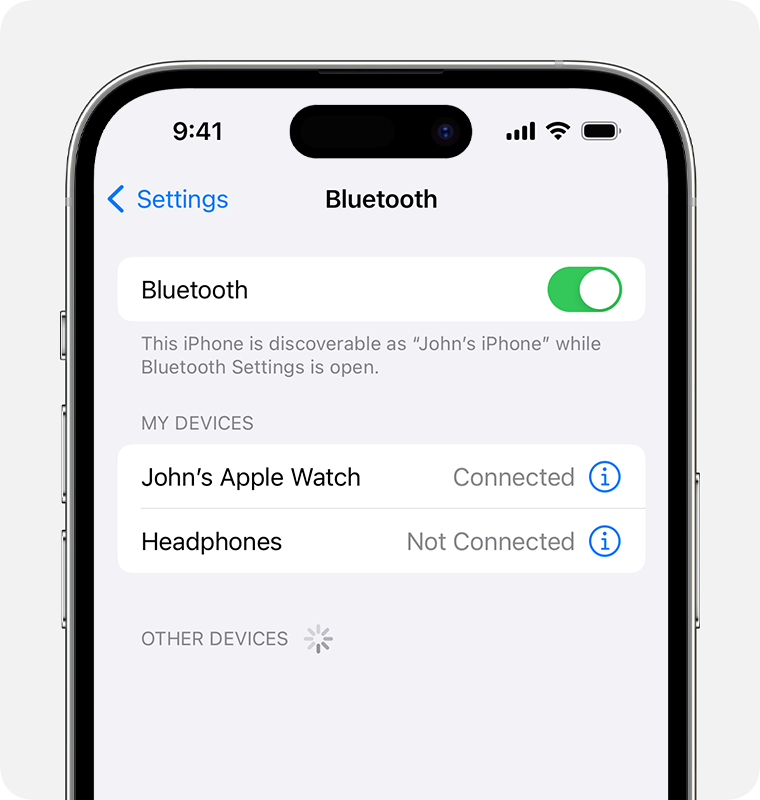
1. On your device, go to Settings > Bluetooth and turn on Bluetooth. Stay on this screen until you complete the steps to pair your accessory.
2. Place your accessory in discovery mode and wait for it to appear on your device. If you don't see it or aren't sure how to make it discoverable, check the instructions that came with your accessory or contact the manufacturer.
3.
4. To pair, tap your accessory name when it appears onscreen. You might need to enter the PIN or passcode. If you aren't sure what your PIN or passcode is, check the documentation for your accessory.
After you pair your accessory, you can use it with your device. To pair multiple Bluetooth accessories, repeat these steps. If you have multiple Bluetooth devices paired with your iPhone or iPad, you can choose which audio source you want to use.
Pair a third-party Bluetooth accessory with your iPhone or iPad - Apple Support
If you can't connect a Bluetooth accessory to your iPhone or iPad - Apple Support
Regards.
Iphone not pairing with other devices