Possible Scam?

Browsing on Ipad to look at grocery flyers when a pop-up came up and an automated voice says that you have been compromised in a phishing scam and that turning the IPAD off will lose data. There was also a message talking about how I had a trojan. and to contact Apple at *-***-***-****.

I'm near sure this a scam but I thought I should see if the number above is connected in any way before I completely rule it out.

Clarification is appreciated.

Thank you.


[Edited by Moderator]

Posted on Oct 4, 2023 9:33 AM

Reply
Question marked as Top-ranking reply

Posted on Oct 4, 2023 10:23 AM

You have encountered a Scam.


See >>> Recognize and avoid phishing messages, phony support calls, and other scams - Apple Support


Don’t respond to, or engage with, the message. Certainly do not, under any circumstances, attempt to contact anyone using the contact details that may have been provided. Alerts of this nature are designed to scare the unwary into giving away sensitive information - or to fool you into doing something that you shouldn’t - usually to defraud you financially.


If you are unable to close the associated alert/window, perform a forced restart of your iPad:


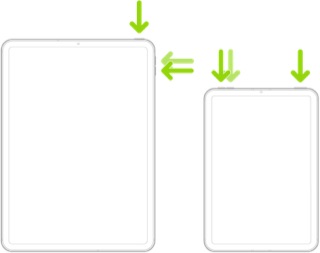
Force restart iPad (models with Face ID or with Touch ID in the top button)

If your iPad doesn’t have the Home button, do the following:

  1. Press and quickly release the volume button nearest to the top button.
  2. Press and quickly release the volume button farthest from the top button.
  3. Press and hold the top button.
  4. When the Apple logo appears, release the top button.


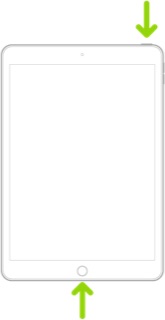
Force restart iPad (models with the Home button)

Press and hold the top button and the Home button at the same time. When the Apple logo appears, release both buttons.


Providing your iPad has been kept up-to-date with system software updates, you should not be overly concerned for your iPad being directly compromised by malware.


For older devices, no longer benefiting from regular security updates, or those that are not kept up to date when system software updates are available, the risk of an unpatched vulnerability being exploited increases. 


Threat Mitigation


The majority of threats to which you will be invariably exposed will surface via web pages or embedded links within email or other messaging platforms. Browser-based attacks can be largely and successfully mitigated by installing a good Content and Ad-blocking product. One of the very best and most respected within the Apple App Store - designed for iPad, iPhone and Mac - is 1Blocker for Safari.

https://apps.apple.com/gb/app/1blocker-for-safari/id1365531024


1Blocker is highly configurable - and crucially does not rely upon an external proxy-service of dubious provenance, often utilised by so-called AntiVirus products intended for iOS/iPadOS. Instead, all processing by 1Blocker takes place on your device - and contrary to expectations, Safari will run faster and more efficiently.


Unwanted content is not simply filtered after download (a technique used by basic/inferior products), but instead undesirable embedded content is blocked from download. The 1Blocker product has also recently introduced its new “Firewall” functions - that are explicitly designed to block “trackers”. Being implemented at the network-layer, this additional protection works across all Apps. Recent updates to 1Blocker has introduced additional network extensions, extending protection to other Apps.


A further to improve protection from exploits is to use a security focussed DNS Service in preference to automatic DNS settings. This can either be set on a per-device basis in Settings, or can be set-up on your home Router - and in so doing extends the benefit of this specific protection to other devices on your local network. I suggest using one of the following DNS services - for which IPv4 and IPv6 server addresses are listed:


Quad9 (recommended)


9.9.9.9

149.112.112.112

2620:fe::fe

2620:fe::9


OpenDNS


208.67.222.222

208.67.220.220

2620:119:35::35

2620:119:53::53


Cloudflare


1.1.1.1

1.0.0.1

2606:4700:4700::1111

2606:4700:4700::1001


Use of the above DNS services will help to shield you from “known bad” websites and URLs - and when used alongside 1Blocker, or other reputable Content Blocker, provides defence in depth.


There are advanced techniques to further “harden” iOS/iPadOS (such as using DoH, DoT and DNSSEC). Apple has recently introduced its new Private Relay to its iCloud+ subscribers - in part employing ODoH (a variant of DoH) as an element of this new functionality. If you have subscribed to iCloud+, and have a device capable of running iOS/iPadOS 15.x or later, this feature is included.



4 replies
Question marked as Top-ranking reply

Oct 4, 2023 10:23 AM in response to Wheels17

You have encountered a Scam.


See >>> Recognize and avoid phishing messages, phony support calls, and other scams - Apple Support


Don’t respond to, or engage with, the message. Certainly do not, under any circumstances, attempt to contact anyone using the contact details that may have been provided. Alerts of this nature are designed to scare the unwary into giving away sensitive information - or to fool you into doing something that you shouldn’t - usually to defraud you financially.


If you are unable to close the associated alert/window, perform a forced restart of your iPad:


Force restart iPad (models with Face ID or with Touch ID in the top button)

If your iPad doesn’t have the Home button, do the following:

  1. Press and quickly release the volume button nearest to the top button.
  2. Press and quickly release the volume button farthest from the top button.
  3. Press and hold the top button.
  4. When the Apple logo appears, release the top button.


Force restart iPad (models with the Home button)

Press and hold the top button and the Home button at the same time. When the Apple logo appears, release both buttons.


Providing your iPad has been kept up-to-date with system software updates, you should not be overly concerned for your iPad being directly compromised by malware.


For older devices, no longer benefiting from regular security updates, or those that are not kept up to date when system software updates are available, the risk of an unpatched vulnerability being exploited increases. 


Threat Mitigation


The majority of threats to which you will be invariably exposed will surface via web pages or embedded links within email or other messaging platforms. Browser-based attacks can be largely and successfully mitigated by installing a good Content and Ad-blocking product. One of the very best and most respected within the Apple App Store - designed for iPad, iPhone and Mac - is 1Blocker for Safari.

https://apps.apple.com/gb/app/1blocker-for-safari/id1365531024


1Blocker is highly configurable - and crucially does not rely upon an external proxy-service of dubious provenance, often utilised by so-called AntiVirus products intended for iOS/iPadOS. Instead, all processing by 1Blocker takes place on your device - and contrary to expectations, Safari will run faster and more efficiently.


Unwanted content is not simply filtered after download (a technique used by basic/inferior products), but instead undesirable embedded content is blocked from download. The 1Blocker product has also recently introduced its new “Firewall” functions - that are explicitly designed to block “trackers”. Being implemented at the network-layer, this additional protection works across all Apps. Recent updates to 1Blocker has introduced additional network extensions, extending protection to other Apps.


A further to improve protection from exploits is to use a security focussed DNS Service in preference to automatic DNS settings. This can either be set on a per-device basis in Settings, or can be set-up on your home Router - and in so doing extends the benefit of this specific protection to other devices on your local network. I suggest using one of the following DNS services - for which IPv4 and IPv6 server addresses are listed:


Quad9 (recommended)


9.9.9.9

149.112.112.112

2620:fe::fe

2620:fe::9


OpenDNS


208.67.222.222

208.67.220.220

2620:119:35::35

2620:119:53::53


Cloudflare


1.1.1.1

1.0.0.1

2606:4700:4700::1111

2606:4700:4700::1001


Use of the above DNS services will help to shield you from “known bad” websites and URLs - and when used alongside 1Blocker, or other reputable Content Blocker, provides defence in depth.


There are advanced techniques to further “harden” iOS/iPadOS (such as using DoH, DoT and DNSSEC). Apple has recently introduced its new Private Relay to its iCloud+ subscribers - in part employing ODoH (a variant of DoH) as an element of this new functionality. If you have subscribed to iCloud+, and have a device capable of running iOS/iPadOS 15.x or later, this feature is included.


Oct 4, 2023 3:52 PM in response to LotusPilot

Thanks this is helpful,

I'm not mainly an apple user and am just using the Ipad temporarily.

I know how to maintain a desktop (Windows mainly with some Linux experience) but have never really worked with Apple, or by extension, An Ipad. The fact that the OS was claiming system error had me in a bit of a panic.

I ended up just doing a hard shutoff and then cleared the cache for safari upon boot up.

Everything appears to be running normally now. The Ipad is a couple months out of date but not years.

Oct 4, 2023 3:55 PM in response to Wheels17

It's good to learn that your iPad is none the worse for encountering the scam. You might do well to consider the suggested mitigations - as in so doing you will substantially reduce the likelihood of encountering a similar (or worse)experience.


Be wary of an often repeated myth that Apple devices are immune to malware; those that perpetuate this fallacy, perhaps with good intention, do not necessarily comprehend the broader threat landscape. Apple expend considerable resources in developing and issuing regular software security updates and patches for its products; if the myth had any substance, regular security updates would be unnecessary.

This thread has been closed by the system or the community team. You may vote for any posts you find helpful, or search the Community for additional answers.

Possible Scam?

Welcome to Apple Support Community
A forum where Apple customers help each other with their products. Get started with your Apple Account.