Apple Music deleting downloaded songs after playing them

Every time I play a song on my downloaded playlist it deletes the song, doesn't even play the song, and it is no longer downloaded. It's like an automatic delete button when I try to play a song

iPhone XS

Posted on Oct 4, 2023 5:52 PM

Reply
Question marked as Top-ranking reply

Posted on Oct 6, 2023 10:49 AM

Hi 1qeeM,


It sounds like you're having an issue with playing and keeping downloaded content with Apple Music. If so, have you checked your device storage to see iff content is automatically offloading due to a lack of overall storage? The steps below found in the article here can help you check: How to check the storage on your iPhone and iPad - Apple Support


"Use your device to check its storage

  1. Go to Settings > General > [Device] Storage. You might see a list of recommendations for optimizing your device's storage, followed by a list of installed apps and the amount of storage each one uses.
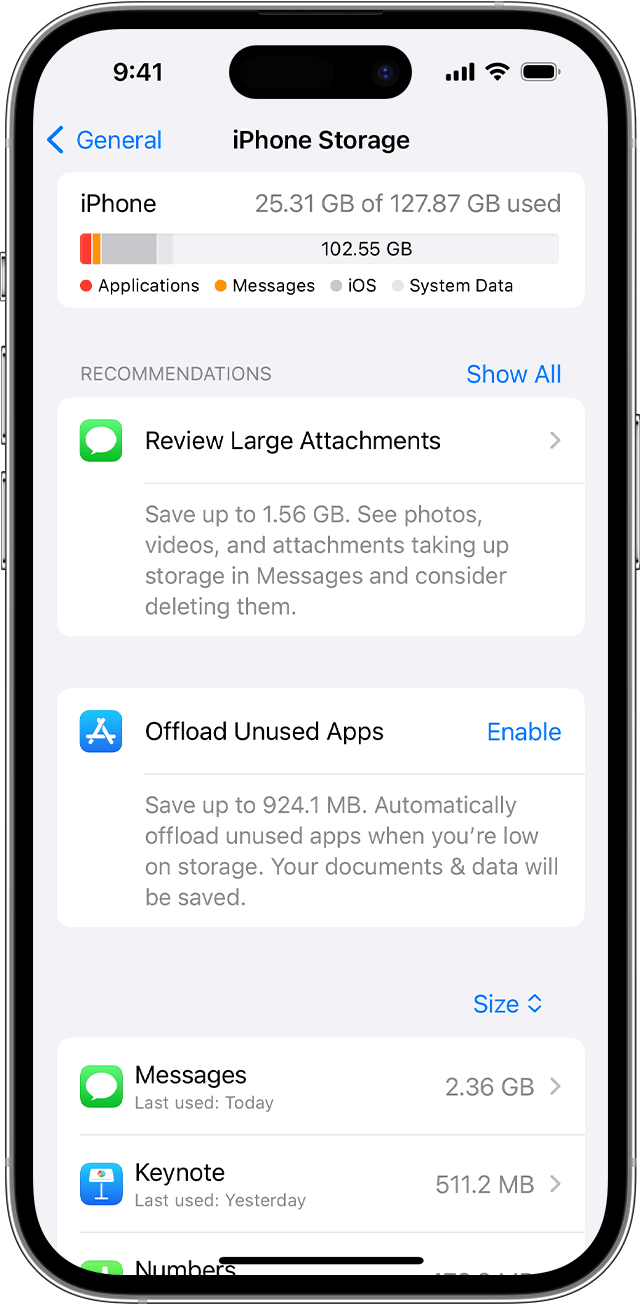
An iPhone screen showing recommendations to make space on your device


2. Tap an app's name for more information about its storage. Cached data and temporary data might not be counted as usage.


In the detailed view you can:

  • Offload the app, which frees up storage used by the app, but keeps its documents and data.
  • Delete the app, which removes the app and its related data.
  • Depending on the app, you might be able to delete some of its documents and data.

If your device is almost full and can't free up space, you might get a Storage Almost Full alert. If you see this alert, check the storage recommendations or offload some less-used content like videos and apps."


Also, do you have an Apple Music voice plan? If so, this doesn't allow adding and downloading content from Apple Music. The article here has this information: Add music to iPhone and listen offline - Apple Support


Keep us posted on what you find when checking your storage and confirming your Apple Music plan, or if you have questions about the steps.


Cheers.

3 replies
Question marked as Top-ranking reply

Oct 6, 2023 10:49 AM in response to 1qeeM

Hi 1qeeM,


It sounds like you're having an issue with playing and keeping downloaded content with Apple Music. If so, have you checked your device storage to see iff content is automatically offloading due to a lack of overall storage? The steps below found in the article here can help you check: How to check the storage on your iPhone and iPad - Apple Support


"Use your device to check its storage

  1. Go to Settings > General > [Device] Storage. You might see a list of recommendations for optimizing your device's storage, followed by a list of installed apps and the amount of storage each one uses.

An iPhone screen showing recommendations to make space on your device


2. Tap an app's name for more information about its storage. Cached data and temporary data might not be counted as usage.


In the detailed view you can:

  • Offload the app, which frees up storage used by the app, but keeps its documents and data.
  • Delete the app, which removes the app and its related data.
  • Depending on the app, you might be able to delete some of its documents and data.

If your device is almost full and can't free up space, you might get a Storage Almost Full alert. If you see this alert, check the storage recommendations or offload some less-used content like videos and apps."


Also, do you have an Apple Music voice plan? If so, this doesn't allow adding and downloading content from Apple Music. The article here has this information: Add music to iPhone and listen offline - Apple Support


Keep us posted on what you find when checking your storage and confirming your Apple Music plan, or if you have questions about the steps.


Cheers.

Oct 7, 2023 9:02 AM in response to 1qeeM

Hello 1qeeM,


Let's use the steps below to make sure that your iPhone is up to date:


1. Back up your device using iCloud or your computer.
2. Plug your device into power and connect to the internet with Wi-Fi.
3. Go to Settings > General, then tap Software Update.
4. If you see more than one software update option available, choose the one that you want to install.
5. Tap Install Now. If you see Download and Install instead, tap it to download the update, enter your passcode, then tap Install Now. If you don't know your passcode, learn what to do.


You can also find those steps in this resource: Update your iPhone or iPad - Apple Support


If your iPhone is up to date, let's restart: Restart your iPhone - Apple Support Updating and restarting can sometimes help address odd behaviors.


Should that still persist, do you use any other devices with Apple Music? If so, are they exhibiting a similar behavior?


Let us know, and we'll keep moving forward from there.


This thread has been closed by the system or the community team. You may vote for any posts you find helpful, or search the Community for additional answers.

Apple Music deleting downloaded songs after playing them

Welcome to Apple Support Community
A forum where Apple customers help each other with their products. Get started with your Apple Account.