I forgot my iPhone's recovery key
I forgot my recovery key to reset my password to set my iphone
[Re-Titled by Moderator]
iPhone XR
I forgot my recovery key to reset my password to set my iphone
[Re-Titled by Moderator]
iPhone XR
Hi Jeskab88,
Do you have access to any of your trusted devices? If so, follow these steps to reset your password: If you forgot your Apple ID password
1. Go to Settings.
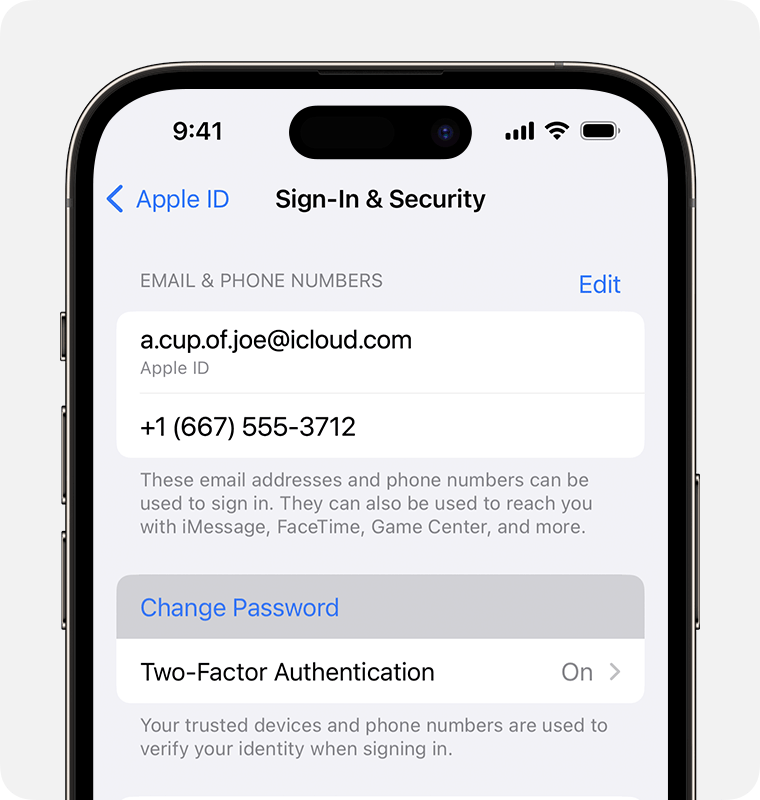
2. Tap your name > Sign-In & Security > Change Password.
3. Follow the onscreen instructions to reset your password.
If you can't access one of your trusted devices, you'll be locked out of your account permanently, as mentioned here: Set up a recovery key for your Apple ID
A recovery key is an randomly generated 28-character code that helps improve the security of your Apple ID account by giving you more control over resetting your password to regain access to your account.
• When you set up a recovery key, you turn off Apple's standard account recovery process.
• Instead, access to a trusted device or your recovery key will be required to reset your Apple ID password and sign in to your account if you ever lose access.
This gives you more control of your account recovery methods and can help prevent an attacker from gaining access to and taking control of your account. However, if you lose your recovery key and can’t access one of your trusted devices, you'll be locked out of your account permanently.
Regards.
Hi Jeskab88,
Do you have access to any of your trusted devices? If so, follow these steps to reset your password: If you forgot your Apple ID password
1. Go to Settings.
2. Tap your name > Sign-In & Security > Change Password.
3. Follow the onscreen instructions to reset your password.
If you can't access one of your trusted devices, you'll be locked out of your account permanently, as mentioned here: Set up a recovery key for your Apple ID
A recovery key is an randomly generated 28-character code that helps improve the security of your Apple ID account by giving you more control over resetting your password to regain access to your account.
• When you set up a recovery key, you turn off Apple's standard account recovery process.
• Instead, access to a trusted device or your recovery key will be required to reset your Apple ID password and sign in to your account if you ever lose access.
This gives you more control of your account recovery methods and can help prevent an attacker from gaining access to and taking control of your account. However, if you lose your recovery key and can’t access one of your trusted devices, you'll be locked out of your account permanently.
Regards.
I forgot my iPhone's recovery key