Autocorrect is still on after turning off

my autocorrect is still on even after the fact that i turned it off after updating to ios 17. imessage and some platforms continue to do it and it annoys me especially since i’m bilingual. i tried turning it on and off as well as shutting my phone down.

iPhone 11, iOS 17

Posted on Oct 10, 2023 4:46 AM

Reply
1 reply

Oct 11, 2023 7:02 AM in response to juls_404

Hello juls_404,


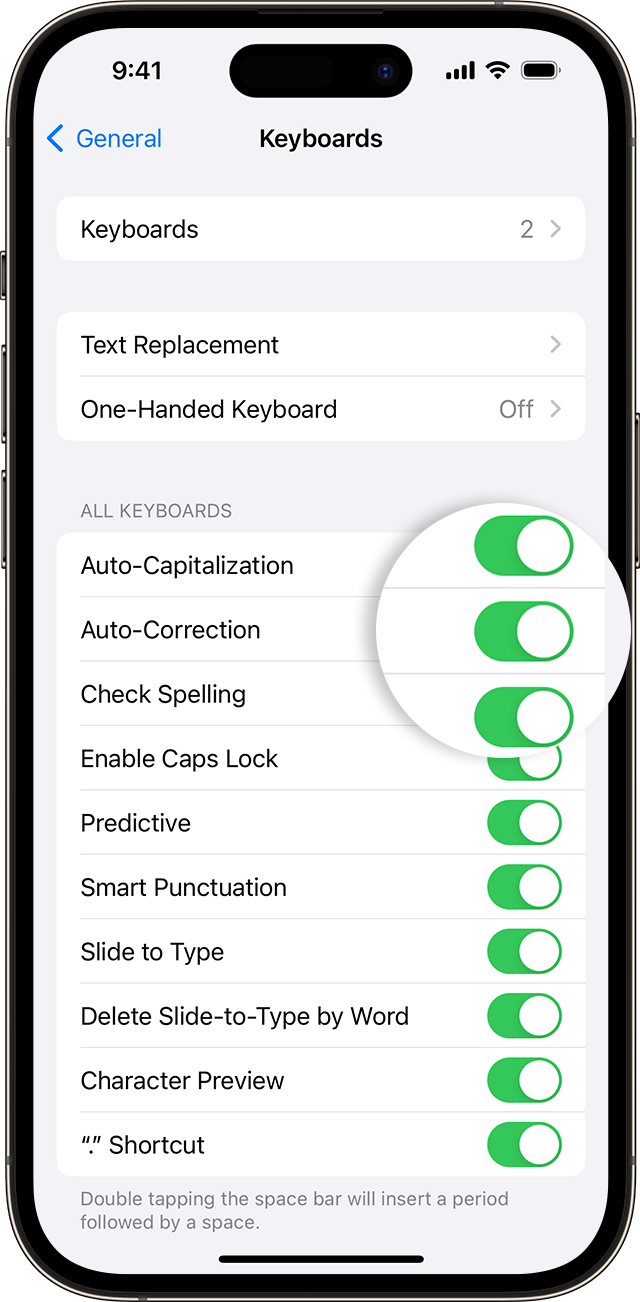
Thanks for choosing the Apple Support Communities. We see you're having trouble turning off Auto-Correction. There may be settings in each individual app to turn this off. Here are instructions on how to turn it off using your iPhone.


How to use Auto-Correction and predictive text on your iPhone, iPad, or iPod touch - Apple Support


"Turn Auto-Correction on or off

  1. Open the Settings app. 
  2. Tap General > Keyboard. 
  3. Turn Auto-Correction on or off
  4. iPhone screen showing how to turn on Auto Correction.

By default, Auto-Correction is on."


You might also look at Predictive Text options in the same article, as they may be what is still turned on.


We hope this helps.


Cheers!


This thread has been closed by the system or the community team. You may vote for any posts you find helpful, or search the Community for additional answers.

Autocorrect is still on after turning off

Welcome to Apple Support Community
A forum where Apple customers help each other with their products. Get started with your Apple Account.