Alarm/Ringtone won’t download/not present?

Been searching for this but not sure how to ask it: I have a ringtone that I downloaded a while back that I use for my alarms. I got the new 15 recently and for some reason the ringtone I had no longer appears in my downloaded tones. Additionally, when I try and redownload it from the iTunes Store, it says I’ve already purchased it but then doesn’t download and reverts back to the “0.99” button. FINALLY, if that wasn’t all, it STILL PLAYS on certain alarms that I used it on BUT it doesn’t show up as an option to select when selecting a sound. I’m so confused

iPhone 15, iOS 17

Posted on Oct 11, 2023 6:24 AM

Reply
Question marked as Top-ranking reply

Posted on Oct 12, 2023 7:22 AM

Hi Yoman_17,


There are specific steps to redownload a purchased ringtone, as shown here:

Use tones and ringtones with your iPhone or iPad - Apple Support

Keep in mind the footnote shown on the page.

Redownload ringtones purchased with your Apple ID
1. Go to Settings > Sounds & Haptics.
2. Under Sounds and Haptic Patterns, tap any sound.
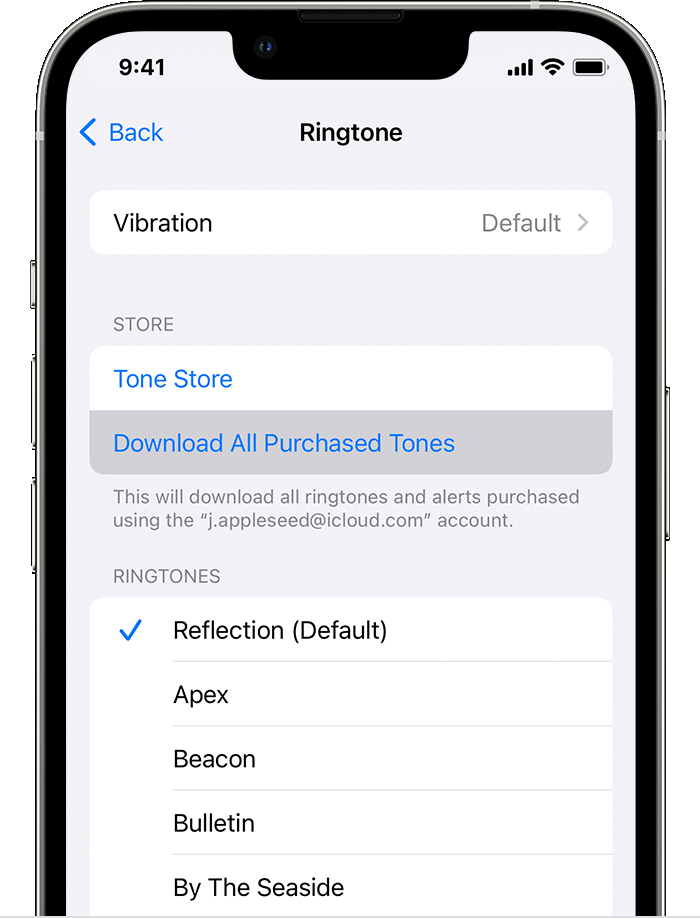
3. Tap Download All Purchased Tones. You might not see this option if you already downloaded all the tones that you purchased or if you haven't purchased any tones.
4.

You might not be able to redownload some previously purchased tones.


If you aren't able to redownload the ringtone, contact Apple Support, to see if they can help.

Get Support


Take care!

1 reply
Question marked as Top-ranking reply

Oct 12, 2023 7:22 AM in response to Yoman_17

Hi Yoman_17,


There are specific steps to redownload a purchased ringtone, as shown here:

Use tones and ringtones with your iPhone or iPad - Apple Support

Keep in mind the footnote shown on the page.

Redownload ringtones purchased with your Apple ID
1. Go to Settings > Sounds & Haptics.
2. Under Sounds and Haptic Patterns, tap any sound.
3. Tap Download All Purchased Tones. You might not see this option if you already downloaded all the tones that you purchased or if you haven't purchased any tones.
4.

You might not be able to redownload some previously purchased tones.


If you aren't able to redownload the ringtone, contact Apple Support, to see if they can help.

Get Support


Take care!

This thread has been closed by the system or the community team. You may vote for any posts you find helpful, or search the Community for additional answers.

Alarm/Ringtone won’t download/not present?

Welcome to Apple Support Community
A forum where Apple customers help each other with their products. Get started with your Apple Account.