Finder Stuck moving file to trash

After upgrade to Sonoma this am when it restarted it said there was a problem with some old carbonite files. I tried deleting them and this problem started.

I can't restart but it does not stop finder.

Tried to shutdown the computer

Tried to Force quite but can on relaunch and that does not stop the operation.


Upgrade this am to


Need help!!!


None of the devices list are what I signed in with. Under General / About / it shows

Posted on Oct 11, 2023 11:51 AM

Reply
13 replies

Oct 11, 2023 2:04 PM in response to Sue Clements

Every MacBook has a start button. Pressing and holding it longer would shut down the MacBook. Let it stay shutoff for few minutes and then start it again. MacOS would've cleared the problem while booting up. Then, if you've already put the Carbonite app to Bin, and emptied the Bin, your MBP doesn't have that app, and won't be able to disturb the workings of the MacOS. But, this Carbonite might've added some junk, or deleted some necessary files somewhere. Better never install such 3rd party apps, who promise you the sky.


Anyway, whatever residue left from this app won't trouble your MBP, if left undeleted. These files might be in places, where you need your password to delete them. So, once you reboot your MBP, delete them one by one. Or, rename them, if you can't delete them for some reason, also one by one.

Oct 11, 2023 12:30 PM in response to Sue Clements

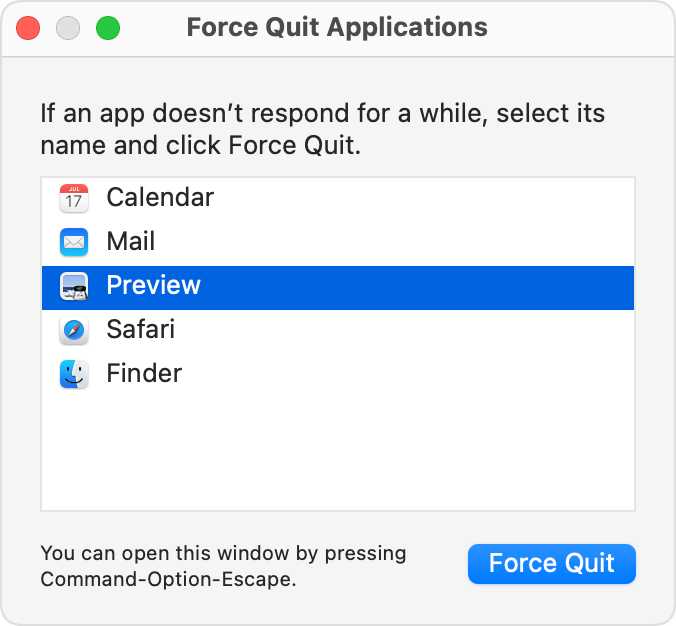
Force an app to quit:

Press these three keys together: Option (or Alt), Command, Esc (Escape).1 Or choose Force Quit from the Apple menu  in the corner of your screen.

A Force Quit window opens. Select the app that you want to quit, then click Force Quit:

The Finder is always open, but if it stops responding, you can force it to quit and then open again: Select Finder in the Force Quit window, then click Relaunch. 


How to force an app to quit on your Mac - Apple Support

  • Then Restart your Mac


This thread has been closed by the system or the community team. You may vote for any posts you find helpful, or search the Community for additional answers.

Finder Stuck moving file to trash

Welcome to Apple Support Community
A forum where Apple customers help each other with their products. Get started with your Apple Account.