HomeKit on Apple Watch ultra issues

First issue:

I just noticed that my HomeKit on my ultra watch only shows the grid forecast and none of my accessories. I can see them on my iPhone and iPad with no issues.

I have Apple ultra watch 1, iPhone 15 pro max, both completely updated with current available software.


second issue:

controller for HomeKit app will not open on my Apple Watch ultra.


troubleshooting done:

-all required sharing settings enabled

-restarted both my iPhone and watch

-uninstalled app, reinstalled app

-made sure all my HomePods and Apple TV were completely up to date, and restarted them

-restarted my home router


Ive searched and googled but nothing has helped. Seems this issue just started with all the new iOS updates. Could use some help from an expert please.

thanks!

Posted on Oct 12, 2023 9:24 AM

Reply
Question marked as Top-ranking reply

Posted on Oct 13, 2023 11:26 AM

Hello Corys26,


You've done some great troubleshooting so far.


As an additional step you can also unpair your Apple Watch and iPhone, and then pair them back together. Your iPhone will make a backup of your Apple Watch during that process, and you can reinstate your data from the backup. That should help to further isolate a potential software conflict: Unpair and erase your Apple Watch - Apple Support


1. Keep your Apple Watch and iPhone close together as you unpair them.
2. Open the Apple Watch app on your iPhone.
3. Go to the My Watch tab and tap All Watches.
4. Tap the info button  next to the watch that you want to unpair. 
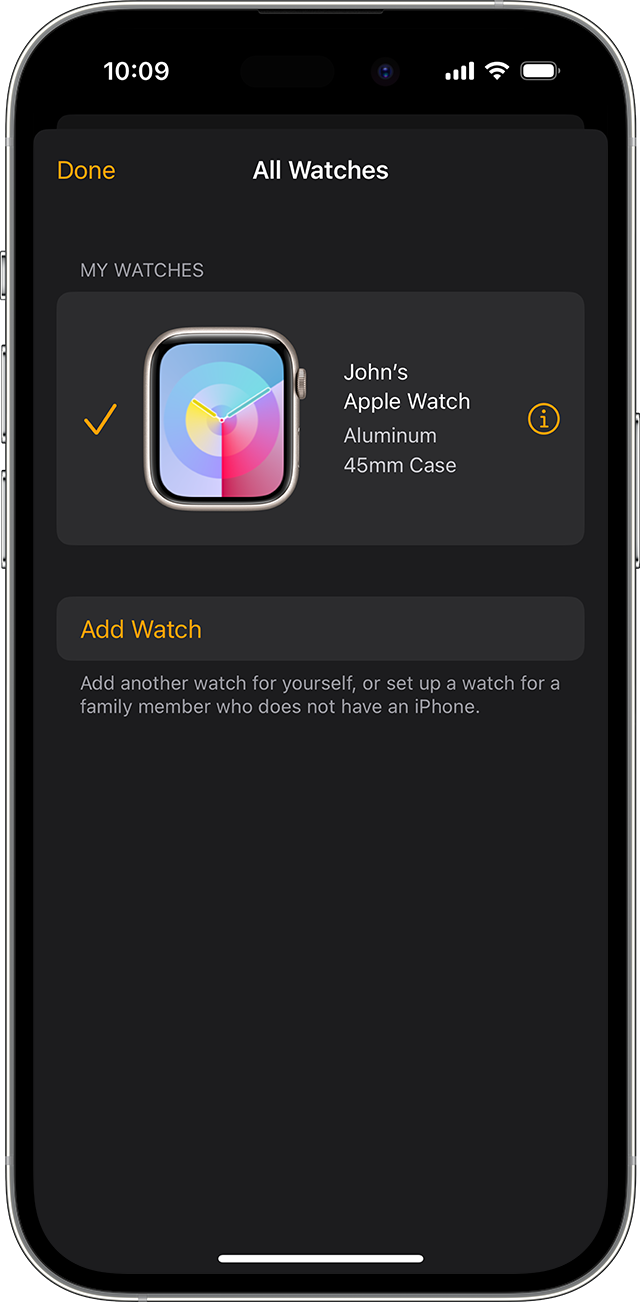
Info button next to the Apple Watch in iOS Apple Watch app
5. Tap Unpair Apple Watch.
Unpair Apple Watch on iOS Apple Watch app
6. Tap Unpair [your Apple Watch name].
7. For GPS + Cellular models, choose whether to keep or remove your cellular plan. 
• If you want to pair your Apple Watch and iPhone again, keep your plan. 
• If you don't want to pair your Apple Watch and iPhone again, remove your plan. If you aren't going to pair with a different watch or iPhone, you might need to contact your carrier to cancel your cellular subscription. 
8. Type your Apple ID password to disable Activation Lock, then tap Unpair. 

Before erasing all content and settings on your Apple Watch, your iPhone creates a new backup of your Apple Watch. You can use the backup to restore a new Apple Watch. After your Apple Watch unpairs, you'll see the Start Pairing message.

Now you can set up your Apple Watch again 


Should that behavior still persist, you'll want to reach out to Apple Support: Apple Support They'll be in the best position to look into this further.


Take care.

3 replies
Question marked as Top-ranking reply

Oct 13, 2023 11:26 AM in response to Corys26

Hello Corys26,


You've done some great troubleshooting so far.


As an additional step you can also unpair your Apple Watch and iPhone, and then pair them back together. Your iPhone will make a backup of your Apple Watch during that process, and you can reinstate your data from the backup. That should help to further isolate a potential software conflict: Unpair and erase your Apple Watch - Apple Support


1. Keep your Apple Watch and iPhone close together as you unpair them.
2. Open the Apple Watch app on your iPhone.
3. Go to the My Watch tab and tap All Watches.
4. Tap the info button  next to the watch that you want to unpair. 
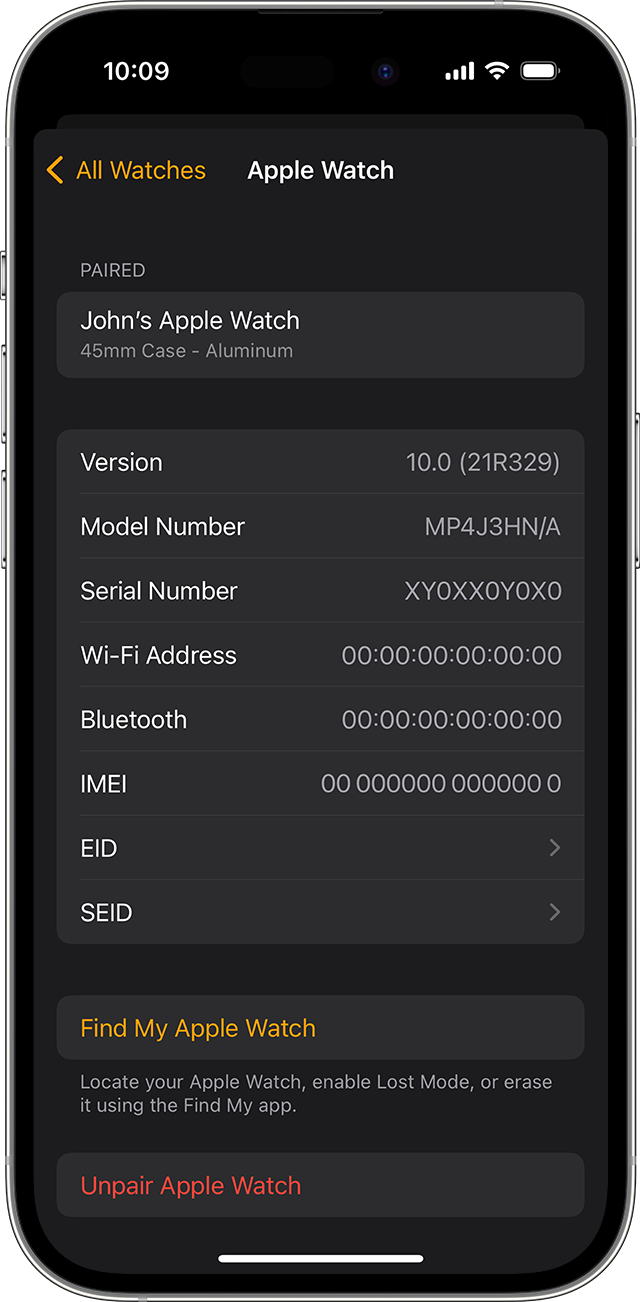
Info button next to the Apple Watch in iOS Apple Watch app
5. Tap Unpair Apple Watch.
Unpair Apple Watch on iOS Apple Watch app
6. Tap Unpair [your Apple Watch name].
7. For GPS + Cellular models, choose whether to keep or remove your cellular plan. 
• If you want to pair your Apple Watch and iPhone again, keep your plan. 
• If you don't want to pair your Apple Watch and iPhone again, remove your plan. If you aren't going to pair with a different watch or iPhone, you might need to contact your carrier to cancel your cellular subscription. 
8. Type your Apple ID password to disable Activation Lock, then tap Unpair. 

Before erasing all content and settings on your Apple Watch, your iPhone creates a new backup of your Apple Watch. You can use the backup to restore a new Apple Watch. After your Apple Watch unpairs, you'll see the Start Pairing message.

Now you can set up your Apple Watch again 


Should that behavior still persist, you'll want to reach out to Apple Support: Apple Support They'll be in the best position to look into this further.


Take care.

This thread has been closed by the system or the community team. You may vote for any posts you find helpful, or search the Community for additional answers.

HomeKit on Apple Watch ultra issues

Welcome to Apple Support Community
A forum where Apple customers help each other with their products. Get started with your Apple Account.