
Sonoma icloud notification settings window will not close.

I recently upgraded my 2018 13" Macbook Pro to Sonoma. Every time I log into my device, I get a notification popup window telling me I need to accept iCloud's new terms and conditions. I would rather not use iCloud. Therefore I disagree. The settings window will not close until I Force-Quit the settings app.

This is annoying and I consider iCloud an unsolicited intrusion on my privacy. I do not wish to trust my personal data to the Big Tech strangers who control "the cloud." How do I get rid of these utterly annoying popups forever?

Posted on Oct 13, 2023 8:17 AM

Reply
Question marked as Top-ranking reply

Posted on Oct 14, 2023 10:49 AM

Hey,


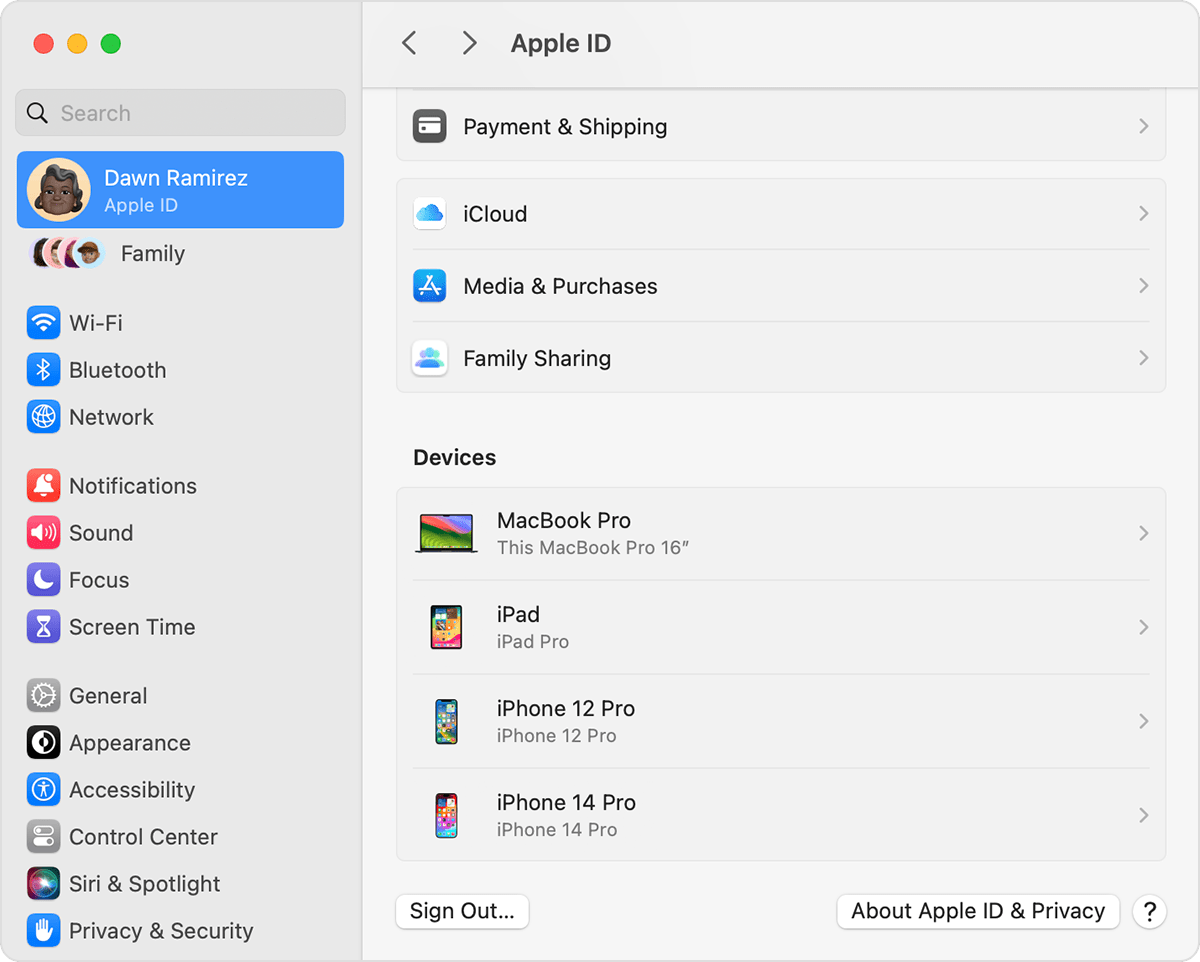
If you don't want to use iCloud on your Mac, you can toggle off those features under System Settings > Apple ID > iCloud.


Sign out on your Mac
In macOS Ventura or later:
1. Choose Apple menu  > System Settings.
2. Click your name.
3.
4. Click Sign Out.
5. If you want to a keep a copy of your iCloud data on your Mac before you sign out, make sure that you select the appropriate checkboxes. Then click Keep a Copy.
6. If you want to keep a copy of your Safari passwords on your Mac, click Keep on This Mac.
In macOS Monterey or earlier:
1. Choose Apple menu  > System Preferences.
2. Click Apple ID, then click Overview.
3. Click Sign Out.
4. If you want to a keep a copy of your iCloud data on your Mac before you sign out, make sure that you select the appropriate checkboxes. Then click Keep a Copy.
5. If you want to keep a copy of your Safari passwords on your Mac, click Keep on This Mac.

If there's additional tweaks to iCloud you'd like to see, we can recommend leaving feedback here:


Cheers!


Similar questions

2 replies
Question marked as Top-ranking reply

Oct 14, 2023 10:49 AM in response to dumber than the rest of us

Hey,


If you don't want to use iCloud on your Mac, you can toggle off those features under System Settings > Apple ID > iCloud.


Sign out on your Mac
In macOS Ventura or later:
1. Choose Apple menu  > System Settings.
2. Click your name.
3.
4. Click Sign Out.
5. If you want to a keep a copy of your iCloud data on your Mac before you sign out, make sure that you select the appropriate checkboxes. Then click Keep a Copy.
6. If you want to keep a copy of your Safari passwords on your Mac, click Keep on This Mac.
In macOS Monterey or earlier:
1. Choose Apple menu  > System Preferences.
2. Click Apple ID, then click Overview.
3. Click Sign Out.
4. If you want to a keep a copy of your iCloud data on your Mac before you sign out, make sure that you select the appropriate checkboxes. Then click Keep a Copy.
5. If you want to keep a copy of your Safari passwords on your Mac, click Keep on This Mac.

If there's additional tweaks to iCloud you'd like to see, we can recommend leaving feedback here:


Cheers!


Oct 17, 2023 1:44 AM in response to DerekM87

I too have this issue on a 16" 2019 i9 Macbook pro.


The advice above from DerekM87 is only valid if you already have had Icloud running and want to stop it and not ever using Icloud.


No matter what settings I input or click on these very annoying notifications still pop up. To add in my Systems Settings 'Apple Id' my list of devices are greyed out??


What I cannot phantom is surely if I 'disagree' to Apple's T&C the notifications should go away without further intervention, but no... once a reboot up they popup again.


This is definitely a ploy of Apple to continuously pester you to use Icloud in the hoping you will subscribe to its service which like the above reporter absolutely have no intention to use Icloud.


All we are asking Apple is to allow us use our devices without being pressured into a contract that we disagree yet are not constantly being bombarded with pesky annoying notifications including the 'red circle with number' on the system settings tab.


Any advice greatly appreciated.

This thread has been closed by the system or the community team. You may vote for any posts you find helpful, or search the Community for additional answers.

Sonoma icloud notification settings window will not close.

Welcome to Apple Support Community
A forum where Apple customers help each other with their products. Get started with your Apple Account.