Notifications on my iPhone 13 are delayed

When my phone is sitting unused for a period of time (not very long) it stops giving me notifications. Then when I pick up my phone it starts rolling through all of the notifications I should have been getting. This is annoying when it happens but also frustrating because I might miss important notifications.

I have an iPhone 13, it has the most recent iOS, I don’t have my notifications in a scheduled summary, and I don’t have any focus settings.

I have seen other people have this problem but I don’t see where anyone has found a solution. Please help!


[Re-Titled by Moderator]

iPhone 11, iOS 15

Posted on Oct 14, 2023 5:15 PM

Reply
12 replies

Oct 14, 2023 5:40 PM in response to menika20

You might not be getting notifications on your iPhone for a few reasons. Here are some of the most common causes:


  • Do Not Disturb mode is turned on. Do Not Disturb mode silences all notifications, so ensure it's turned off. You can do this by swiping down from the top of your screen and tapping the crescent moon icon.
  • You're in Focus mode. Focus modes are like the Do Not Disturb mode, but they can be customized to block notifications from specific apps or people. To check if you're in Focus mode, swipe down from the top of your screen and tap the Focus icon.
  • You've turned off notifications for a specific app. You can turn off notifications for individual apps in the Settings app. To do this, go to Settings > Notifications and scroll down to the app you want to change. Toggle the Allow Notifications switch to the off position.
  • Your iPhone is in Airplane mode. Airplane mode turns off all wireless connections, including cellular data and Wi-Fi. This means that you won't be able to receive notifications if your iPhone is in Airplane mode.
  • Your iPhone is not connected to the internet. If your iPhone is not connected to the internet, you won't be able to receive notifications from apps that need to connect to the internet to send notifications.


If you've checked all of these things and you're still not getting notifications, you can try restarting your iPhone. If that doesn't work, you can contact Apple support for help.



Have you enabled Scheduled Summary?


Settings > Notifications > [Select the App that you are having trouble receiving immediate notifications]


See the pic below for a few examples. Please select immediate delivery.
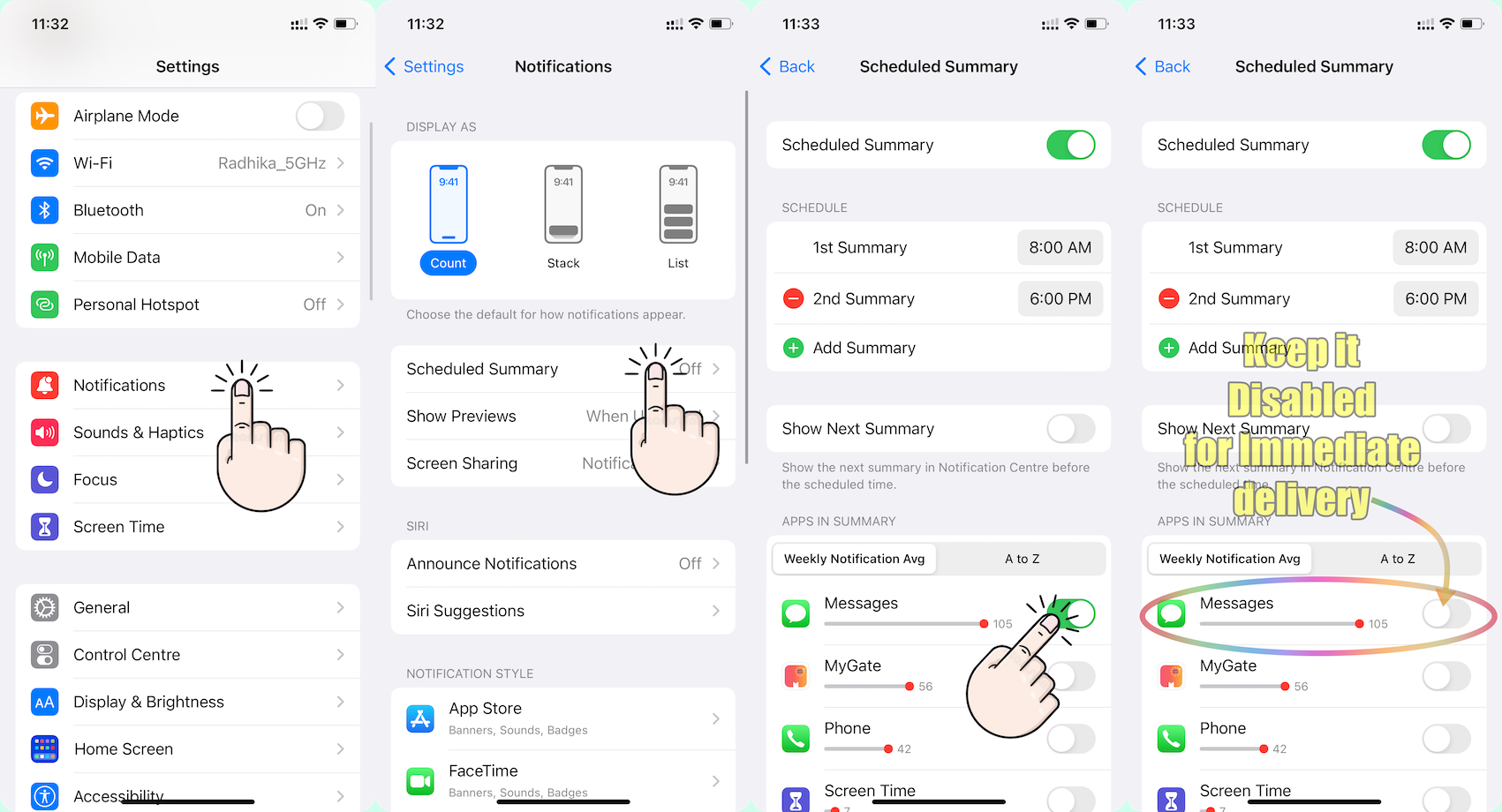


Go to Settings and tap Notifications. Select an app under Notification Style. Under Alerts, choose the alert style that you want. If you turn on Allow Notifications, choose when you want the notifications delivered — immediately or in the scheduled notification summary.


Use notifications on your iPhone, iPad, and iPod touch


Change notification settings on iPhone

  1. Go to Settings > Notifications.
  2. To schedule a notifications summary, tap Scheduled Summary, then turn on Scheduled Summary. ... 
  3. To choose when you want most notification previews to appear, tap Show Previews, select an option—Always, When Unlocked, or Never—then tap.

More items...


Change notification settings on iPhone - Apple Support (IN)


You can allow access to Notification Center on the Lock Screen. Go to Settings > Face ID & Passcode (on an iPhone with Face ID) or Touch ID & Passcode (on other iPhone models). Enter your passcode. Scroll down and turn on Notification Center (below Allow Access When Locked).


View and respond to notifications on iPhone - Apple Support (IN)


Here are some additional tips for troubleshooting notification problems on your iPhone:

  • Make sure that your iPhone is not in silent mode.
  • Check the notification settings for individual apps to make sure that they are turned on.
  • Make sure that your iPhone is connected to a Wi-Fi network or cellular data network.
  • Restart your iPhone.
  • Update your iPhone to the latest version of iOS.
  • Contact Apple support for help.


Apr 21, 2024 8:53 PM in response to khatia226

Same. I've been having the same problem for about 2 days now. Coincides with the date of your post.


I have no "Do not disturb" or "Focus" features enabled. All of them are disabled. I also have no "Scheduled Summary" feature enabled, it is disabled also.


I also turned of bluetooth on my Apple watch because it turned out that they were hijacking notifications from the smartphone while the smartphone is locked (most of the time). This is a problem because I set up a special urgent notification in one application on my smartphone with a special notification sound, but the watch intercepting this notification does not play a special sound, but plays a regular notification sound - the same as dozens of other notifications. Due to the fact that there are a lot of notifications, I look through them later in a bunch rather then immediately (still doesn't like scheduled summary btw because I need to know if some notification arrived to decide whether to check now or later). And that's why I set up a special notification sound in one app for urgent notifications from that app. But the watch spoils this and it cannot be configured or disabled without disconnecting the watch from the smartphone, which is what I had to do.

Oct 14, 2023 5:57 PM in response to menika20

Do you have multiple devices set to receive notifications? In my experience with notifications, in iOS 17, they’re more discreet and precise. Like an ungracious person who is repeating themselves when they talk, so to are notifications sounding on multiple devices repeating the same notification. Instead, iOS 17 seems to determine where you are and sound the specific device that you’ll see or hear, and say it once.


Alternatively, your phone may be delaying notifications like you said. Perhaps your carrier, or WiFi is not so great?

Oct 15, 2023 8:24 AM in response to menika20

Okay, you have a watch. If you're wearing your watch the notification thump and beep on your watch, but not on your phone. Likewise, if you're not wearing your watch the alerts will thump and beep on your phone, but not on your watch. At least that has been my experience with notifications, series 9, 15P, and iOS17.


More, your discovery regarding the auto lock relationship to your notifications is keen.

Apr 25, 2024 3:32 AM in response to AlexRave

Also, it seems that the permanent type of notification banner blocks subsequent notifications - subsequent notifications pop up only after swiping the permanent notification banner, indicating how many minutes ago the notification would have been if it had not been blocked by the permanent banner, although they are also important.


It's strange that permanent notifications don't stack, especially considering that they are meant to be important and it would be worth playing a sound for each such notification without delay.

Jul 11, 2024 11:49 AM in response to SravanKrA

So how do I set up my DND focus to allow voicemail notifications but no phone call notifications? The app "Phone" is either off or on. Seems like the app "Phone" should be in a category of its own. If I'm in DND apparently I don't even see little red numbers on the phone app.


(Voicemail notifications can appear on my lock screen two days later. If I'm in DND then why do they ever appear? If they can appear in DND then why can't they appear immediately?)


And why can't there be some kind of "you have notifications" feature (which might be an actual notifications "app" that has an icon that gets red numbers.)

This thread has been closed by the system or the community team. You may vote for any posts you find helpful, or search the Community for additional answers.

Notifications on my iPhone 13 are delayed

Welcome to Apple Support Community
A forum where Apple customers help each other with their products. Get started with your Apple Account.

