Hi sanjan16,
Just to confirm, does that only happen with Instagram or other apps as well? That information will help us plan how to proceed.
If the issue only happens with Instagram, we would suggest reaching out to the app developer, so they can assist you with their app.
This link explains how to contact an app developer, and may be helpful: How to contact an app developer
When to contact an app developer for help
* If an app isn't working, but the issue doesn't affect other apps
* If you can't use an in-app purchase, such as a bonus game level or "remove ads"
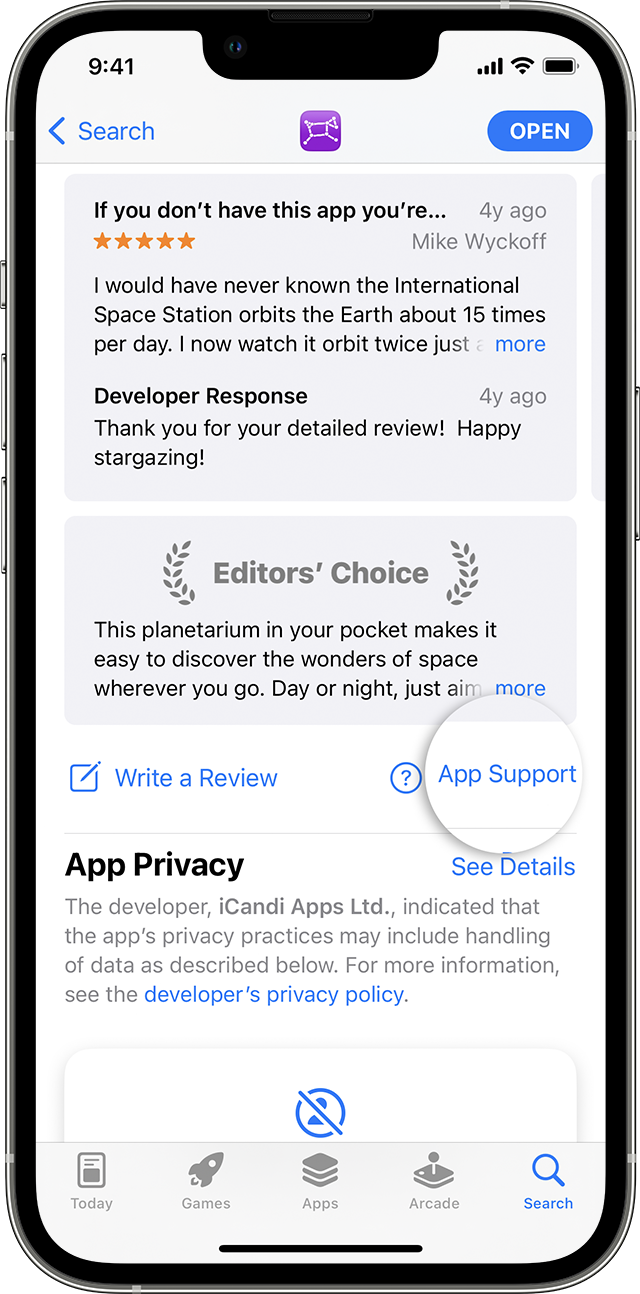
Contact the developer of an iOS, iPadOS, or watchOS app
1. Open the App Store on your iPhone or iPad.
2. Search for the app, then tap it. If you can't find it, tap the account button  or your photo at the top of the screen, tap Purchased, tap "Not on this [device]," then tap the app.
3. The app's product page appears. Scroll to the Ratings & Reviews section, then tap App Support. If you don't see App Support, make sure that you're signed in with the correct Apple ID.
Thanks!


