ipad / Iphone IOS 17.0.3

I have some IOS 17.0.3 on both Ipad Air 4 and Iphone SE. The control center show the Apple TV only on the Iphone.

I restart the Ipad, and Apple Tv and still missing from the devices list.

All my devices are updated to the latest IOS, and use the same WiFI network and same Apple ID account.

iPad Air, iPadOS 17

Posted on Oct 18, 2023 5:04 PM

Reply
Question marked as Top-ranking reply

Posted on Oct 19, 2023 12:24 PM

Hey C1980,


It looks like you have already done some troubleshooting to solve this issue. Even though there is a chance that you've tried these steps already, we would recommend you follow every step and let us know if the issue persists.


"If you don’t see the Apple TV Remote icon in Control Center on your iOS or iPadOS device, you can add it manually.

  1. On the iOS or iPadOS device, go to Settings > Control Center, then tap Customize Controls.
  2. Tap the Add button  next to Apple TV Remote in the More Controls list to add it to Control Center."


Control Apple TV with iOS or iPadOS Control Center - Apple Support


Please don't hesitate to let us know if you need additional assistance.


Thank you for using Apple Support Communities. Have a good one.

5 replies
Question marked as Top-ranking reply

Oct 19, 2023 12:24 PM in response to C1980

Hey C1980,


It looks like you have already done some troubleshooting to solve this issue. Even though there is a chance that you've tried these steps already, we would recommend you follow every step and let us know if the issue persists.


"If you don’t see the Apple TV Remote icon in Control Center on your iOS or iPadOS device, you can add it manually.

  1. On the iOS or iPadOS device, go to Settings > Control Center, then tap Customize Controls.
  2. Tap the Add button  next to Apple TV Remote in the More Controls list to add it to Control Center."


Control Apple TV with iOS or iPadOS Control Center - Apple Support


Please don't hesitate to let us know if you need additional assistance.


Thank you for using Apple Support Communities. Have a good one.

Oct 19, 2023 1:54 PM in response to C1980

Hi C1980,


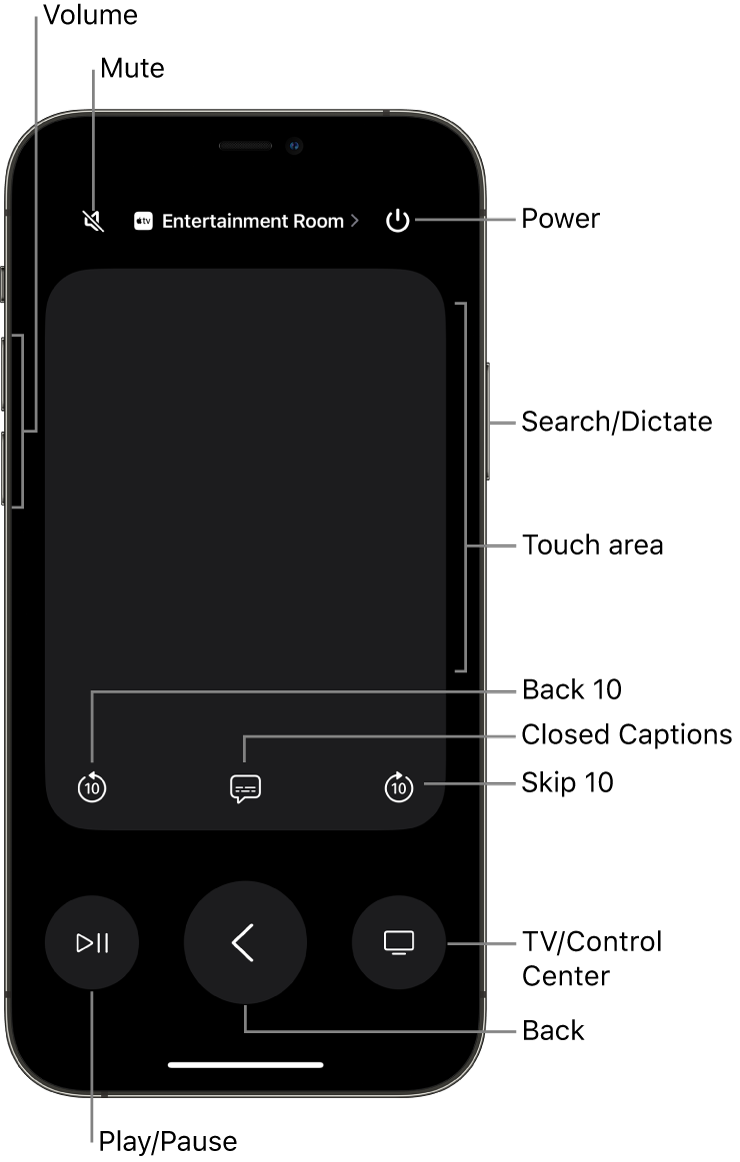
Got it. For confirmation, check out this screenshot below which is from the resource titled Control Apple TV with iOS or iPadOS Control Center:


"Remote app on an iPhone, showing buttons for volume, playback, power, and more"


To make sure we're understanding, you're not seeing your Apple TV listed where it says "Entertainment Room" in that screenshot, but only from the iPad, correct? If so, what are you seeing instead? Are you able to tap that area to bring up a menu to select the Apple TV?


The steps below could help, particularly regarding checking your network configuration: Set up the Apple TV Remote on your iPhone or iPad - Apple Support


"If you can't set up the Apple TV Remote

Try these steps. After each step, see if you still need help. 


  1. Check that your iPhone or iPad is on the same Wi-Fi network as your Apple TV or AirPlay-compatible smart TV. On your iOS or iPadOS device, go to Settings > Wi-Fi. On your Apple TV, go to Settings > Network.
  2. Make sure that your iPhone or iPad is updated to the latest version of iOS or iPadOS, and your Apple TV is updated to the latest version of tvOS.
  3. Restart your Apple TV or AirPlay-compatible smart TV. Also try restarting your iPhone or iPad.
  4. If you still can't set up the Apple TV Remote, contact Apple Support."


Keep us posted.


Take care.

Oct 20, 2023 6:13 PM in response to ryane77

I manage to get some screenshots to visualize my issue.

The Apple TV name is 'CRISTINA'.


1 Ipad IOS 17.0.3

Sometimes the name of Apple TV appeared under Screen Mirror, sometimes Not. It is very strange I was able to mirror to Apple TV my screen from Ipad watch a movie and after that the option of mirroring was gone.

When I check the remote control option from Control Panel the name of Apple TV is there.


2 Iphone SE IOS 17.0.3

Better behavior, the name Apple TV show-up on both mirror and remote control option from Control Panel.


I powered off all my devices and restart them, same behavior for the Ipad.


Looks like I'm not able to attached the screenshots ( this site don't allowed because of the size).

Can you give me another option to send you the screen shoots.

This thread has been closed by the system or the community team. You may vote for any posts you find helpful, or search the Community for additional answers.

ipad / Iphone IOS 17.0.3

Welcome to Apple Support Community
A forum where Apple customers help each other with their products. Get started with your Apple Account.