
Login for Apple tv on a firestick
After downloading the App I am asked for my Apple ID which I have but then I am asked for a password, I'm not sure what password they are looking for as I don't have one for Apple ID
After downloading the App I am asked for my Apple ID which I have but then I am asked for a password, I'm not sure what password they are looking for as I don't have one for Apple ID
Hi dsoukas,
Each Apple ID created will have an associated password for the account. For help with resetting your Apple ID password, test the steps below found in the article here: If you forgot your Apple ID password
"Here's how to reset your Apple ID password and regain access to your account.
The fastest and easiest way to reset your password is with your iPhone or other trusted Apple device — one that you're already signed in to with your Apple ID, so that we know that it's yours.
You need a passcode (or password on Mac) set up on your device.
Reset your Apple ID password on your iPhone or other trusted Apple device
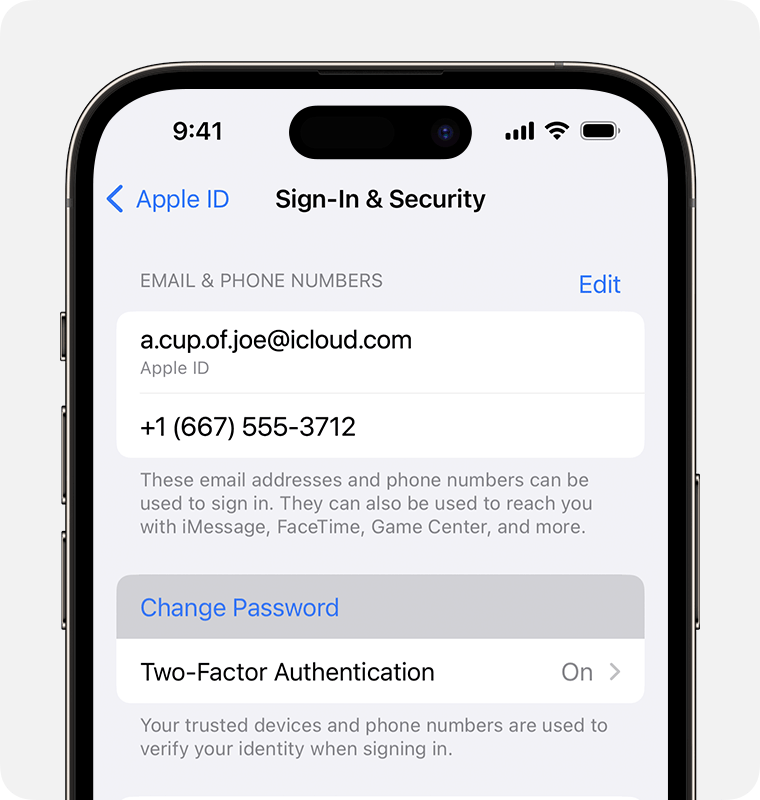
3. Follow the onscreen instructions to reset your password.
You can also follow this process on a trusted iPad or Apple Watch.
To reset your password on your trusted Mac, choose Apple menu > System Settings > your name. Then click Sign-In & Security, Change Password, and follow the onscreen instructions."
If you don't have an iPhone, iPad or Apple Watch. Use the same article to view the steps for resetting on a borrowed device or the web.
You can also view details about setting up Apple TV+ and needing a password associated with your account from the steps here: Get the Apple TV app or Apple TV+ app on your smart TV or streaming device - Apple Support
Should you still need assistance, reach out to Apple Support directly. Get Support
Best.
Hi dsoukas,
Each Apple ID created will have an associated password for the account. For help with resetting your Apple ID password, test the steps below found in the article here: If you forgot your Apple ID password
"Here's how to reset your Apple ID password and regain access to your account.
The fastest and easiest way to reset your password is with your iPhone or other trusted Apple device — one that you're already signed in to with your Apple ID, so that we know that it's yours.
You need a passcode (or password on Mac) set up on your device.
Reset your Apple ID password on your iPhone or other trusted Apple device
3. Follow the onscreen instructions to reset your password.
You can also follow this process on a trusted iPad or Apple Watch.
To reset your password on your trusted Mac, choose Apple menu > System Settings > your name. Then click Sign-In & Security, Change Password, and follow the onscreen instructions."
If you don't have an iPhone, iPad or Apple Watch. Use the same article to view the steps for resetting on a borrowed device or the web.
You can also view details about setting up Apple TV+ and needing a password associated with your account from the steps here: Get the Apple TV app or Apple TV+ app on your smart TV or streaming device - Apple Support
Should you still need assistance, reach out to Apple Support directly. Get Support
Best.
Login for Apple tv on a firestick

