Can't see text on Pages document

I know that the text I typed is there, but it appears to be invisible. If I highlight the section, I can see that a text is present, but when I return to the document, it is still invisible. When I start a new document, the text is also invisible. What can I do to return my document to normal visibility?

MacBook Air 13″, macOS 14.0

Posted on Oct 20, 2023 11:45 AM

Reply
1 reply

Oct 21, 2023 11:57 AM in response to BaruchF-K

Hello BaruchF-K,


Let's use the steps below to change the font color to see if it was unintentionally or unexpectedly set to be the same as the background color:


1. Select the text you want to change.
To change all of the text in a text box or table cell, select the text box or table cell.
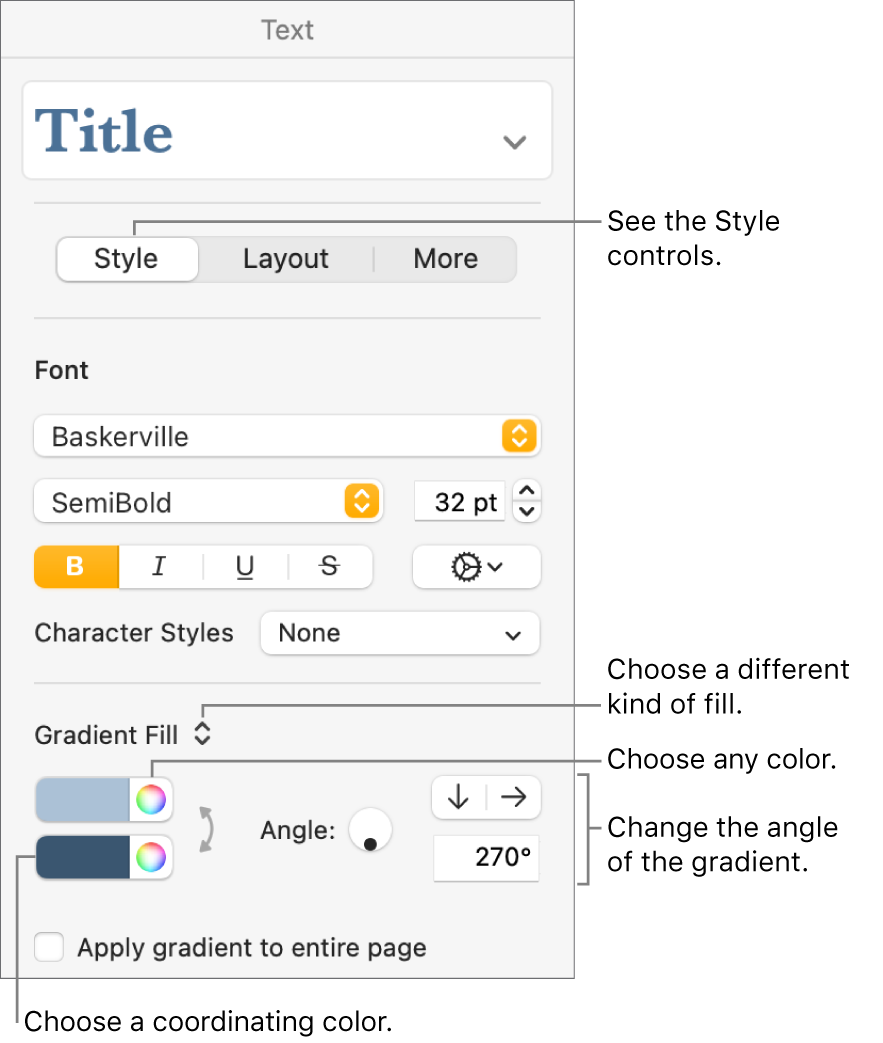
2. In the Format  sidebar, click the Style button near the top.
If the text is in a text box, table, or shape, first click the Text tab at the top of the sidebar, then click
the Style button.
Controls for choosing predesigned colors or any color.
3. Choose one of the following:
A color that coordinates with your template: Click the pop-up menu below the Font section, then choose Text Color. Click the color well, then choose a color.
Any color: Click the pop-up menu below the Font section, then choose Text Color. Click the color wheel, then choose a color from one of the color palettes.


You can also find those steps in this resource: Change the color of text or add a gradient in Pages on Mac - Apple Support


Let us know your result, and we'll keep moving forward from there.

Can't see text on Pages document

Welcome to Apple Support Community
A forum where Apple customers help each other with their products. Get started with your Apple ID.